Showing posts with label JavaScript. Show all posts

Thursday, August 9, 2018

What programming language do you want to learn?


Of course, you want the most popular and the most valuable.

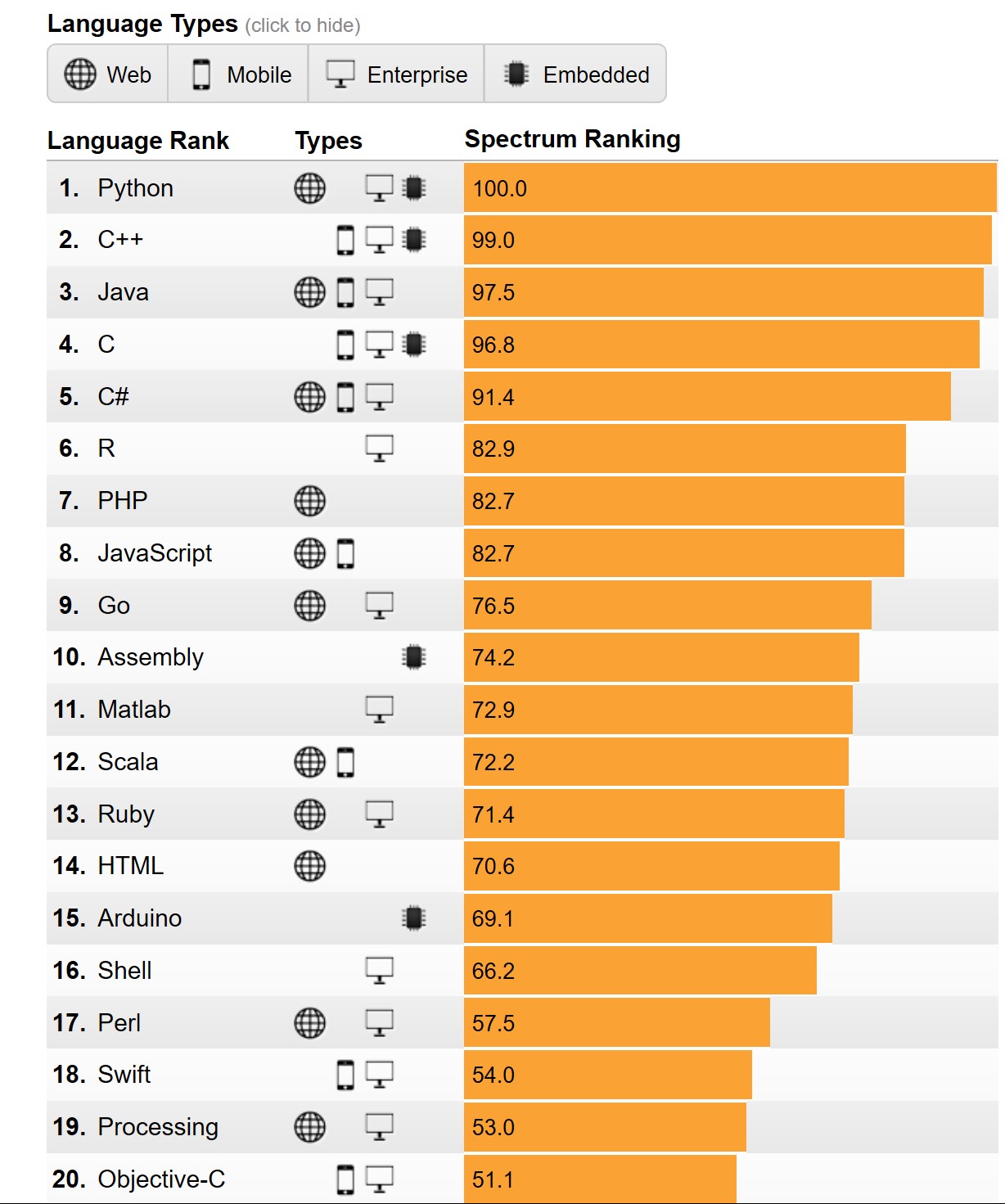
According to the Institute of Electrical and Electronics Engineers (IEEE) , it is Python, the clear winner.

Here are the top ten in its rankings:


Why Python?

The answer appears to the fact that it iss now used for embedded applications and because it has beefed up its repertoire related to AI and Machine learning. It is for this reason R language (somewhat specialized) has seen some decline.

Microsoft C# is still standing there at 5 and probably its place will be solid 5 for all types of programming - Web, desktop and Mobile. SQL is also there but does not show up as top 10 which is understandable given its area of usage.

Well here is the first 20. Find if your favorite is here


Well, you may want to know the basis for the ranking. You can get to know here.

You can find a lot of posts on R and Python on this site.


You can find a lot of Python and R posts in my blogs.

Friday, July 13, 2018

What is Dynamic Language Runtime (DLR)?

Dynamic Language Runtime(DLR) is a runtime environment that adds set of services for dynamic languages to the Common Language Runtime.

The difference between dynamic languages and statically typed languages such as C# and Visual Basic is that you need to specify the object type at design time for the latter.

There are a lot of popular dynamic languages such as the following:

LISP
SmallTalk
Javascript
PHP
Ruby
Python
ColdFusion, Lua
Cobra and
Groovy

Dynamic languages are also excellent scripting languages used in designing Web sites; data transformations; artificial intelligence, etc.

The main driver for DLR is to create the ability to run the dynamic languages on top of the CLR. Dynamic objects (in System.dynamic) now can be used in C# and Visual Basic. This in Visual studio Community 2017.


DLR_0
Here is the architecture of DLR for IronPython and IronRuby from Microsoft documentation in MSDN.


DLR.png

Sunday, April 29, 2018

What is JerryScript?

No, it is not mispelled JavaScript. It is to (Internet of Things) IoT as JavaScript is to the Web. JerryScript is lightweight JavaScript to run on very constrained devices such as microcontrollers.

Just see how lightweight it is:

Only few kilobytes of RAM available to the engine (<64 br="" kb="" ram="">Constrained ROM space for the code of the engine (<200 kb="" p="" rom="">
JerryScript engine supports on-device, executio and provide access to periferals via JavaScript.

Presently it is supported officially only on Ubuntu 14.04+.

If you have the above go here and test drive:
http://jerryscript.net/getting-started/

Saturday, April 28, 2018

What is the most popular programming language presently?

Looking back at my previous post on programming language popularity C language was at the top with Java in the second place.


However according to a chart on this site  shown here, Java continues to be the king once in a while ceding the top place.


TiobeIndex2017.png

Note that Python is rising, probably because of its use in AI, BigData and Robotics.

Thursday, February 1, 2018

What does JSON.stringify() do?

It takes a JSON object as an argument and converts it to a JSON string.

Here is a code:


Tuesday, September 12, 2017

What is Microsoft Universal Windows Platform (UWP) App?

UWP is an app for the Windows 10 and Windows 10 runs on a number of hardware devices: PC, tablet, Xbox, HoloLens, Surface Hub etc. UWP with just one API set and one app package and one store can reach all screen sizes from the smallest to the largest.

It can support different modes of interaction;
touch
mouse + key board
pen
game controller

Programming UWP apps is very flexible, just not limited to C# and XAML. You can use JavaScript(& HTML). You could also use Unity or MonoGame. You can mix them as well.

You will create just one project for (any) every device you want to address.

Let me enumerate the features:
  • Common API surface across all devices
  • Extension SDKs to do specific stuff on chosen device
  • Apps packaged using .AppX packaging format and distributed from store
  • One store for all devices
  • Adaptive controls and input are supported(Keyword Responsive design)
Go on, monetize your app!

Thursday, August 31, 2017

Where is the link to TypeScript 2.5?


TypeScript 2.5 (the latest) is now available for download here:

http://www.typescriptlang.org/#download-links


TypeScript2.5_0

If you have installed npm, installing TypeScript is a breeze.

> npm install -g typescript

Read here for installing npm:

http://hodentekhelp.blogspot.com/2017/08/what-is-npm-and-how-is-it-useful.html

Monday, July 17, 2017

What is a Single Page Application?

It is exactly what it says. Single Page Applications (SPAs) are web applications with a single web page that uses AJAX for its dynamic interactions. As page refresh is on the client side the SPAs can have downside of performance degradation if they are not properly designed and SEO optimized.

There are many JavaScript frameworks to write SPAs. There are lots of JavaScript frameworks that you can use to build SPAs. Lots of them are Open Source. Here are some:

WinJS
Angular
React
Ember
Aurelia
Dojo
Vue.js
Cycle.js
Backbone
Dojo


I hear a lot about Angular and Aurelia, perhaps more people are using them.
Intel XDK had both Angular and Backbone templates, but they are not supporting them anymore.

AngularJS is in Version 2.

I have a large number of posts on Intel XDK here.

Friday, February 10, 2017

How do you enable JavaScript in Microsoft Edge?


Enabling JavaScript in Microsoft Edge is a two step process.

In Microsoft Edge do this:

Click on ... (ellipsis) button at the right extreme to display the drop-down menu as shown.


EnableJavascriptEdge_0.png

Click Open with Internal Explorer to open the IE Browser.

In the opened IE Browser do this:
Go to Menu at the top, click and open the Internet Options (at the very bottom) to open the Internet Options window.
Click Security tab to open.


EnableJavascriptEdge_1.png

Click Custom level...  under Security level for this zone to open the Security Settings -Internet Zone as shown above.

Scroll down and enable Active Scripting as shown.


EnableJavascriptEdge_2.png

Sunday, November 27, 2016

What is Polyfill as related to JavaScript?

In the early days of Internet (some 10 years ago or so) one had to write some kind of code that recognizes the browser and control the flow so that the audience is given the information that there was no browser support for the functionality.

An extreme kind of instruction was that the browser's JavaScript functionality was not on, etc.

A Polyfill ( piece of code, plug-in,add-in, script) is a browser fallback so that feature(s) works in a modern browser also works in older browsers which per se did not support what is supported in the modern browser.

Here is a comprehensive collection of HTML5 Cross Browser Polyfills.

The term Polyfills was coined by Remy Sharp to describe JavaScript shims that replicate standard API found in modern browsers for those older browsers that do not support.

Polyfills are created by developers to fulfill this requirement and one can create ones own Polyfill .

One of the most popular Polyfills is htmlshiv (https://github.com/aFarkas/html5shiv)

In IE versions of 9.0 and prior versions
and would have been parsed as empty elements. These tags however described nesting of elements and styling them would have been difficult. Html5shiv takes care of this by directing the page if opened in IE 9 to use the appropriate script:


Thursday, November 10, 2016

What is TypeScript and how different is it from JavaScript?

JavaScript is loosely typed. You can simply declare a varible. Loosely typed language can result in errors sooner or later in compilation. For exmaple if you declare the variable 'AGE', it could be written as an integer (25) or even as a string (twentyfive, twenty-five etc). In a typed language there is no ambiguity, 'AGE' will be declared as a varible of type int (for integer).

TypeScript is strongly (option) typed. TypeScript is Open Source. TypeScript does not enforce strong typing. Let us say you declare a variable 'Age' and later when you use it for first time use, such as age=25; the language takes 'Age' as an integer (a feature called Type Inference). Type Script also has advanced features like interfaces and generics.

The advantage of strongly typed language is that the compiler finds it easy to handle unambiguously resulting in easier maintenance and increased performance.

TypeScript 2.1 is in the process of being released with yet more new features. Check out the following post.

Monday, September 26, 2016

What is meant by JavaScript Lint?


JavaScript Lint is designed to check JavaScript and helps you prevent making coding mistakes in the JavaScript code you write. Many JavaScript implementations do not have warning mechanisms built-in to check the code for errors and that is where JavaScript Lint beocmes very useful. Using JavaScript Lint you need not actually run the code and you need not even open a web page which has JavaScript code.

Where do you get it?

You can download it from this site: javascriptlint.com. You also find documentation there.

JavaScript Lint is based on the Javascript engine for Firefox browser which makes it possible not only to check JavaScript syntax but also warn about quesitonable code.

To get started with JavaScript Lint, download the appropriate package and extract its contents.
JavaScript Lint 0.3.0 for Windows (jsl-0.3.0-win32.zip)
JavaScript Lint 0.3.0 for Mac OS X Intel (jsl-0.3.0-mac.tar.gz)
JavaScript Lint 0.3.0 Source (jsl-0.3.0-src.tar.gz)


JavaScript Lint can be run in different ways:
Integrate it into Visual Studio
From Windows Explorer
Using command line


Developers can also integrate them into their Windows programs or from a PHP site.
More on Forums, Wiki etc here:
https://sourceforge.net/p/javascriptlint/wiki/Home/

Wednesday, September 21, 2016

What is jsFiddle?

jsFiddle a nice tool to have, especially for web developers. It is a 'What you see is what you get tool that can do HTML, CSS and JavaScript. It can also access great many script libraries like, jQuery, Dojo, etc.

This is a must have tool if you are working on web pages. If you are a beginner or, one trying to learn web page authoring this is a great tool.

This is an online tool and therefore you do not need to install anything on your computer. You should have internet connection, though. .

You access this site https://jsfiddle.net/ and you get this displayed. All set and ready to go.


jsFiddle_00

You can test your HTML, CSS and JavaScript online with this tool

Test HTML:
In the HTML pane, just type this:

Welcome to jsFiddle

and click Run at the top.
Immediately you will see the result in the Result pane as shown.


jsFiddle_01


Add CSS and Test again:

Now I will style the text we  just wrote by adding the style rule in the CSS pane (right of HTML). This is the rule I am going to add:

h1{color: Magenta;
   text-align: center;
  font-family: verdana;}


After typing in click Run and you will immediately see the change as shown:


js_fiidle_02

Add HTML fragment to place a button with the text 'Click me' as shown.
You should see the button on the document.


 Write script for the button click:
Write the javascript code as shown which does the following:
When you click the button, the function test is run which should bring up the alert message.
The jsFiddle with button and JavaScript is as shown.


jsFiddle_03

When you click the button, you should see this:


Tuesday, May 24, 2016

How do you get the node.js project templates in Visual Studio 2015?

In a recent post I tried to install Node.js tools that is supposed to help create node.js project types in Visual Studio Community 2015. After installing, I realized that I could not access the node.js templates in Visual Studio. I noted however that the installer version was NTVS 1.1.1 VS2015.msi.

As an after thought I found an easier route to get the node.js support for Visual Studio 2015 Community. This post describes the steps.

After launching Visual Studio 2015 Community ( I have the Update 2, version 14.0.25123.00 Update 2) you can access Extensions and Updates menu item as shown.

NodeJsTools_07.png

Click on the menu item. The Extension and Updates window appears as shown. You need to search for node.js in Visual Studio Gallery. You will find both 1.1 and 1.2 versions.


NodeJSToolsPlug_inVS2015.png

Click Download button for version 2.

The related msi file gets downloaded. The version is


NodeJsTools1point2.png

You may double click the downloaded file to install the plug-in. But first take care of the Apache license.


NodeJsTools_001.png

The extension gets updated as the program installs.


NodeJsTools_001_2.jpg

Once the extension is installed, when you create a New Project... in Visual Studio 2015 Community you should be able to see all the node.js templates as shown in the next image.


NodeJsTools_05.jpg

Monday, May 23, 2016

How can you program IOT controllers using JavaScript?

Arduino boards can be programmed using Arduino software and Intel IOT boards can be programmed using Intel XDK IOT. Using JavaScript to program controllers would be very useful as most browsers are HTMl5 compliant. The Johnny-Five Robotics and IOT program is an interesting option.

Johnny-Five is the JavaScript Robotics & IOT platform released by the Bocoup group. Johnny-Five is maintained by a growing number of talented developers.

What is Bocoup?
Bocoup  is a group that championed the cause of Open tools and Work Flow. They really seems to have people with very varied and diverse talents to tackle web, data, and visualization.

How does Johnny-Five handle the Hello World (or Blink for that matter)?
It looks like 1-2-3 really.

1. Install Node.js(Prefer 4.2.1 LTS)
2. Setup your board
3. Run: npm install johnny-five

What else is needed?

You also need to run the Firmata protocol for the controller board to communicate with the computer.
Interestingly Johnny-Five can handle over 30 different arduino compatible boards from the likes of Raspberry, Intel, Arduino, Sparkfun and many more.

This is very impressive indeed as each of these boards are handled by their vendors like Arduino, Intel and others.

How about non-arduino boards?

There are platform specific IO Plugins (for example, Galileo-IO plugin) .These plugins can speak the language of the platform as they implement Firmata compatible interfaces.

You will be hearing more about Johnny-Five in my blogs, here and here, keep reading....

Wednesday, April 13, 2016

Do you want to build real time communication apps in JavaScript?

You can use Intel XDK together with Intel Collaboration Suite for Web RTC to build the real time communication apps.

With Intel Collaboration Suite for Web RTC (Intel CS for WebRTC )it is possible to build apps for real time communication over the web.

You need to use the Intel CS for WebRTC SDK built on top of W3C standard for WebRTC. You can create apps for broadcast, peer-to-peer and apps for conference.

To cater to the major OSs and HTML, the SDK is available in four versions one each for:

  • Android
  • JavaScript
  • iOS
  • Windows
There is a server that you need to get used to:
Intel CS for WebRTC Conference Server that provides the Video Conference Service that streams the service to many end points with the following quoted features:

  • High performance, VP8 and H.264 real-time transcoding with Intel® Iris™ Pro and Intel HD Graphics
  • Scalable multipoint control unit (MCU) server
  • Efficient mixing of HD video streams for saving bandwidth and power on mobile device
  • Intelligent QoS control mechanism that adapts to different network environments
If you are building with JavaScript there are browser requirements and you should get this:
CS_WebRTC_Client_SDK_JavaScript..zip .


More information available here:
http://software.intel.com/en-us/webrtc-sdk

Wednesday, March 23, 2016

What is JavaScript hoisting?

In programming, usually a variable has to be declared before it is used. However with JavaScript you can declare a variable after it is used. Hoisting is JavaScript's default behaviour. JavaScript hoisting moves up all declarations to the top. Note that variable declarations are moved up and not the variable assignments.

This is variable declaration: This gets moved up to top
var x;

This is variable assignment:This does not move up, stays put where defined.
y=10;

Saturday, December 12, 2015

What is Cardova?

Web apps are apps built using HTML5, CSS and JavaScript. This is no different than building a web site with HTML and JavaScript. Your web app is just the web view that will render the HTML/CSS/JavaScript files. Unfortunately this by itself is not enough except for some simple applications. However if you need access to native hardware like camera, accelerometer etc then Cardova plugins can provide access to those native capabilities.

Cardova plugins consist of a JavaScript file and a code files for a given platform. Cardova maps the native code to JavaScript specific for the platform (iOS, Android, Windows) to care of implementing the native devices.

Here is a list of many Cardova Plugins.

Thursday, January 29, 2015

How popular is JavaScript?

It has gained lot of popularity because of the many libraries developed such as jQuery, Bootstrap, Node.JS, Win.JS, dojo etc. Together with HTML5 it has become all the more popular for web development.

The popularity of a programming language is described by an index called the TIOBE Index.
TIOBE index provides a measure for the popularity of programming languages as mined from search engines. It includes many browser results as well as many programming languages. The index is published every month and for the month of January you can find it here:
http://www.tiobe.com/index.php/content/paperinfo/tpci/index.html

Programming languages C and Java are the top dogs and Javascript jumped from 9 to 7 in January 2015 and C# steady from 2014 to 2015 at 5.

TIOBE Index is calculated by the query +"Language> programming" to the search engines.

Get more info on TIOBE herre:
http://www.tiobe.com/index.php/content/products/tics/TICS_framework.html

Monday, November 3, 2014

How do you work with Javascript Object Notation?

With enhancements to JavaScript in recent years and the advent of AJAX, interest in JavaScript took a turn for the better. Early on with AJAX it was recognized that there was a contender for XML for handling data which was stable, faster, and portable. This was the beginning of JSON.

Although RFC 4627 marks a JSON milestone, it appears that it had already been discussed among the JavaScript cognoscenti. JSON is equally, or even more suited, for data exchange than XML, which was originally considered to be the ideal wire friendly format.
What is JSON?
So what is JSON? It’s an acronym you might have started appearing in greater frequency on the Internet. JSON stands for JavaScript Object Notation. Well, it is a special object notational construct and is a subset of JavaScript. It can be used wherever JavaScript can be used and you do not need to download anything. There is no need to worry about the version of JavaScript.
You can read more about JSON in RFC 4627. JSON was designed to be minimal (small), textual, and portable. The MIME Media Type is now registered as application/json. JSON can handle exchanging data in applications written in different programming languages such as C, C#, ColdFusion, Perl, Python, Ruby, and so forth.

JSON Basics
JSON has simple types and two structures which are very similar to the universally used data structures such as dictionary objects, hash values, key/value pairs, lists, sequences, record sets, arrays and so on. It is a natural.

Types in JSON

JSON’s JavaScript subset admits of the following four primitive types.
* strings [except ", and Control Characters]
* number [Integer, real and Floating point]
* Boolean [literals, true and false]
* null

Unlike JavaScript it does not support hexadecimal and octal representation of numbers, nor does it support NaN (not a number) and infinity. Also numbers do not need quotes but strings do.
In addition to the four primitives it also supports two kinds of structures, object and array.

JSON Object
A JSON object is an unordered set (members) of key/value pairs, with keys being separated by values using a colon (:) and the members being separated by a comma (,). The colon and the comma are respectively called the name separator and the value separator.
Here is a variable that represents a JSON object with three members. “company”:”Hodentek” is one member of the JSON object where the key, which is “company,” is separated by the value, which is “Hodentek.” The object is always enclosed between curly brackets as shown in the declared variable. In this example all the values are of type string.

var jObj={"company":"Hodentek", "phone":"609-275-1205", "city":
"Plainsboro"};

You can access any member’s value using the dot notation as shown in the next snippet, which shows the “phone” of the object in the alert as “609-275-1205.”

alert(jObj.phone);//

The values of members of the JSON object can be of different types as shown in the following code listing.
 
‹Script Language="JavaScript"›

//values are numbers (integer and floating point)
var jobj2={"sunday":1, "tuesday":2.85, "wednesday":3};
document.write("‹b›jobj2.tuesday:‹/b› " + jobj2.tuesday +"‹br›");
//values are of mixed types
var jObj3={"culprit":true, "innocent":false, "notsure":null};
document.write("‹b›jObj3.culprit:‹/b› " + jObj3.culprit +"‹br›");
document.write("‹b›jObj3.innocent:‹/b› " + jObj3.innocent +"‹br›");
document.write("‹b›jObj3.notsure:‹/b› " + jObj3.notsure +"‹br›");

‹/script›

The displayed output when this code is browsed is as shown in the next picture.


JSON Array

Unlike JSON objects, JSON arrays are enclosed between square braces [ ]. The JSON array is an ordered sequence of values separated by a comma (,). The values can be any of the primitive types as well as the two structures, JSON objects and JSON arrays. Here is a JSON array variable with four string values.

var myJsonArray=["Red", "Blue", "Yellow", "Magenta"];

You will be able to access an array item from its position (0 based) as shown in the following listing.

‹SCRIPT LANGUAGE="JavaScript"›
var myJsonArray=["Red", "Blue", "Yellow", "Magenta"];
for (i=0; i‹4; i++){
document.write("‹b›myJsonArray["+i+"]‹/b›="+ myJsonArray[i]+"‹br›");
}
‹/SCRIPT›

The displayed output when this script is executed is as shown in the next picture.


It is possible to have an array  whose elements are of different types. Array items can be objects and arrays as well, as shown in the next listing.
‹SCRIPT LANGUAGE="JavaScript"›
//Array with different types
myJA2=["red", 1, null, true];
document.write("‹;b›myJA2:‹;/b›  " + myJA2[2]);
document.write("‹;p›‹;/p›");
//Nested array
myJA3=["red",1,["a", "b", "c"], false];
document.write("‹;b›myJA3[2][1]:‹;/b›  " + myJA3[2][1]);
document.write("‹;p›‹;/p›");
//Object in an array
myJA4=["red", {"Yes":"Yes, you do", "No":"No, you do not"}, 2];
document.write("‹;b›myJA4[1].Yes: ‹;/b›"+ myJA4[1].Yes);
‹;/SCRIPT›

The displayed output when this script is executed is as shown in the next picture.


Notice how the inner array and the object inside the array are  accessed.
JSON and XML
JSON is minimal textual representation of data as compared to the “verbose” XML, which makes equivalent XML much larger than JSON. Well, both are textual, but JSON is more so than XML with all its “angularities.” This is not to put down XML but just to highlight the obvious. This has obvious implications for AJAX, and more often JSON is the preferred data format in which AJAX results are received.
Everything in XML is a string but JSON has types as discussed earlier. JSON equivalent of XML In my previous tutorials, XML Islands and XML Responses and AJAX, the file webstudents.xml was used for illustration.

The same file will be represented as a JSON object in this section. The file is reproduced here for reference. In writing down the equivalence only the root element and its children are considered. Here is the listing of webstudents.xml.
‹wclass›
‹!--My students who took web programming class with me--›
‹student id="1"›
‹name›Linda Jones‹/name›
‹legacySkill› Access, VB5.0‹/legacySkill›
‹/student›
‹student id="2"›
‹name›Adam Davidson‹/name;
‹legacySkill›Cobol, MainFrame‹/legacySkill›
‹/student›
‹student id="3"›
‹name›;Charles Boyer‹/name›
‹legacySkill›HTML, Photoshop‹/legacySkill›
‹/student›
‹student id="4"›
‹name›Charles Mann‹/name›
‹legacySkill›Cobol, MainFrame‹;/legacySkill›
‹/student›
‹/wclass›

The rules in this conversion are simple. The root element will be the main object, and the three student nodes will form an array. Each array element will be a student object with its own attributes as a string value pair. If you keep the following syntax  in your cross-hairs it will be easy to follow the listing.

Object: var obj={key1:value1, key2:value2 ,key3:value3};
Array: var Arr=[valueA, valueB, valueC];

The XML document has both simple and complex types and this is developed piecewise to make the explanation easy to understand.

Root element with students and their attributes

The root element is the object with the three students arranged in an array. Each of the students is an object as shown in the next listing.

‹SCRIPT LANGUAGE="JavaScript"›
var justStudents={"wclass":[
{"student":{"id":"1"}},
{"student":{"id":"2"}},
{"student":{"id":"3"}}
]}
alert(justStudents.wclass[1].student.id);
‹/SCRIPT›
This is an object whose value is an array. The wclass[1] refers to the second student object and is accessed as shown in the alert statement. This code will display an alert window with value 2. In the above code the children of the students are not included.
Root element with student’s children

The next listing shows the JSON object with only the children of students shown in an array.

‹SCRIPT LANGUAGE="JavaScript"›
var webclass ={
"wclass":[
{"student":
{"name":"Linda Jones", "legacySkill":"Access, VB 5.0"}},
{"student":
{"name":"Adam Davidson", "legacySkill":"Cobol, MainFrame"}},
{"student":
{"name":"Charles Boyer", "legacySkill":"HTML, XML"}}
]
};
alert(webclass.wclass[1].student.legacySkill);
‹/SCRIPT›

Here student 2 is “Charles Boyer” and his legacyskill is displayed in the alert box. Combining the two, it is easy to see how the JSON equivalent of webstudents.xml can be fashioned as shown in the next listing.
‹SCRIPT LANGUAGE="JavaScript"›
var studentAll={"wclass":[
{"student":{"id":"1"},"name":"Linda Jones",

"legacySkill":"Access, VB 5.0"},
{"student":{"id":"2"},"name":"Adam Davidson",

"legacySkill":"Cobol, MainFrame"},
{"student":{"id":"3"},"name":"Charles Boyer",

"legacySkill":"HTML, XML"}
]};
document.write("‹b›Id of 3rd student: ‹/b›" + studentAll.wclass[2].

student.id);
document.write("‹br/›");
document.write("‹b›name of 2nd student:‹/b› " + studentAll.wclass[1].

name);
document.write("‹br/›");
document.write("‹b›legacySkill of 1st student:‹/b› " + studentAll.

wclass[0].legacySkill);
‹/SCRIPT›

The listing also shows how the various values are accessed. The displayed output when this script is executed is as shown in the next picture.


Notice how the student attributes are accessed.

What about binary object representation?

There is no native support for binary objects. However some new formats have appeared recently.
Read here and here. However their universal adoption will take time.

Summary

JavaScript Object Notation (RFC 4627) is introduced with examples of its types, objects and structures in this post. JSON is well suited for data interchange. JSON is stable because it has no versions; needs no validation; and is not extensible, all very likable characteristics which may make it a long time player in JavaScript.

However, since JSON is a subset of JavaScript, it has to conform to the same naming conventions regarding the use of language specific keywords and other rules. Also, its usefulness in AJAX calls is obvious because JSON is as easy for humans as it is for machines, and a lot simpler and more understandable. he fact that it is easy for machines makes it an obvious for the Internet of Things where communication with machines takes center stage.

In the simple example of webstudents.xml, the number of characters for XML amounted to 413, whereas when formatted in JSON it required 243, a substantial difference. Accessing values is also a lot simpler than going through the ECMA object model climbing up and down the XML tree.

Unmodified version of the post appeared here:
http://www.devarticles.com/c/a/JavaScript/JSON-Basics/2/