The readers of my articles on several forums asks questions regarding something or the other and I do answer them promptly. However I feel the answers should be shared among a larger group of people. I think this blog will make this possible.
Local Storage is supported if you use HTML. First of all you should make sure that your browser supports Local Storage. Data is stored as NAME,VALUE pairs in local storage.
Let us say you want to store the string "Hi, Good Morning". You need to create a NAME \ VALUE pair, your VALUE being "Hi, Good morning" and the NAME can be anything. In the present example the NAME is "Greetings".
All you need to do is create a web page (just HTML) shown here:
Greetings.png
When you browse this page on your local IIS Server (localhost), you will see the greeting:
UWP is an app for the Windows 10 and Windows 10 runs on a number of hardware devices: PC, tablet, Xbox, HoloLens, Surface Hub etc. UWP with just one API set and one app package and one store can reach all screen sizes from the smallest to the largest.
It can support different modes of interaction;
touch
mouse + key board
pen
game controller
Programming UWP apps is very flexible, just not limited to C# and XAML. You can use JavaScript(& HTML). You could also use Unity or MonoGame. You can mix them as well.
You will create just one project for (any) every device you want to address.
Let me enumerate the features:
Common API surface across all devices
Extension SDKs to do specific stuff on chosen device
Apps packaged using .AppX packaging format and distributed from store
One store for all devices
Adaptive controls and input are supported(Keyword Responsive design)
In the early days of Internet (some 10 years ago or so) one had to write some kind of code that recognizes the browser and control the flow so that the audience is given the information that there was no browser support for the functionality.
An extreme kind of instruction was that the browser's JavaScript functionality was not on, etc.
A Polyfill ( piece of code, plug-in,add-in, script) is a browser fallback so that feature(s) works in a modern browser also works in older browsers which per se did not support what is supported in the modern browser.
Here is a comprehensive collection of HTML5 Cross Browser Polyfills.
The term Polyfills was coined by Remy Sharp to describe JavaScript shims that replicate standard API found in modern browsers for those older browsers that do not support.
Polyfills are created by developers to fulfill this requirement and one can create ones own Polyfill .
One of the most popular Polyfills is htmlshiv (https://github.com/aFarkas/html5shiv)
In IE versions of 9.0 and prior versions and would have been parsed as empty elements. These tags however described nesting of elements and styling them would have been difficult. Html5shiv takes care of this by directing the page if opened in IE 9 to use the appropriate script:
The Navigator object's geolocation should be checked first to verify if it is supported. You can just insert this between script tags.
---------------------- if (navigator.geolocation){alert("geolocation is supported")}; ---------------
If Geolocation is supported then this script will write to the browser the latitude and longitude:
var watchID = navigator.geolocation.watchPosition(function(position) { document.write( "Longitude= "+position.coords.longitude," ","Latitude= "+position.coords.latitude); });
---------------
For the above code in a web page the following response was received. Sometimes there may be browser message asking for permission to use your current location.
My current location is right next to Chaminade University in Honolulu and the coordinates are correct.
This is the age of mobile and mobile applications will be dominant in the coming years.
Intel XDK is a good tool to create cross-platform mobile applications for
diverse device foot prints from Smart Phones starting with generation 3
all the way to 7 from diverse manufacturers, Apple, Microsoft, Google,
Black Berry etc. Developers using Intel XDK can test their apps on their
own device over Wi-Fi; test them in the emulators and debug them as
well.
The project you create will be on a server. For accessing the app from the server over Wi-Fi you need the Intel App Preview
which is available for most devices and the software gets updated and
the preview app is available from the app store (Apple store, Windows
Store, etc.).
The Intel App Preview is available for the latest phones as well, such as iPhone 6, Microsoft Lumia 950 and many others.
For iOS devices from Apple Store:
For Windows Phone from Microsoft Store (Windows 10) :
I
recently created several apps and naturally wanted to see how it works.
I downloaded Intel App Preview for both iPhone 6S and Microsoft Lumia
950. I was surprised to find that generally Microsoft Lumia 950 did a
much better hob, or rather the Preview fared much better on Lumia 950.
One
of the biggest drawbacks of using the Preview on iPhone 6S was that
once you click to look at an app, there is no way you can go back to
the Preview activation link. You will have to delete Intel App Preview
and reinstall again. For example, I opened an app, 'Hodentek Books', the
page shows up neatly, but how do I go back? The 'back' on the screen
is actually a refresh to populate a 'iFrame' widget.
Iphone6_WidgetTest.png
On
Microsoft Lumia Intel App Preview fared much better because of the
software back button that takes you back to the quiescent state of Intel
App Preview.
However
the access time of the apps from both the devices over Wi-Fi were quite
long and will not match with the patience of the audience.
On
the fidelity of the app on the phones, the iPhone 6S was identical to
the one on related emulator in Intel XDK. The Windows 10's rendition was
far from perfect although the claim is made that styling issues have
been fixed. However, the present emulator was really made for Windows
8.1 but tested on Windows 10. It may be noted that Intel App Preview
claims to have been built for Windows 10 which perhaps is an optimistic
statement.
I had a response from the Intel XDK Forums
(User Forums| App Framework) that a new version for Windows 10 will be
released soon. Perhaps things can get better.
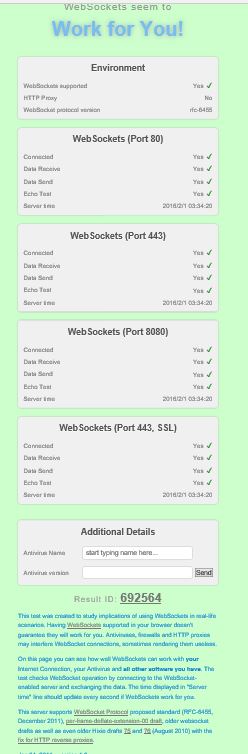
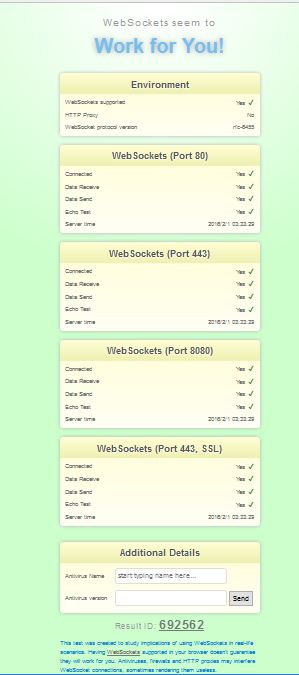
This is an easy test that will get you the answer in no time at all. I have Mozilla Firefox 44.0 and Microsoft Edge 25.10586.0.0 and Microsoft EdgeHTML 13.10586. Both reported that Web Socket will work on this Windows 10 (x64) computer. Even IE 11 reported the same. However there may be other issues. Here are the results from Firefox and Edge.
Just launch the browser and enter the following for the URL: websocketstest.com. That's it!
Web apps are apps built using HTML5, CSS and JavaScript. This is no different than building a web site with HTML and JavaScript. Your web app is just the web view that will render the HTML/CSS/JavaScript files. Unfortunately this by itself is not enough except for some simple applications. However if you need access to native hardware like camera, accelerometer etc then Cardova plugins can provide access to those native capabilities.
Cardova plugins consist of a JavaScript file and a code files for a given platform. Cardova maps the native code to JavaScript specific for the platform (iOS, Android, Windows) to care of implementing the native devices.
This morning a Windows 10 Update was applied. It took a while to get the computer back for working. Microsoft Edge has many neat features and it is supposed to be better designed for HTML 5 for speed and performance than the earlier browser versions. On the other hand I recently installed Firefox 42 which is also pretty good.
I just wanted to see how they compare and ran a test on this site (http://html5test.com/) for the two browsers I have on my Windows 10 Pro.
Firefox 42
MicrosoftEdge (EdgeHTML13.10586)
It appears Firefox 42.0 is quite good with a slightly (not a big difference) better rating. May be you should go to this site and check out the details.
But surely, Microsoft Edge is catching up and coming out Open.
When you need to fashion a web page to include in-line data, you would use the data URI (URL)
scheme.
Here is the IETF reference for the Data URL scheme, http://tools.ietf.org/html/rfc2397
As described in the above it is,
"A new URL scheme, "data", is defined. It allows inclusion of small data items as "immediate" data, as if it had been included externally"
You can embed different kinds of data in a web page using the source pointing to this URL scheme.
For example you can embed the image of a red dot with the following scheme,
The above is from WIKIPEDIA.
Read the advantages and disadvantages of using URL scheme in web pages in the above link.
As to using audio files, you would normally code as follows:
If the browser does not support the .ogg file it would play the MP3 file and if it cannot it will
display a message as indicated.
In IE11 you get to see the audio controls but you get an error message.
When you accept to allow running scripts it changes to a different error but does not play the audio.
Firefox 26.0 does not play the file although the controls are displyed briefly to fade quickly.
Safari 5.1.7 clearly does not support the audio element.
Now how do you use the data URL Scheme to play audio?
The Base64 content is too big and therefore truncated.
IE11 does display the controls but the error in display is 'Invalid source'.
Safari 5.1.7 does not run the audio content.
However Mozilla Firefox 26.0 does play the audio file.
How do you create Base64 content. You can take your *.wav file and run it thorough a program that
converts it to Base64 format and use it in the web page.
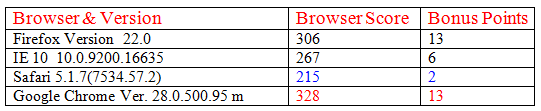
These are some of the browsers I use and I am not sure they are
the latest. But you can see that Google Chrome Version 28.0 support most of the functionalities of HTML 5.
 Greetings.png