Showing posts with label Microsoft Edge. Show all posts

Wednesday, August 15, 2018

Oh! Why do I get this blank Microsoft edge browser page?

 Recently my laptop OS got upgraded to the build, 17733.rs5_release.18083-1525. Looks like Microsoft Edge with the following signature:

Microsoft Edge 44.17733.1000.0
Microsoft EdgeHTML 18.17733

has some display related problems.

This is one of the observed problems that some blank browser pages appear that cannot be closed using the context menu or the Close(x) (or ALT+F4) control on the page.

Before this blank page showed up, the OS sort of rebooted all by itself and when the OS was reloaded, this blank page showed up.

Here are some associated screen shots:


Blank page was there in the first place, added another page above.


It appears blank, but it is on a NASDAQ site.
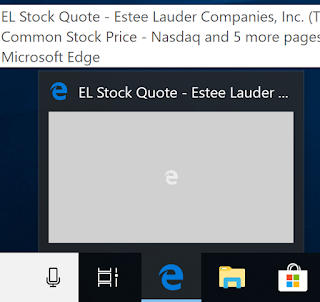

The blank page can be minimized/maximized but cannot be closed.

The other thing I have been noticing is that the Downloads now go to a TEMP location and presently to:
C:\Users\TEMP.XXXXXX\Downloads. There is a control that allows saving it to a different location. I am not sure when this happened. I heard that Microsoft decided to save everything to Cloud, I am not sure if it is true.

Also the Project I create in Visual Studio also gets saved to this 'TEMP.xxxxx' folder. Is this normal?

Tuesday, August 29, 2017

Does your browser support localStorage?

If your browser supports HTML5 then your browser supports local storage. The image below is for Microsoft Edge 15.


You can also view this HTML file (TodaysDate.html) below on your local IIS.


<html>
<body>

<div id="result"></div>

<script>
// Check browser support
if (typeof(Storage) !== "undefined") {
    // Store
    localStorage.setItem("Today", Date());
    // Retrieve
    document.getElementById("result").innerHTML = localStorage.getItem("Today");
} else {
    document.getElementById("result").innerHTML = "No browser support for localStorage";
}
</script>

</body>
</html>

If localStorage is supported then you should see the following (for today).

This also worked on IE 11 as well as Mozilla Firefox.


Monday, August 14, 2017

Is SVG a part of HTML5?


SVG is variously described as  'part of HTML5 specification' or an HTML5 extension. In either case, I am very happy as I am a fan of SVG.

In HTML documents you could embed an in-line SVG code.
SVG in some cases appear superior to Canvas in HTML. SVG creates prefabricated graphics that is part of the documnet model which can be accessed by the ID for any event based action, where as the graphics for use in CANVAS needs to be created and rendered during page loading.

Read my SVG related posts here:

http://hodentekhelp.blogspot.com/2015/12/does-microsoft-edge-support-svg.html

http://hodentek.blogspot.com/2009/10/finally-svg-in-visual-studio.html

http://hodentek.blogspot.com/2010/09/svg-gets-rendered-on-ie-90.html

http://hodentek.blogspot.com/2013/08/short-of-cash-get-apache-openoffice-40.html

http://hodentek.blogspot.com/search?q=svg

http://hodentekmobile.blogspot.com/2016/03/intel-xdk-controls-2-usage-of-svg-and.html

Wednesday, February 22, 2017

How do you fix this RStudio error?

You some times see this error in your RStudio console:

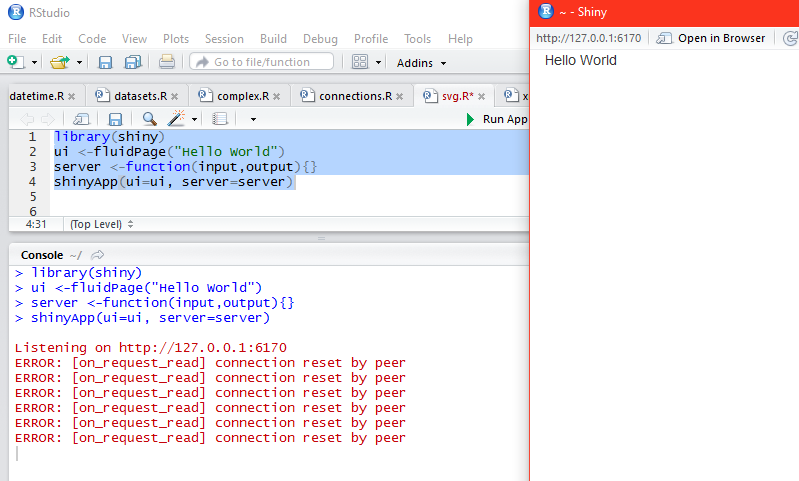
ERROR: [on_request_read] connection reset by peer

What is described is not a complete fix but a possible explanation of what is happening. It is most probably related to RStudio using the Microsoft Edge in Windows 10 operating system.

There are three modes that you can run to display in a viewer. This are shown in this image here:


ShinyError_000.png

Run in Window mode:

Run in Window opens a window ~ -Shiny as shown and runs the highlighted code to display the result.


ShinyError_00.PNG

Notice that the tab that is open is http://127.0.01:6170. Now if you change over the tab to 'Open in Browser', Microsoft Edge opens displaying the same URL. Now if you close the browser you see the error messages as shown. I am not sure why it repeats so many times.


ShinyError_02.PNG

However, if you copy the URL (http://127.0.0.1:6170) and paste it into a Firefox browser you will see 'Hello World' displayed again. But if you close this browser, no error is reported in RStudio console.

Hence in Run in Windows mode you can get away without producing error and stopping by pasting the code in Mozilla Firefox (assuming you want to see it in a browser).

Run External:

In this mode the Run result is displayed in the external browser which happens to be Microsoft Edge and you cannot avoid the error. Of course the code runs and displays the result but when you close the browser the error crops up in the console.

Run in Viewer Pane:

Viewer pane is one of the panes of RStudio. When you run the code in this mode the result will be displayed as shown.

The error crops up immediately as shown.


ShinyError_04.PNG

You need to click the Stop button to return to console prompt.

You can avoid this problem by choosing Mozilla Firefox as your default browser.


ShinyError_05.PNG

Friday, February 10, 2017

How do you enable JavaScript in Microsoft Edge?


Enabling JavaScript in Microsoft Edge is a two step process.

In Microsoft Edge do this:

Click on ... (ellipsis) button at the right extreme to display the drop-down menu as shown.


EnableJavascriptEdge_0.png

Click Open with Internal Explorer to open the IE Browser.

In the opened IE Browser do this:
Go to Menu at the top, click and open the Internet Options (at the very bottom) to open the Internet Options window.
Click Security tab to open.


EnableJavascriptEdge_1.png

Click Custom level...  under Security level for this zone to open the Security Settings -Internet Zone as shown above.

Scroll down and enable Active Scripting as shown.


EnableJavascriptEdge_2.png

Thursday, March 31, 2016

What is Microsoft Translator?


Microsoft Translator is a Microsoft Edge extension in preview for the Microsoft Insiders in a recent Build.

You can read more about it here and here.

It supports 50+ languages:
The Microsoft Translator supports more than 50+ languages.

Languages that are supported by this extension:
   # Arabic
   # Bosnian (Latin)
   # Bulgarian
   # Catalan
   # Chinese Simplified
   # Chinese Traditional
   # Croatian
   # Czech
   # Danish
   # Dutch
   # English
   # Estonian
   # Finnish
   # French
   # German
   # Greek
   # Haitian Creole
   # Hebrew
   # Hindi
   # Hmong Daw
   # Hungarian
   # Indonesian
   # Italian
   # Japanese
   # Kiswahili
   # Klingon
   # Klingon (plqaD)
   # Korean
   # Latvian
   # Lithuanian
   # Malay
   # Maltese
   # Norwegian
   # Persian
   # Polish
   # Portuguese
   # Queretaro Otomi
   # Romanian
   # Russian
   # Serbian (Cyrillic)
   # Serbian (Latin)
   # Slovak
   # Slovenian
   # Spanish
   # Swedish
   # Thai
   # Turkish
   # Ukrainian
   # Urdu
   # Vietnamese
   # Welsh
   # Yucatec Maya

It supports even Klingon for the Star Trek afficionados.

In order to work with Microsoft Translator you need to be signed in for the Insiders Program and then you can download and install as explained in one of the above links.

Monday, February 15, 2016

Is my Microsoft Edge infected?

Yes, it very much looks like. I allowed a comment on my blog while using Microsoft Edge and this problem showed up. The page shows up with this message:


Once this message comes, none of the other pages are reachable.
Steps I took:
Reported the comment on my blog ass scam.
Used the Task Manager to close Microsoft Edge.
Deleted browsing history and cookies.

Right now the Firefox is working. I read that this infects Chrome and Firefox as well. A remedy has been recommended (on the Internet)  to close all programs and hard boot. I will try it next.
Unfortunately you cannot rely on Windows Defender as it does not tell what the problem is.


Notes added: 1:45 PM Hawaii
The problem continues with Microsoft Edge. This post is written on Firefox. Adding the offending site to the Restricted sites did not help the problem.

Monday, February 1, 2016

Which browser supports HTML5 best?

This comparison can be made quite easily by accessing this URL in the browser you want to test. It gives a number the maximum of which can be 555.

http://html5test.com/index.html

This was the score for the latest Microsoft Edge 25.10586.0.0 and MicrosoftEdgeHTML 13.10586:


This one was for Mozilla Firefox 44.0


Well, Firefox does a little better.

There has been a lot of progress made by Microsoft in the past few years.
http://hodentekhelp.blogspot.com/2013/08/which-is-best-browser-to-text-html5.html

Does HTML5 WebSockets work for you?

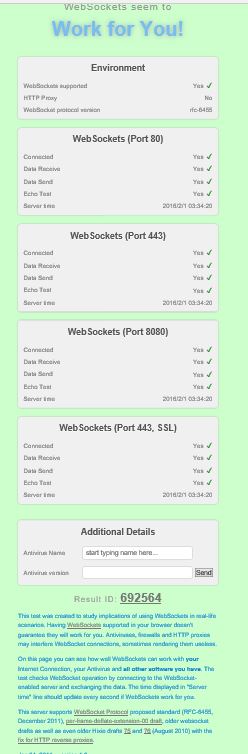
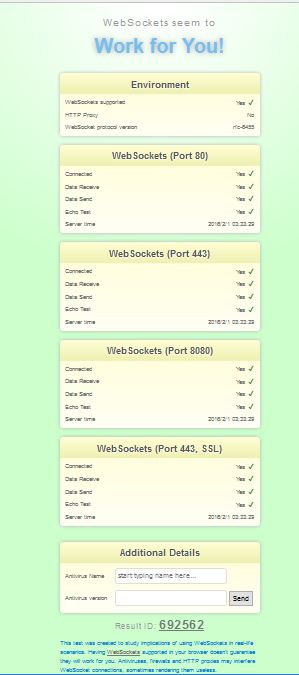
This is an easy test that will get you the answer in no time at all. I have Mozilla Firefox 44.0 and Microsoft Edge 25.10586.0.0 and Microsoft EdgeHTML 13.10586. Both reported that Web Socket will work on this Windows 10 (x64) computer. Even IE 11 reported the same. However there may be other issues. Here are the results from Firefox and Edge.
Just launch the browser and enter the following for the URL:
websocketstest.com. That's it!

Works on Edge

 Works on Firefox

Friday, January 22, 2016

Is it possible to access a Microsoft Report Server in Microsoft Edge?

What I have found so far is that you cannot access the Report Server using the Microsoft Edge browser.

Microsoft Edge, or simply Edge is the default browser in Windows 10. It is not designed to start with elevated permissions.

When you try to access Reporting Services Server  in the default Edge browser on Windows 10 and you end up with access denied message. The message as says , /  does not have sufficient permissions. One could use another browser such as Firefox but Reporting Services server cannot be accessed even when the browser is launched with elevated permissions. Firefox did not have problems in accessing the Report Server in SSRS 2012.


The way out for this in using the IE 11 browser that comes with Windows 10.

Saturday, December 19, 2015

Which of Firefox and Microsoft Edge support MathML better?

This is just the view point looking at just one example and must not be construed to apply to whole of MathML. You may review some basic MathML information here.

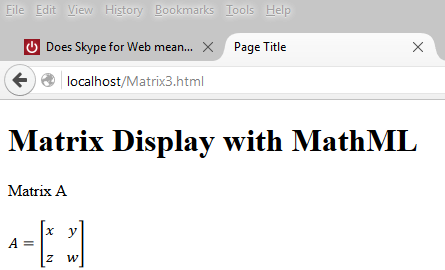
Here is an example of displaying a matrix using the presentation elements of MathML. Browsers do not support MathML the same way, some do better than others. Generally speaking browsers that support HTML5 should support MathML to some extent. This post considers only the latest versions of Firefox and Microsoft Edge at present.

This page can be hosted on a web server(in this case on the local ISS, IIS Version 10.0.10586) on Windows 10 Pro)

Matrix Display with MathML


Matrix A
 
     
  A
  =


         x
         y


         z
         w


This is a very simple page but there are differences how the browsers display them. The MathML is highlighted in yellow in the HTML page.

Firefox 42
Firefox displays as shown here without any modification. This is the correct way of displaying a matrix.


Microsoft Edge 25

The HTML code used as is (with the

Monday, December 14, 2015

What is MathML?

ML stands for Markup Language and MathML is the markup you can use in web pages (html for example) to display mathematical equations, expressions etc.

MathML is the XML standard for encoding mathematics. It is not just for incorporating mathematics into web pages but also for communicating and exchanging mathematics in mathematical and scientific applications. While most browsers would implement MathML from a standards view point Chrome wanted to have its own way of implementing MathML. However check with the latest version of Chrome for its MathML support.

 The earliest MathML specification is at least some 8 years old. MathML is quite widely used in print books, eBooks, etc. It is also used as an exchange format to support mathematical symbols and content in Microsoft Word, Open Office etc. With all kinds of sensors entering the web by way of Internet of Things, I am positive MathML will be used more widely than at present.

Read more here:
http://www.w3.org/TR/MathML2/overview.html
http://www.dessci.com/en/reference/webmath/tech/mathml.htm

Friday, December 11, 2015

Does Microsoft Edge support SVG?

Microsoft Edge natively supports SVG although it does not allow plug-ins. You can upload a SVG file to your web browser and bring it up in Microsoft Edge as shown here:


SVGTest.png

The SVG file was downloaded from this site.

With Microsoft coming out with Continuum after the debut of Windows 10 OS, SVG should be quite attractive.

Also, Firefox 42 does render it equally well.


SVGTest2.png

Few more related links if you want to review:


2009
http://hodentek.blogspot.com/2009/10/finally-svg-in-visual-studio.html

2010
http://hodentek.blogspot.com/2010/09/svg-gets-rendered-on-ie-90.html

Export SVG from OpenOffice
http://hodentek.blogspot.com/2013/08/short-of-cash-get-apache-openoffice-40.html


Tuesday, December 8, 2015

How does the latest Firefox compare with Microsoft Edge for HTML5?

This morning a Windows 10 Update was applied. It took a while to get the computer back for working. Microsoft Edge has many neat features and it is supposed to be better designed for HTML 5  for speed and performance than the earlier browser versions. On the other hand I recently installed Firefox 42 which is also pretty good.


I just wanted to see how they compare and ran a test on this site (http://html5test.com/) for the two browsers I have on my Windows 10 Pro.

Firefox 42


 MicrosoftEdge (EdgeHTML13.10586)


It appears Firefox 42.0 is quite good with a slightly (not a big difference) better rating. May be you should go to this site and check out the details.

But surely, Microsoft Edge is catching up and coming out Open.

Tuesday, August 25, 2015

What is a Web Note and how do you use it?

This is one of the coolest features of Microsoft Edge, Microsoft's latest browser (no relative of Internet Explorer).  You can write on your web page or add annotation and send it to your friend(s). Here is the Windows 10 version of Microsoft Edge used for this post.


Medge01.png

Let us say you found something useful and you want to add some annotation, or simply you want to highlight just one item from a bunch of stuff and want your friend to buy it for you as you are rushed. You just highlight that item right on the browser and share it with your friend in a couple of different ways.

We just take this example of sharing some selection you made that you want your friend to look at.

Here is the page you were looking at:


Medge02.png


Now you want to highlight your selection. The following assumes you have a Windows 10 operating system on your computer. Click on the icon under the red square. When you place your mouse tip on it you see text that says 'Make a web page".


Medge04.png

When you click on the icon, the page changes to this.

Medge05.png

Now we are in the editing mode and from top left to right we have some tools. They are, Pan (like scrolling), Pen, a highlighter with yellow tip(you can pick color and size), eraser, 'Add a typed note' item; and clip. On the right you have Save web Note (floppy disc icon), Share and 'Exit'. Presently these are supported and perhaps more may be added in future.

Now let us highlight one of the shoes. Click on the highlighter tool (which is next to the pen' and then with your mouse highlight one of the shoes by dragging your mouse tip around it (can be more than one) as shown.


Medge06.png

Now click on the 'Add a note' icon to the left of clip. A box opens and you can position it by dragging it and type into it as shown.


Medge07.png

Now you want to send it to your friend. Click on the Share on the right mentioned earlier. The share choices open as shown.


Medge08.png

Click on Mail and the next window opens (actually that is the only way I share). Here you will have to setup your email options.


Medge09.png

When I hit Get started, it brings up my Windows mail at live.com as shown. You can add other accounts if you want like gmail, etc.


Medge10

Sure enough the mail can be sent.


 Medge11.png

The mail can be retrieved.

Medge12.png

Well. What are some problems that I encountered?


  • I am documenting the steps to help readers and going back and forth to get the correct screen shot can mess up with the natural flow of a program. However, while trying to share information the edited page may loose some information. 
  • Going from editing stage to sharing stage should retain edited information  no matter how many times I go between the browser and the Share settingss.
  • The image that is sent appears to be the whole web page rather than the one in the images shown. Perhaps, this is my bad. One may need to clip further so that only a short message is sent.
  • There must be more Share choices, perhaps there will be a way to add choices in the future.
But this is a great improvement. I think DHTML has come to some maturity.