Showing posts with label Java. Show all posts

Sunday, June 23, 2024

What is the latest version of Android Studio and what are its features?

 The latest version of Android Studio (2024.1.1) is called Koalas.

Android Studio is used for building high-quality, modern Android Applications. The following features make it extremely well suited for building modern Android applications. These are in no way new but essential in all modern design environments:

  •  Develop Native Android Apps:  The basic function is used to build Android applications using KOTLIN, or Java. KOTLIN is Google's preferred language for Android app development. It provides an development environment with all the necessary tools for writing, editing, testing, debugging, and deploying your application. It's Android device monitor can explore various aspects of a connected Android app.

  • Build app's UI with Jetpack Compose :  Without UI you can not think of an application and Android can do UIs. It uses 'Jetpack Compose' to create UIs. Jetpack Compose is a declarative UI framework that allows you to build modern, customizable, and efficient user interfaces with a more composable and reactive approach.

  •  Utilize Robust Development Tools: Android Studio has a rich set of tools to do almost anything such as:

  1.  Code editing: Syntax highlighting, code completion, refactoring tools, and code navigation for efficient coding.
  2.  Debugging: Step through your code, set breakpoints, inspect variables, and identify and fix bugs effectively. Debugging can also be used look at data flows in the app.
  3. Testing: Write unit tests, integration tests, and UI tests to ensure code quality and prevent regressions.
  • Emulation and Testing on Different Devices:  Every app developer wants to see how is app works on a physical device and the look and feel on other device sizes. Without needing a physical device for every configuration, you can use the built-in Android Emulator to test your app on virtual devices simulating various screen sizes, operating systems, and device capabilities. Additionally, you can connect real Android devices for testing and development. You can test on external devices using WiFi or USB. 
  • Integrate with Firebase and Other Services:  You can use Google Firebase for authentication, databases, cloud storage, analytics, and more. Android Studio also supports integrating with other third-party libraries and services to enhance app features such as Networking, Image loading, UI animations, databases, etc.

Here is a link to installing Android Studio on Windows 10: 

Also, couple of more articles on the same HodentekMobile blog.

Tuesday, August 18, 2020

How do you convert XML to Java?

You could the online Code Beautify at:

 https://codebeautify.org/xml-to-java-converter#

Here is an example:

Here is my XML -->
-----------
Input
--------------
------------
Output
-----------
public class Codebeautify {
 Employees EmployeesObject;


 // Getter Methods

 public Employees getEmployees() {
  return EmployeesObject;
 }

 // Setter Methods

 public void setEmployees(Employees employeesObject) {
  this.EmployeesObject = employeesObject;
 }
}
public class Employees {
 Employee EmployeeObject;


 // Getter Methods

 public Employee getEmployee() {
  return EmployeeObject;
 }

 // Setter Methods

 public void setEmployee(Employee employeeObject) {
  this.EmployeeObject = employeeObject;
 }
}
public class Employee {
 private String id;
 private String Name;
 private String job;


 // Getter Methods

 public String getId() {
  return id;
 }

 public String getName() {
  return Name;
 }

 public String getJob() {
  return job;
 }

 // Setter Methods

 public void setId(String id) {
  this.id = id;
 }

 public void setName(String Name) {
  this.Name = Name;
 }

 public void setJob(String job) {
  this.job = job;
 }
}

Thursday, August 9, 2018

What programming language do you want to learn?


Of course, you want the most popular and the most valuable.

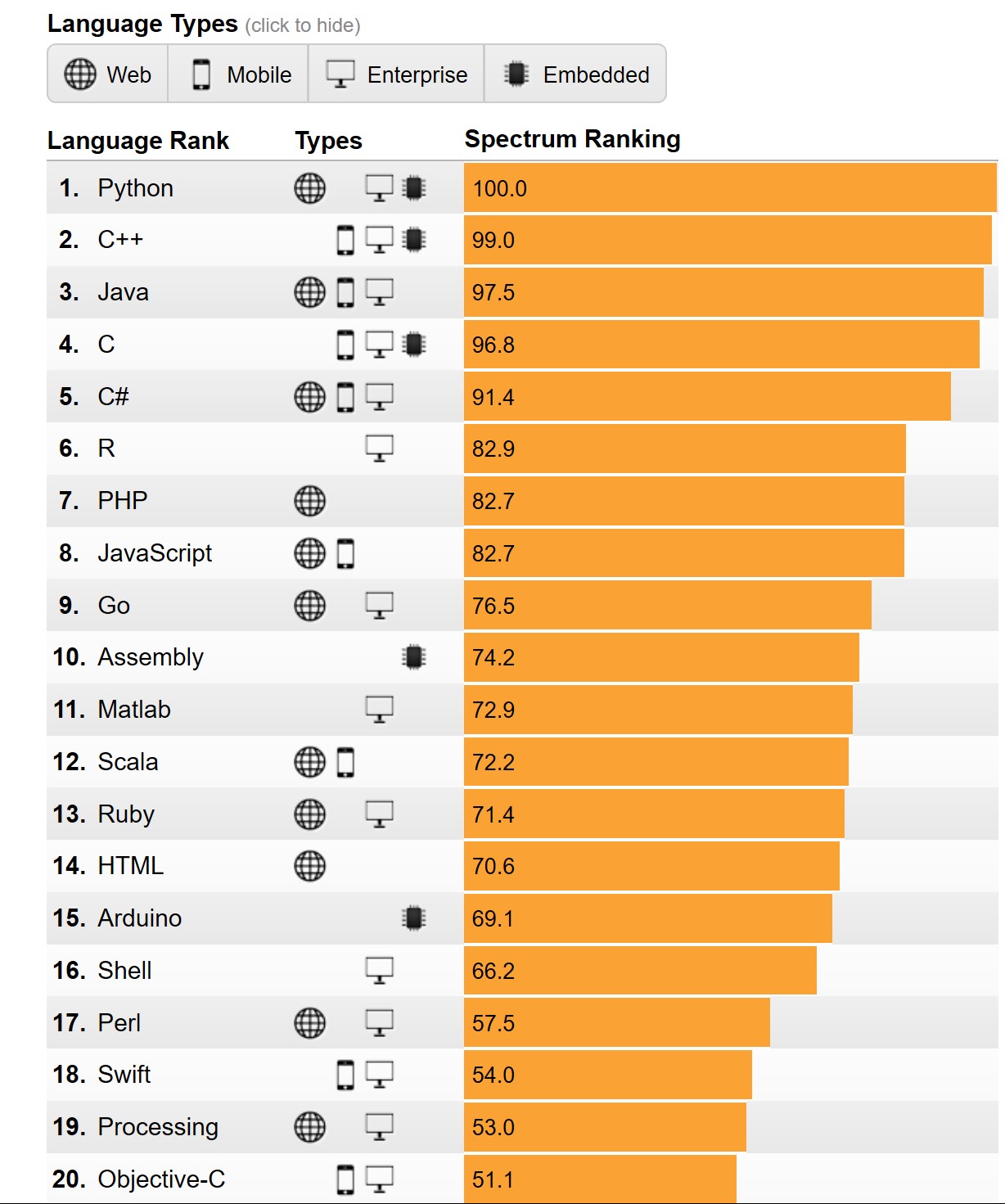
According to the Institute of Electrical and Electronics Engineers (IEEE) , it is Python, the clear winner.

Here are the top ten in its rankings:


Why Python?

The answer appears to the fact that it iss now used for embedded applications and because it has beefed up its repertoire related to AI and Machine learning. It is for this reason R language (somewhat specialized) has seen some decline.

Microsoft C# is still standing there at 5 and probably its place will be solid 5 for all types of programming - Web, desktop and Mobile. SQL is also there but does not show up as top 10 which is understandable given its area of usage.

Well here is the first 20. Find if your favorite is here


Well, you may want to know the basis for the ranking. You can get to know here.

You can find a lot of posts on R and Python on this site.


You can find a lot of Python and R posts in my blogs.

Saturday, April 28, 2018

What is the most popular programming language presently?

Looking back at my previous post on programming language popularity C language was at the top with Java in the second place.


However according to a chart on this site  shown here, Java continues to be the king once in a while ceding the top place.


TiobeIndex2017.png

Note that Python is rising, probably because of its use in AI, BigData and Robotics.

Wednesday, December 20, 2017

How do you create apps for SQL Server

This is a very useful site that you should acquaint yourself with. You can create apps that work with SQL Server with all of the following:

C#
Java
NodeJS
PHP
Python

on

Windows
macOS
RHEL
UBUNTU
SLES (Suse...)


You need to start at this link:

Thursday, October 22, 2015

How do I find the Java Control Panel in Windows 10?

Java is a key program which is widely used and you invariably need Java on your computer. Microsoft Windows is another equally important operating system and with Windows 10 and the new Microsoft browser, Microsoft Edge, one of course need to know about how Java works on Windows 10.

Finding Java Control Panel
Go to Control Panel | Programs
You will find Java

CPL_Java1.png
Click on Java. Java Control Panel opens as shown.

CPL_Java2.png

This is how it is registered in the Windows Registry.


CPL_Java3.png

This advice is from Java web site.
From Windows Search, type in Java. In the search results, select Configure Java. The Java Control Panel will appear.

Wednesday, July 1, 2015

Do you need to know the programming language Scala?

BigData is all the rage now.

The functional coding language Scala is Object Oriented, type safe and compiles to ByteCode, the format for JVM. It is therefore interoperable with Java. Apache Spark understands BigData.  For working with Apache Spark and BigData, you better learn Scala.

I would say it is essential to have a knowledge of Scala. Sure Java and Python are also the other languages you should have in your toolbox as all of these allow you to build parallel applications for a distributed environment. In addition to Java, Python, and Scala, R programming can also be used.

Thursday, January 29, 2015

How popular is JavaScript?

It has gained lot of popularity because of the many libraries developed such as jQuery, Bootstrap, Node.JS, Win.JS, dojo etc. Together with HTML5 it has become all the more popular for web development.

The popularity of a programming language is described by an index called the TIOBE Index.
TIOBE index provides a measure for the popularity of programming languages as mined from search engines. It includes many browser results as well as many programming languages. The index is published every month and for the month of January you can find it here:
http://www.tiobe.com/index.php/content/paperinfo/tpci/index.html

Programming languages C and Java are the top dogs and Javascript jumped from 9 to 7 in January 2015 and C# steady from 2014 to 2015 at 5.

TIOBE Index is calculated by the query +"Language> programming" to the search engines.

Get more info on TIOBE herre:
http://www.tiobe.com/index.php/content/products/tics/TICS_framework.html