Showing posts sorted by relevance for query visual Studio. Sort by date Show all posts

Friday, August 5, 2016

What is needed to leverage R from Visual Studio?

Microsoft's strategy is to bind all its assets and stay in a continuous state of integration, be it SQL Server; Office or its Communication set of products such as Exchange, Live or Skype.

With the addition of R technology for SQL Server in its most recent, highly touted product SQL Server 2016, integration of R with SQL Server and by default with Visual Studio 2015 was a natural extension. Probably integrating R with Excel is not far behind.

As it moves forward embracing Open Source concepts, Microsoft R client is free, the details of which follow:
----------
Microsoft R Client (x64) - (English)
SHA1: B5A7053C7CBC1079091DD1420D04E0489F43AD00
File name: en_microsoft_r_client_x64_8839107.exe
--------------
You can download R Client from here:
http://aka.ms/rclient/download

With Microsoft R Client you are not limited to Microsoft R Open and you can use any open source R package. ScaleR is a powerful new technology in Microsoft Client. ScaleR's propriety functions can be used to great advantage for parallelization and remote computing. With R Client you can work locally using ScaleR but is somewhat constrained limited by local memory and speed. This is improved by pushing the compute context to Microsoft R Server(SQL Server R Services) and R Server for Hadoop.

Microsoft R Client is also part of the R Tools for Visual Studio which gets installed with Visual Studio Update 3 install.

Here are some screen shots from a Visual Studio 2015 Community Update 3 upgrade from Update 2. You can also install the latest version of Visual Studio 2015 Community.

As a default, you get notified of product updates right within Visual Studio 2015 Community (presently Update 2).

 In the Extensions and Updates window you see more details and you can launch the installation from here by clicking the Update button.


This is an intermediate window during updating. R Tools 0.3 for Visual Studio 2015 are being applied to Visual Studio.
This is the Help screen of Visual Studio 2015 after update. I am not sure why the window is stall showing Update 2!! However, notice that R Tools have been added.

R Tools appear to provide a comprehensive set programming support for using R with Visual Studio 2015.

A R Tools toolbar item is added to the menu as shown.

Looks like there are two independent ways of getting Microsoft R Client, the hyperlink which downloads the executable to your computer to being installing or upgrading Visual Studio 2015.

Please note before upgrading to Visual Studio 2015 Community Update 3 I might have started the independent client installation. I will have to check on that.

Here is an image from R Tools site.


Monday, May 2, 2016

How do you create a Arduino Project in Visual Studio 2015 Community?

Arduino has a number of hardware products (microcontrollers. SoC, etc) that can be used for various end uses including the Internet Of Things (IoT).

Visual Studio can be used to create Arduino projects wherein the application created using the Visual Studio can be used to control like in robotics, garage openers, light dimmers, etc. to mention a few.

The more recent Visual Studio editions that are free and well suited for Arduino projects are the two Community Editions, Visual Studio 2013 Community and Visual Studio 2015 Community.

The first thing you need is to install Visual Studio (either 2013 or 2015). If you want to know details for 'how' follow these two posts.

http://hodentek.blogspot.com/2015/07/installing-visual-studio-2015.html
http://hodentek.blogspot.com/2014/11/you-get-all-this-for-free-in-visual.html

This post considers the Visual Studio 2015 Community(VS2015C).
A default install of VS2015C does not have the 'hooks' to create a Arduino Project. You will not find it in the 'New Project' templates.

You need to install the Arduino Extension for Visual Studio 2015. You can get an idea how to do it by following this Swaytorial:
https://docs.com/jayaram-krishnaswamy/4701/install-arduino-extension-to-visual-studio-2015

Once you install this you can create an Arduino Project from File | New Arduino Project.


NewProj.png

Click and you have created a project. It is that easy.

NewArduinoProj

You just need to give a name to the project and the template is ready.
I have a few projects created with the VS2013C on my blog which you may want to review.

Analog Serial Readout
http://hodentek.blogspot.com/2015/05/debugging-arduino-from-visual-studio.html

Tuesday, May 31, 2016

Can you program Arduino 101 with Visual Studio 2015?

The short answer is, Yes you can.

If you rather not use Visual Studio 2015, you could also use the program from Arduino.

But Visual studio does lot more than Arduino Program.

Here is the how and the long answer regarding Arduino with Visual studio..

First thing you need to have is the correct version (if you follow my advice) of Visual Studio. Get the Visual Studio 2015 Community (What I have is the same but with Update 2).

If you do not have, no problem. Read this post.


For Arduino to work with Visual Studio 2015 Community (VS2015C), you need to install the Arduino Extensions for Visual Studio. A default install of VS2015C does not have the 'hooks' to create a Arduino Project. You will not find it in the 'New Project...' templates.

You need to install the Arduino Extension for Visual Studio 2015. You can get an idea how to do it by following this Swaytorial:

Of course you need to buy the Arduino 101. It is available from many sources. Connect it to computer with a USB cable as shown.


With all of the above in place, it is very easy to run the board from Visual Studio 2015 Community.

 Open Tools menu as shown to access the Extensions and Updates... submenu.

arduino101_Vs15C

The extension immediately brings in the support for Arduino 101.


Start a new project as shown here:

arduino101_Vs15C_000

Provide a name for the project (herein OneZeroOne)and click OK. The project with folders will be created for you as shown.

arduino101_Vs15C_00

In the above image click on the OneZeroOne.ino file. This is the 'sketch' that you will using to interact with the board via your USB drive to which the arduino 101 board is connected. It will be a simple, empty template. You can cut and paste any of the relevant sketches. Herein I have used the same sketch I used here to run the 'Blink' project that makes a LED on the arduino 101 board to flash on and off. It is one of the example applications, something akin to a 'Hello World'.

Here is the sketch used in this post:


arduino101_Vs2015C_02

When you compile and run this program you may get a message like this.

arduino101_Vs2015C_02

You may also get the messages from the serial port as shown as you connect/disconnect or run the program:


arduino101_Vs2015C_04

The arduino extension you added will also add a arduino specific toolbar as shown which makes it easy to work with the board.
arduino101_Vs2015C_05

There are couple of ways to build the program and upload it to the board. Here is one way using the main menu.
arduino101_Vs2015C_06

 As soon as you upload the second LED on the board starts blinking.


Tuesday, March 20, 2018

Does Visual Studio 2017 support Python?

Yes, in a big way. Just the Intellisense support may by itself a great help.

You need to install PTVS (Python Tools for Visual Studio) to have Python support in Visual Studio (2017,2015, 2013 and earlier). In Visual Studio 2015 you need a Python Interpreter (Python 3.5 or earlier, 3.6 and above are not supported). The VS may guide you to install a Python Interpreter.

Python support is not presently available in Visual Studio for Mac, but is available on Mac and Linux through Visual Studio Code.

More here:
https://docs.microsoft.com/en-us/visualstudio/python/installing-python-support-in-visual-studio

Well, here is my personal take. I have Microsoft Visual Studio Community 2017, version 15.5.7 which has the following Python related products:

VS2017Python_1

In the installed templates I can see all of the following that are specific to Python:


VS2017Python_0

What is more. You also get other perks, if you install Visual Studio that I have installed:


VS2017Python_2


Actually, I have other Python stuff as well:


Saturday, July 18, 2015

How do you create JSON data with Visual Studio?

You can create JSON formatted data using a text writer as it is really a text file specially
formatted and saved with the extension .json. JsonTextwriter is derived from System.IO assembly.

You can look at everything (properties, methods, etc.) in Newtonsoft.Json which you added to a
Visual Studio project in a previous post using the Object Browser in Visual Studio IDE (herein Visual Studio2013 Community edition.

Browse for Newtonsoft.Json in My Solution as shown in your Visual Studio IDE after displaying the Object Brower.

NewtonsoftNamespace.png

The first step is to create a C# (could be VB also, but here it is a simple console project)
Project and add reference to Newtonsoft.JSON as described in the previous post.

The following code taken from the Newtonsoft site was slightly altered to make it work in the
Visual Studio 2013 Community edition(free).

The original code is here:

Origcode.png

In order to build and run this code in Visual Studio you need to provide references to the various assemblies you will be including in the code. You will be using the various methods that Newtonsoft.Json provides which you can see in the object browser.

The code instantiates a String Builder to take the text writer's text (name and value) and build the Json formatted object.

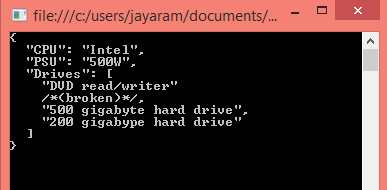
In order to use String Builder you need to reference System.IO assembly and the result of running the code will be displayed in the Console as shown:

ConsoleDisplay.png

However if you want to display the result in the Debug Output window in Visual Studio IDE you need to do a couple of things:

1. You should add a reference to System.Diagnostics.Debug assembly.
    This may not be available in the default installation of Visual Studio 2013 but you should browse for it in the Window Phone related assemblies (this was where it was found)

2. In the project properties Application page you should change the output type from the default 'Console Application' to 'Windows Application'.

WindowsApplication.png

3. Add a line of code to display using System.diagnostics.debug.print()
Now build and run the program and you will display result in the debug output window as shown.

debugprint.png

Here is the code that was run to display the above.
----------------
using System;
using System.Collections.Generic;
using System. Linq;
using System.Text;
using System.Threading.Tasks;
using Newtonsoft.Json;
using System.IO;
using System.Diagnostics;


namespace JsonWrite

{
class Program
{
static void Main(string[] args)
{
StringBuilder sb=new StringBuilder();
StringWriter sw = new StringWriter(sb);
JsonWriter writer = new JsonTextWriter(sw);


writer.Formatting = Formatting.Indented;

writer.WriteStartObject();
writer.WritePropertyName("CPU");
writer.WriteValue("Intel");
writer.WritePropertyName("PSU");
writer.WriteValue("500W");
writer.WritePropertyName("Drives");
writer.WriteStartArray();
writer.WriteValue("DVD read/writer");
writer.WriteComment("(broken)");
writer.WriteValue("500 gigabyte hard drive");
writer.WriteValue("200 gigabype hard drive");
writer.WriteEnd();
writer.WriteEndObject();

Console.WriteLine(sb.ToString());
// Console.WriteLine(sb.ToString());
System.Diagnostics.Debug.Print(sb.ToString());
}

}
}


Sunday, November 10, 2013

Read these mostly Microsoft SQL Server related articles on Packt Network

Creating a matrix report using the Analysis Services Cube

Excerpt:

nd database , a copy of the Northwind database. In this article by Dr. Jayaram Krishnaswamy, we will be authoring a report based on an analysis services CUBE. Reviewing Jayaram's other OLAP related articles may greatly help in understanding this article. Creating the CUBE will be essential to work with this
Manage SQL Azure Databases with the Web Interface 'Houston'

Excerpt:

version of SQL Server 2008 is R2. This article by Jayaram Krishnaswamy , is based on a project named 'Houston' which is a web based SQL Azure management tool that has not gone into production but can be tested using the SQL Azure Labs portal at http://www.SQLAzureLabs.com . In this article we look at some of the features of this web
Working with Data Application Components in SQL Server 2008 R2

Excerpt:

Jayaram Krishnaswamy In the August CTP Microsoft introduced Data-Tier Applications and several new features were introduced in the Nov 2009 CTP. Registering, Viewing & comparing and upgrading Data-Tier applications were added. This article by Dr. Jayaram
VB.NET Application with SQL Anywhere 10 database: Part 1

Excerpt:

Jayaram Krishnaswamy This article by Jayaram Krishnaswamy shows how you can develop a VB.NET 2.0 application using the integration features provided by the SQL Anywhere database. The SQL Anywhere tools are directly accessible without
Creating an Analysis Services Cube with Visual Studio 2008 - Part 2

Excerpt:

Jayaram Krishnaswamy As noted in Part 1 , OLAP presents Business Intelligence via what is known as a CUBE. A Cube has many dimensions and it provides a faster method to access the intelligence compared to the structured querying
Creating a Web Page for Displaying Data from SQL Server 2008

Excerpt:

Dr.Jay Krishnaswamy This article by Jayaram Krishnaswamy describes how you may connect to SQL Server 2008 and display the retrieved data in a GridView Control on a web page. Trying to establish a connection to the SQL Server 2008 is
Migrating a MySQL table using Oracle SQL Developer 1.5

Excerpt:

to migration of databases from third party vendor products to Oracle. This article by Dr. Jayaram Krishnaswamy , shows how the reader may use Oracle's most recent tool, the Oracle SQL Developer 1.5 to work with the MySQL database. An example of migrating a table in MySQL to Oracle 10G XE is also described. The
Microsoft LightSwitch: Querying Multiple Entities

Excerpt:

Querying in LightSwitch can be carried out using the built-in Query Designer but more advanced querying can be carried out using code. This article by Jayaram Krishnaswamy , author of Microsoft Visual Studio LightSwitch Business Application Development , describes the use of the built-in Query Designer in the IDE to query the entities in the data
Processing Twitter and New York Times APIs with ASP.NET Ajax on Microsoft CDN

Excerpt:

Jayaram Krishnaswamy In this article by Dr. Jayaram Krishnaswamy , we look at two APIs, the Twitter API and the New York Times API and see how we can access data on them using the JavaScript libraries available on the Microsoft
Creating a VB.NET application with EnterpriseDB

Excerpt:

Jayaram Krishnaswamy Getting introduced to working with Postgres was described in the recent article, " installation and some basic features of EnterpriseDB ". Migration of data from SQL Server 2008 was described in "
Microsoft SQL Server 2008 - Installation Made Easy

Excerpt:

Jayaram Krishnaswamy SQL 2008 server is the latest in the line of Microsoft database servers and this article by Dr. Jayaram Krishnaswamy discusses the challenges one may face in installing the Developer version of this product
Microsoft LightSwitch Application using SQL Azure Database

Excerpt:

on August 23rd for the general public while it has been used by MSDN members and Microsoft insiders for couple of months. This article by Jayaram Krishnaswamy shows how you may download and install this program. The article also shows how you may develop a simple database application using this product retrieving data from the Cloud hosted relational
MySQL Data Transfer using Sql Server Integration Services (SSIS)

Excerpt:

Jayaram Krishnaswamy There are a large number of posts on various difficulties experienced while transferring data from MySQL using Microsoft SQL Server Integration Services. While the transfer of data from MySQL to Microsoft SQL Server
MySQL Linked Server on SQL Server 2008

Excerpt:

Jayaram Krishnaswamy Linking servers provides an elegant solution when you are faced with running queries against databases on distributed servers or looking at your distributed assets on disparate databases. This article by Dr. Jay Krishnaswamy explains how
A Simple Pocket PC Application using Visual Studio 2005

Excerpt:

Jayaram Krishnaswamy This article by Dr. Jayaram Krishnaswamy teaches how you may create a .NET Compact Framework (CF) 2.0 forms application. This can be used with Pocket PC 2003, or later devices. In the absence of a device being
VB.NET Application with SQL Anywhere 10 database: Part 2

Excerpt:

Jayaram Krishnaswamy This article by Jayaram Krishnswamy shows how you can develop a VB.NET 2.0 application using the integration features provided by the SQL Anywhere database. The SQL Anywhere tools are directly accessible without
Migrating from MS SQL Server 2008 to EnterpriseDB

Excerpt:

Dr. Jayaram Krishnaswamy In this article by Dr. Jayaram Krishnaswamy , we will learn about migration of data from MS SQL Server 2008 to EnterpriseDB. Migration Studio bundled with the EnterpriseDB download is a collection of tools to
Creating an Analysis Services Cube with Visual Studio 2008 - Part 1

Excerpt:

data. This two part article by Dr. Jayaram Krishnaswamy describes how a Cube is designed using Visual Studio 2008 and how it may be browsed on the Analysis Server. In Part 1, the necessary items for creating the Cube, namely the Data Source and Data Source Views are described.   Reviewing Jayaram's other OLAP
Transferring Data from MS Access 2003 to SQL Server 2008

Excerpt:

two non-Microsoft databases. Both Microsoft and proprietary data source providers are available to connect to many different database products. In this article by Dr. Jayaram Krishnaswamy , we will be transferring data from an MS Access database to a database on SQLServer 2008. Both the source of data and the destination database are on the same
Creating a Simple Report with Visual Studio 2008

Excerpt:

Jayaram Krishnaswamy Report Services, Analysis Services, and Integration Services are the three pillars of Business Intelligence in Microsoft's vision that continues to evolve. Reporting is a basic activity, albeit one of the
Windows Presentation Foundation Project - Basics of Working

Excerpt:

Dr.Jay Krishnaswamy This article by Jayaram Krishnaswamy introduces the reader accustomed to working with the traditional graphic user interface in earlier versions of VB to Windows Presentation Foundation . Importantly, it introduces
Exporting data from MS Access 2003 to MySQL

Excerpt:

SettingsJayaram Krishnaswamy>cd C:>cd xamppmysqlbin C:xamppmysqlbin>mysql -h localhost -u root -p Enter password: ********* Welcome to the MySQL monitor. Commands end with ; or g. Your MySQL connection id is 2 Server version: 5.1.30-community MySQL Community Server (GPL) Type 'help;' or 'h' for help. Type 'c'
Displaying SQL Server Data using a Linq Data Source

Excerpt:

provided by the Linq to SQL classes, a class generator that maps SQL server objects to the model. The class files generated support CRUD operations. In this article by Dr. Jay Krishnaswamy , we will be adding a LinqDataSource control in Visual Studio 2008 to a ASP.NET website and configuring it by providing a data context. The data context will
Overview of SQL Server Reporting Services 2012 Architecture, Features, and Tools

Excerpt:

MDX with Microsoft SQL Server 2008 R2 Analysis Services Cookbook () () This article by Jayaram Krishnaswamy  the author of  Learning SQL Server Reporting Services 2012,  provides a summarized overview of SQL Server Reporting Services 2012 and the background information
Using the Data Pager Control in Visual Studio 2008

Excerpt:

or it can be installed manually after installing the ListView. In this article both of them are described. While the number of items displayed in a list can be declaratively coded, it is possible to set it at page load time as well. This article by Dr. Jayaram Krishnaswamy describes how you may connect to SQL Server 2008 and display the retrieved
Navigating Pages in XAML Browser Applications

Excerpt:

published to a web server and can be browsed on IE and Firefox. This article by Dr. Jayaram Krishnaswamy shows how to create a XBAP application using Visual Studio 2008; how to navigate between pages in the application; and how to deploy the application to the local intranet web server using built-in support in Visual Studio.
Moving a Database from SQL Server 2005 to SQL Server 2008 in Three Steps

Excerpt:

Jayaram Krishnaswamy There are several options if one wishes to move a database from a SQL Server 2005 to SQL 2008 Server. First of all there is a 'Copy Database Wizard' in SQL 2008 Server which is meant for transferring
Microsoft LightSwitch: Querying and Filtering Data

Excerpt:

will not be wrong. Just like you take information out of the table, make changes to it and return it to the table, you do likewise with entity sets. In this article by Jayaram Krishnaswamy , author of Microsoft Visual Studio LightSwitch Business Application Development , we will take a look at querying a single entity.
MS Access Queries with Oracle SQL Developer 1.2 Tool

Excerpt:

Jayaram Krishnaswamy This article by Jayaram Krishnaswamy shows how you can install the Oracle SQL Developer 1.2 and connect to an MS Access database. This article will cover the steps right from downloading and installing the
Displaying MySQL data on an ASP.NET Web Page

Excerpt:

database server on a web page using ASP.NET . The table used in this tutorial was the one described in the first article in this series on Exporting data from MS Access 2003 to MySQL . This article by Dr. Jay Krishnaswamy explains how to populate a GridView on an ASP.NET web page by data retrieved from a MySQL Server. MySQL.Data.MySqlClient
SSIS Applications using SQL Azure

Excerpt:

Report Server providing full support with a web service frontend for a variety of reporting needs—from web-based reporting to embedded reporting. In this article by Jayaram Krishnaswamy , author of Microsoft SQL Azure Enterprise Application Development , we will be leveraging SSIS, SSRS, and the tools used to address ETL processes, and Report
jQuery Embedded in Dojo Accordion Panes

Excerpt:

library. In this article by Dr. Jayaram Krishnaswamy , we will experiment embedding jQuery in DOJO 123's Accordion widget and try to identify if there exists any cross-code interactions. The code is also tested for cross-browser suitability. Basic DOJO 123 accordion In my earlier article I had used the version
Oracle SQL Developer Tool 1.5 with SQL Server 2005

Excerpt:

party vendor products to Oracle. Please review the following articles on the earlier versions 1.1 and 1.2: MS Access Queries with Oracle SQL Developer 1.2 Tool and Migrating MS Access 2003 Data using the Oracle SQL Developer 1.2 . In the present article by Dr. Jayaram Krishnaswamy the latest version of this tool [Oracle SQL Developer 1
Binding MS Chart Control to LINQ Data Source Control

Excerpt:

Jayaram Krishnaswamy In this article by Dr. Jay Krishnaswamy , a Microsoft Chart Control will be bound to a Linq Data Source using LinqDataSource control and a pie chart displays the data. We will be going through the following
Migrating MS Access 2003 Data using the Oracle SQL Developer 1.2

Excerpt:

Dr.Jay Krishnaswamy In this article, Jayaram Krishnaswamy shows how to migrate an MS Access database to an Oracle 10G XE Server, describing all the steps involved in the migration process. Introduction
Ground to SQL Azure migration using MS SQL Server Integration Services

Excerpt:

Jayaram Krishnaswamy In this article by Dr. Jayaram Krishnaswamy , you will learn how to migrate a table from your ground based SQL Server 2008 to your cloud based SQL Azure instance using MS SQL Server Integration Services.
Copying a Database from SQL Server 2005 to SQL Server 2008 using the Copy Database Wizard

Excerpt:

Jayaram Krishnaswamy This article by Jayaram Krishnaswamy shows how to migrate a database from SQL Server 2005 (should work for 2000 as well) to SQL Server 2008 using the Copy Database tool in SQL Server 2008. In an earlier article we saw how this can
Connecting to Microsoft SQL Server Compact 3.5 with Visual Studio

Excerpt:

features 128-bit file level encryption. It is referential integrity compliant; supports multiple connections; has transactions support with rich data types. In this tutorial by Jayaram Krishnaswamy , various scenarios where you may need to connect to SQL Server Compact using Visual Studio IDE (both 2008 and 2010) are described in detail. Connecting
Microsoft Chart with XML Data

Excerpt:

nts and SettingsJayaram KrishnaswamyMy DocumentsVisual Studio 2008Chart_XMLWebApp_DataPrincetonXMLDOC.xml"); //Response.Write(Convert.ToString(ds.Tables[0].Columns[0].ColumnName)); Chart1.Series.Add("Series2"); Chart1.Series[0].XValueMember=Convert.ToString(ds.Tables[0].Columns[1].ColumnName); string
Understand and Use Microsoft Silverlight with JavaScript

Excerpt:

and contribute to rich and interactive designs that are well integrated with Microsoft's Expression series of programs. In this article by Jayaram Krishnaswamy we will be using Silverlight 1.0 with JavaScript. We have come a long way from the day the WEB was created in 1992 by T.B.LEE in Switzerland. From
Authoring an EnterpriseDB report with Report Builder 2.0

Excerpt:

Jayaram Krishnaswamy This article by Dr. Jayaram Krishnaswamy shows step-by-step how you may retrieve data from a database on a Postgres Plus server and display the results in a report generated using Report Builder 2.0. Report
Installation and basic features of EnterpriseDB

Excerpt:

cost effectiveness versus Oracle and better scalability than MySQL. It can easily integrate with most applications such as Java, Ajax, Ruby, Drupal etc. This article by Dr. Jayaram Krishnaswamy mainly describes the installation of EnterpriseDB and the basic features to get started on this important database product. Installing
Term Extraction Tasks in SQL Server Integration Services

Excerpt:

stop the flow review it and turn it on to let the data flow to the next step. You may provide a name to the Data Viewer. There are four types of data viewers (Grid, Histogram, Scatter Plot, and Chart) and the 'Grid' type is used in this article. Build the Project and Execute the Package This is easy. Click on the menu item Build
Easy guide to understand WCF in Visual Studio 2008 SP1 and Visual Studio 2010 Express

Excerpt:

suite of products provides an easy to use interface for developing WCF applications. Using these IDEs a number of different types of WCF applications can be built. The emphasis of this article by Dr. Jayaram Krishnaswamy is to show to the user how to leverage the IDE for understanding the ins and outs of a WCF application and learn about the
Microsoft SQL Azure Tools

Excerpt:

the tools that can be leveraged working with SQL Azure, but a few third-party vendors and others have also created tools for SQL Azure. In this article by Jayaram Krishnaswamy , author of Microsoft SQL Azure Enterprise Application Development , we will discuss the Microsoft Tools.   Microsoft
Data Access with ADO.NET Data Services

Excerpt:

operating on the data. In this article by Dr. Jayaram Krishnaswamy , you will learn how to create a ADO.NET Data Service from scratch. You will also learn how you may access data using the URI constructs. The backend data for this tutorial comes from a copy of Northwind database named TestNorthwind on a named instance of SQL Server 2008. In order
Writing XML data to the File System with SSIS

Excerpt:

Jayaram Krishnaswamy This article by Dr. Jayaram Krishnaswamy , shows how you may retrieve XML data from a relational database and write it to a folder on your file system as a text or xml file using Microsoft SQL Server Integration
Working with the Report Builder in Microsoft SQL Server 2008: Part 1

Excerpt:

Jayaram Krishnaswamy Report Builder 2.0 is feature-rich reporting tool with the latest Microsoft Office look and feel. In this two part article by Jayaram Krishnaswamy , we will see how the Report Builder 2.0 provides an extremely
Programmatically Creating SSRS Report in Microsoft SQL Server 2008

Excerpt:

Jayaram Krishnaswamy In this article by Dr. Jayaram Krishnaswamy , the process of programmatically creating the SQL Server Reporting Services (SSRS) tabular report is described. You will be creating a very simple report using the
Working with the Report Builder in Microsoft SQL Server 2008: Part 2

Excerpt:

Jayaram Krishnaswamy In the previous part of the article, we had a look at the Report Builder overview and described the Report Builder 2.0 interface . In this part by Jayaram Krishnaswamy , we will discuss about Enabling and reviewing