Showing posts with label SQL Server 2016. Show all posts

Friday, September 14, 2018

How do you use command line tool (CMD) to check SQL Server Report Servers?

You could use the command rskeymgmt

Here are the things you can find out about Report Servers from command lineusing HELP:
-----------------------
C:\Users\TEMP.HODENTEK9.000>rskeymgmt -?
Microsoft (R) Reporting Services Key Manager
Version 13.0.1601.5 x86

Performs key management operations on a local report server.
  -e  extract           Extracts a key from a report server instance
  -a  apply             Applies a key to a report server instance
  -s  reencrypt         Generates a new key and reencrypts all encrypted
                        content
  -d  delete content    Deletes all encrypted content from a report server
                        database
  -l  list              Lists the report servers announced in the report server
                        database
  -r  installation ID   Remove the key for the specified installation ID
  -j  join              Join a remote instance of report server to the
                        scale-out deployment of the local instance
  -i  instance          Server instance to which operation is applied;
                        default is MSSQLSERVER
  -f  file              Full path and file name to read/write key.
  -p  password          Password used to encrypt or decrypt key.
  -m  machine name      Name of the remote machine to join to the
                        scale-out deployment
  -n  instance name     Name of the remote machine instance to join to the
                        scale-out deployment
  -u  user name         User name of an administrator on the machine to join to
                        the scale-out deployment.  If not supplied, the current
                        user is used.
  -v  password          Password of an administrator on the machine to join to
                        the scale-out deployment
  -t  trace             Include trace information in error message

To create a back-up copy of the report server encryption key:
RSKeyMgmt -e [-i ] -f -p

To restore a back-up copy of the report server encryption key:
RSKeyMgmt -a [-i ] -f -p

To reencrypt secure information using a new key:
RSKeyMgmt -s [-i ]

To reset the report server encryption key and delete all encrypted content:
RSKeyMgmt -d [-i ]

To list the announced report servers in the report server database:
RSKeyMgmt -l [-i ]

To remove a specific installation from a scale-out deployment:
RSKeyMgmt -r [-i ]

To join a remote machine to the same scale-out deployment as the local machine:
RSKeyMgmt -j [-i ] -m
          [-n ] [-u -v ]

C:\Users\TEMP.HODENTEK9.000>
------------------------------

I have three report servers but two of them have a problem.

If you want to use rskeymgmt you should start the CMD program with elevated privileges as shown:


Once CMD screen is displayed you can find the report servers as shown. I am using the l and i flags in rskeymgmt. The SQL Server Report Server 2012 PCATT has no problem, while the 2016 and 2017 SQL Server instances OHANA and SSRS are showing the same exception.

C:\>rskeymgmt -l -i PCATT   ---SQL Server 2012
HODENTEK9\PCATT - 879ea471-47cf-4386-b7f1-6eb213a5fff6
The command completed successfully

C:\>rskeymgmt -l -i OHANA     ---SQL Server 2016
The profile for the user is a temporary profile. (Exception from HRESULT: 0x80090024)

C:\>rskeymgmt -l -i SSRS      --default instance of SQL Server 2017
The profile for the user is a temporary profile. (Exception from HRESULT: 0x80090024)


The previous result was obtained using a Preview Build of OS that was not working well.

Recently 9/14/2018 there was an update to the OS and things have improved. Here are some new results for the same. 


Two of them are not displaying results, in one case the Database Engine is not running and in the other the Report Server is not running.

Saturday, June 23, 2018

What is treemap and how do you use it in Power BI?

A treemap represent an entity of items in a rectangle where each item occupies a rectangle and all entities are inside the single rectangle( not unlike a map of a state containing all the counties, a map unlike treemap is not in a rectangle).


This is supported visualization type in Power BI.


Treemap.png

I am using the data from this post  of filtered sales by employees in the Northwind database on SQL Server 2016 using a direct query.

On a new page, click treemap under visualization to add the treemap to the page as shown,


Treemap_0

Drag fields LastName and UnitPrice to the treemap and the treemap changes as shown. Each rectangle now corresponds to an employee with its area in proportion to the sales made by the employee.


Treemap_00

You can add other formatting as shown


Treemap_000
You can add Spotlight to the treemap using the Spotlight menu as shown.


Treemap_2


You can also add tooltip in the Group page.


Treemap_3

Thursday, June 21, 2018

How do you use Direct Query in Power BI?

Launch Power BI (June 5, 2018 Version used for this post).

Click GetData and Choose SQL Server (you may choose a different source and the steps could be different).


The SQL Server database details page opens.


Fill in details about Server and Database (this is better if you want to get directly to data that you need from a database).

Choose the Direct Query Option and click Advanced Options.

Advanced options opens up for query insertion. Timeout is optional. This query is already filtered and should run fast. Insert the query as shown.

Click OK.

The data gets displayed. Load and it gets loaded as shown.


Monday, June 18, 2018

How do you use pivot() oprator in SQL Server?

Pivot() is a relational operator that changes a table-valued expression into another table. It rotates the table-valued expression by turning the unique values from one column  in the expression into multiple columns in the output and performs aggregations where they are required on any remaining column values that are wanted in the final output.

This is the syntax from MSDN for the PIVOT operator.
------------
SELECT , 
    [first pivoted column] AS , 
    [second pivoted column] AS , 
    ... 
    [last pivoted column] AS  
FROM 
    (
------------
Let us take an example frrom Northwind database. Here is a query that Selects lastname of employee and Unitprice from the Order Details table for UnitPrice greater than 50 and Quantity>10.


Pivot_0.png

You can see that Employees figure in many orders (have order details) with different UnitPrices. Now if you want to aggreegate the average Unitprice of articles sold by each employee (or a chosen number of employees) you need to do an aggregate.

For the above query we cannot directly use the PIVOT operator and we need to create an ALIAS as shown. PriceTable is the ALIAS for this query
----------
Select * FROM
(SELECT        Employees.LastName, [Order Details].UnitPrice
FROM            Employees INNER JOIN
                         Orders ON Employees.EmployeeID = Orders.EmployeeID INNER JOIN
                         [Order Details] ON Orders.OrderID = [Order Details].OrderID INNER JOIN
                         Products ON [Order Details].ProductID = Products.ProductID
WHERE [Order Details].UnitPrice >50.00 and [Order Details].Quantity>10)
as PriceTable
-----------
Nothing is changed as far as the Query return is concerned but we now have an  ALIAS.

Now we create a table which aggregates the average of UnitPrice for some named Employees using their LastName from the PriceTable as shown here.
----------
Select * FROM
(SELECT        Employees.LastName, [Order Details].UnitPrice
FROM            Employees INNER JOIN
                         Orders ON Employees.EmployeeID = Orders.EmployeeID INNER JOIN
                         [Order Details] ON Orders.OrderID = [Order Details].OrderID INNER JOIN
                         Products ON [Order Details].ProductID = Products.ProductID
WHERE [Order Details].UnitPrice >50.00 and [Order Details].Quantity>10)
as PriceTable
Pivot(Avg(UnitPrice) For LastName in ([King], [Davolio], [Fuller],[Peacock],[Suyama]))
as StudentPivot
----------------
When you run this the response is a table that has the values we were looking for:


Saturday, June 2, 2018

How do you connect to SQL Server from Python?

Well, like other software you need a Python SQL Driver. These drivers can be downloaded from here:

https://docs.microsoft.com/en-us/sql/connect/python/python-driver-for-sql-server?view=sql-server-2017

There are two drivers and Microsoft recommends using pyodbc.

pyodbc
pymssql


The one thing that bothers me is that the drivers are Python version dependent and there are so many of them. This is only for Windows that includes both x32bit and x64bit.

Go here to get the proper one:
https://www.python.org/downloads/windows/

I am on Windows 10 Pro Version 1803 (OS Build 17134.48). I also have several versions of SQL Servers. I will try out the web installer for x32 and x64 versions of Python3.7.0b5(64).

Tuesday, May 29, 2018

How do I format date data to remove the time data portion from it?

I have date coming from database as shown with time information really does not mean anything.

How do I clean up this column so that only date is shown.

Your original SELECT query is giving you this response.


You can use the Convert() function as shown here:

The syntax for Convert() function is as shown:

CONVERT(data_type(length), expression, style)

Underlying data type  datetime is converted to nvarchar(20) for the column Birthday using the Japanese Style (111).

Here is the style for USA:


Saturday, May 26, 2018

How do you know which columns are masked in a table?

If the table belongs to a database, then in the context of the database sun the query:

SELECT * FROM sys.columns

If the column(s) is masked you should look for the column 'is_masked' in the response as shown.


What is new in SQL Server 2016 Database Engine?

In SQL Server 2016,

Configure multiple TempDB database files during Installation and set up.
https://hodentekmsss.blogspot.com/search?q=TempDB

The Query Store (new) stored texts, execution plans and performance metrics with the database. You have access to its dashboard related to query performance.

https://hodentekmsss.blogspot.com/search?q=query+store
[image]

Availability of Temporal Tables (history) which records all data changes.
https://hodentekmsss.blogspot.com/2016/07/temporal-tables-in-sql-server-2016-to.html

Built-in JSON Support(new). You can import/export, save and parse in JSON.
https://hodentekmsss.blogspot.com/2016/11/accessing-nested-json-formatted-text.html

Polybase(new) query engine integrated SQL Server with external data in Hadoop or Azure Blob storage. Import/export and executing queries all possible.
https://hodentekmsss.blogspot.com/search?q=polybase

Stretch Database(new) lets you dynamically, securely archive data from local SQL Server Database to an Azure cloud SQL database. querying is automatic both local and remote data by linked databases.
https://hodentekmsss.blogspot.com/2016/05/stretch-database-is-nice-feature-of-sql.html

In-memory OLTP:
Now supports FOREIGN KEY, UNIQUE and CHECK constraints, and native compiled stored procedures OR, NOT, SELECT DISTINCT, OUTER JOIN, and subqueries in SELECT.
Supports tables up to 2TB (up from 256GB).
Has column store index enhancements for sorting and Always On Availability Group support.

New security features:
Always Encrypted: When enabled, only the application that has the encryption key can access the encrypted sensitive data in the SQL Server 2016 database. The key is never passed to SQL Server.
Dynamic Data Masking: If specified in the table definition, masked data is hidden from most users, and only users with UNMASK permission can see the complete data.

https://hodentekmsss.blogspot.com/2017/07/new-security-feature-in-sql-server-2016.html

Row Level Security: Data access can be restricted at the database engine level, so users see only what is relevant to them.

Friday, May 25, 2018

What are the choices for installing Reporting Services 2016?

The choices have not changed from previous versions.

During SQL Server 2016 Installation you can choose to specify Reporting Services Configuration mode.

There are two modes that you can specify Reporting Services Configuration:

Reporting Services Native Mode
Reporting Services SharePoint Integrated Mode


You can choose both modes or just one mode.

If you choose to install the Native mode there are two options:

Install and Configure
Install Only


Install and Configure option installs and configures the report server in Native Mode. However you need to do further configuration for your specific case. The Report Server is operaitonal with the Windows Service and the databases needed by Reporting Services in your named instance.

Install only installs the report server files. You need to use the RS Configuration Manager to compele configuration.

If you choose to install the SharePoint Integrated Mode you can only install the Report Server files but you will need SharePoint Central adminsitration to complete configuration.


Details for both modes of installation for SQL Server 2012 were described in my book:

ISBN 139781849689922
Paperback566 pages

Wednesday, May 23, 2018

What data types can we use in a SQL Server 2016 database table?

Based on the table design using SQL Server Management Studio, v17.7, the following data types can be identified. These are the ones you find in SQL Server 17 as well.


Data types (text,ntext, image) continues to be present although Microsoft has been saying that they will be deprecated in a future version of SQL Server. 

Wednesday, December 13, 2017

How do you plot using GGPLOT in Power BI?

We saw an example of plotting using GGPLOT earlier in the RGUI.

Herein we use ggplot in Power BI.

We connect to Northwind database on an instance of SQL Server 2016 Developer. We load data from Products and OrderDetails table into Power BI.

We drop the R Script Visual from the Visualizations onto the designer.


ggplot2
The R script editor opens up as shown


ggplot_03

Add the following code as shown:
-------------------------------
library(ggplot2)
y=ggplot(data=dataset, aes(x=ProductName, y=Quantity))
y=y + geom_point(aes(color="red"))

-------------------------
If you run this code using the R script

You get an error:


Now modify the above to this:
---------------------------
library(ggplot2)
y=ggplot(data=dataset, aes(x=ProductName, y=Quantity))
y=y+geom_point(aes(color="red"))
y=y+geom_point(aes(size=Quantity))
y

---------------------
Now run the script. You will see the plot as shown. The size shows the value of "Quantity" and the color=red is supposed to make it red.


The correct code for aes is modified to this:
-------------------
library(ggplot2)
y=ggplot(data=dataset, aes(x=ProductName, y=Quantity))
y=y+geom_point(aes(size=Quantity, color="red"))
y

-------------------
Run this code again. You get the following visualization.

Looks like there may some error in rendering of the color. Changing it to blue makes it still 'red'.


Tuesday, September 12, 2017

Can you access data on a web page using Microsoft PowerBI?

You can not only access data on a web page but also from very many sources shown here:


Briefly from the menu item Get Data after you launch the Power BI Desktop, you can access Web in the Get Data window. When you insert the URL of the page from which you want to extract data, the Power BI program will display all the available data in the tables in the web page in its Navigator menu.

Once you have the tables listed in the Navigator menu, just choose the table or tables and load them to the Power BI for processing. You can then query the data that you just brought in and then create the pages of reports you want to create. It is that easy.

Here is an example from a web page (Wikipedia).


Here is an example fro SAP anywhere Server:


Here is an example from a text file using Power BI


You can find many more examples from my blog here:
https://hodentekmsss.blogspot.com

Tuesday, August 1, 2017

What is the difference between dbo and db_owner?

This question pops up now and then.

dbo is a user and db_owner is a database role. They both are in the Security node in the Object Browser. The SQL Server Management Studio (SSMS) makes it abundantly clear.

dbo


dbo.png

db_owner

db_owner.png

It will be instructive to review their properties as shown here.

dbo - Properties


dboProps.png

db_owner - Properties


db_ownerProps.png

Sunday, July 23, 2017

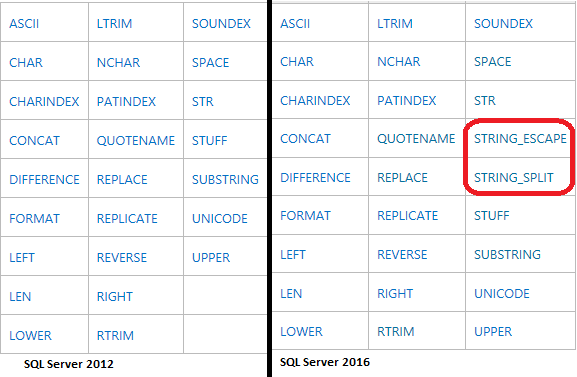
How does the string function STRING_SPLIT() work?

When compared to an earlier version, SQL Server 2016 has two new string functions shown in the next image.


String2016.png

The syntax for the new function:
STRING_SPLIT ( string , separator )

Let us take this string:

'quote, substring, toLowerCase, toUpperCase, charAt,
      charCodeAt, indexOf, lastIndexOf'

Now write the following code in the query pane of SQL Server 2016 as shown. When the query is evaluated we see that the string is split at the comma (,) as shown. The white spaces are preserved.


Sunday, July 16, 2017

How do you restore a database from its backup?

A backup of Northwind database was obtained from the Codeplex site and was saved to one of the folders on a Dell computer with Windows 10 OS. The computer also has SQL Server Management Studio (v 17.1). You should be able to restore using the SQL Server Management Studio installed when you installed the SQL Server 2012 Database engine.

Follow these steps to restore the Northwind database to an instance of SQL Server 2012 (x86) installed on the same computer.

Step 1. Start SQL Server Management Studio v17.1 (Run as administrator)

The SSMS is version 17.1 and Hodentek9\PCATT is a SQL Server 2012 Express

Step 2. Right click the Databases node highlighted in the PCATT isntnace as shown.


RestoreDB_01

Step 3: Click Restore Database...

Restore Database window is displayed as shown.


RestoreDB_02

Step 4: The Default Source is Database and it is greyed out as shown. Chnage it to Device. The Restore Database gets changed as shown.


RestoreDB_03

Step 5: Click the ellipsis button along 'Device' in the above image.

Select backup devices window shows on top of Restore Database window as shown.


RestoreDB_04

Step 6: Click Add button in Select backup devices window.
Locate Backup File window gets displayed as shown.


RestoreDB_05

Usually the 'backup files with extension .bak' are found in the following directory in the case of x32 bit SQL Server.
C:\Program Files (x86)\Microsoft SQL Server\MSSQL11.PCATT\MSSQL\Backup

However, for this exercise it is stored in a different location.

Step 7: Now browse to that location and highlight the Northwind.bak (A backup file which came from a Microsoft site) as shown.


RestoreDB_06

Step 8: Click OK. The file path is entered in the Select backup devices window as shown.


RestoreDB_07.png

Step 9: Click OK
You are returned to the Restore Database - Northwind as shown.


RestoreDB_08.png

Step 10: Click OK in the above.

Microsoft SQL Server Managment Studio message reports that the database
'Northwind' restored successfully.


RestoreDB_09.png

Step 11: Click OK to the message. Verify that Northwind database is in the SQL Server 2012 instance Hodentek9\PCATT


RestoreDB_10.png


Bye


Thursday, July 13, 2017

What is Dynamic Data Masking?

The title is quite revealing, is it not?

Dynamic Data Masking which is available in SQL Server 2016 allows you provide another level of security to your data, by masking data that you do not want unauthorized (by policies) users to peek into. Data in the database itself is unchanged. SQL Server 2016 has other security features besides dynamic data masking.

This is a nice feature that you should implement if are dealing with sensitive information (Credit card numbers, Social Security Numbers, etc).

Here is an image of credit card numbers being masked


Credit card masking imaged source: http://www.gsapps.com/images/masking2.gif

Read here about masking using JavaScript:

https://stackoverflow.com/questions/25367230/masking-a-social-security-number-input

Do you need special permission to create a table with a dynamic data mask?

No, you do not. Of course you need standard permissions like Create table, Alter on schema permissions.

The Alter Any Mask permission and Alter permission on  a Table are needed, though.

Read more about Dynamic Data Masking here:
https://docs.microsoft.com/en-us/sql/relational-databases/security/dynamic-data-masking

Sunday, May 21, 2017

How do you query the OpenJSON function with a SELECT statement?

OpenJSON converts an array of objects in a variable in JSON Format to a rowset
that can be queried with standard SQL Select statement.

Here is an example:

We are going to look at a JSON list of my first batch of students who took my course shown here. 

["wclass",
{"student":{"name":"Linda Jones","legacySkill":"Access, VB 5.0"}
},
{"student":{"name":"Adam Davidson","legacySkill":"Cobol, MainFrame"}
},
{"student":{"name":"Charles Boyer","legacySkill":"HTML, XML"}
}]

This is the result of running OpenJSON using the above:


Now you can run a SELECT query with a with clause on the rows returned by OpenJSON as shown here:

The first member "wclass" has nulls for the selected columns. It exists because it actually was in the original XML that got converted to JSON.
Here are my more recent JSON related articles:

JSON validation in SQL Server:
https://hodentekmsss.blogspot.com/2016/11/using-json-validator-in-sql-server.html

Nested JSON using SQL Server 2012:
https://hodentekmsss.blogspot.com/search?q=json

Retrieve JSON formatted data from SQL Anywhere 17
https://hodentekmsss.blogspot.com/2016/11/retrieve-data-from-sql-anywhere-17-in.html