Showing posts with label XML. Show all posts

Tuesday, August 18, 2020

How do you convert XML to Java?

You could the online Code Beautify at:

 https://codebeautify.org/xml-to-java-converter#

Here is an example:

Here is my XML -->
-----------
Input
--------------
------------
Output
-----------
public class Codebeautify {
 Employees EmployeesObject;


 // Getter Methods

 public Employees getEmployees() {
  return EmployeesObject;
 }

 // Setter Methods

 public void setEmployees(Employees employeesObject) {
  this.EmployeesObject = employeesObject;
 }
}
public class Employees {
 Employee EmployeeObject;


 // Getter Methods

 public Employee getEmployee() {
  return EmployeeObject;
 }

 // Setter Methods

 public void setEmployee(Employee employeeObject) {
  this.EmployeeObject = employeeObject;
 }
}
public class Employee {
 private String id;
 private String Name;
 private String job;


 // Getter Methods

 public String getId() {
  return id;
 }

 public String getName() {
  return Name;
 }

 public String getJob() {
  return job;
 }

 // Setter Methods

 public void setId(String id) {
  this.id = id;
 }

 public void setName(String Name) {
  this.Name = Name;
 }

 public void setJob(String job) {
  this.job = job;
 }
}

Sunday, December 2, 2018

How do you bring in XML data into PowerBI?

Here is how to do it.

Launch PowerBI. Click Get Data.

Click XML. Open dialog is displayed. Previously I saved a CD.XML file from W3C site here.


I highlight CD.xml and click Open. Power BI processes my input, and brings up the CD.xml in the Navigator as shown.


I place a check mark for CD.XML. The file loads into the Navigator.


I click Load. My action Load gets processed.


Now CD.XML is loaded into PowerBI. I still don't see it.


 Change it to DataView on the Left. Now you see the data in CD.xml.


That's all folks. Now you can do what you want to do in PowerBI.

Wednesday, July 18, 2018

How do you parse an XML document using Python 3.70b2?

Let us start with an XML Document. Here is my XML Document saved to my computer as MyStudents.xml.


XMLParsing_0

Launch Python 3.7.0b5(x64bit) and do an import using the xml.etree.ElementTree module by importing it like,


XMLParsing_1

>>> import xml.etree.ElementTree as ET


Now you can use ET as shown here:

XMLParsing_2

Now you can get the 'root' of XML Document as in:


XMLParsing_3.jpg

You use the tag attribute of the root to get the tag.

The 'root' has children which are the four students with their ID's.

You can get all of the children as shown in the code shown below.


How is XML Documents parsed in R?
Read here.

Also here.


Parsing using JSON:
http://hodentekhelp.blogspot.com/2014/11/how-do-you-work-with-javascript-object.html

Tuesday, July 17, 2018

Is there an easy to use XML validator on the web, on-line?

There may be many. I some tiems use this one (look at the URL address).


xmLvALIDATE__0

I submitted this document that I know is well formed without errors.


xmLvALIDATE_2.jpg

When I click 'validate', I get this response.

xmLvALIDATE_1.jpg

Wednesday, November 29, 2017

Does PowerShell work with XML?

XML is stored as a string in PowerShell. Hence it can work with XML.

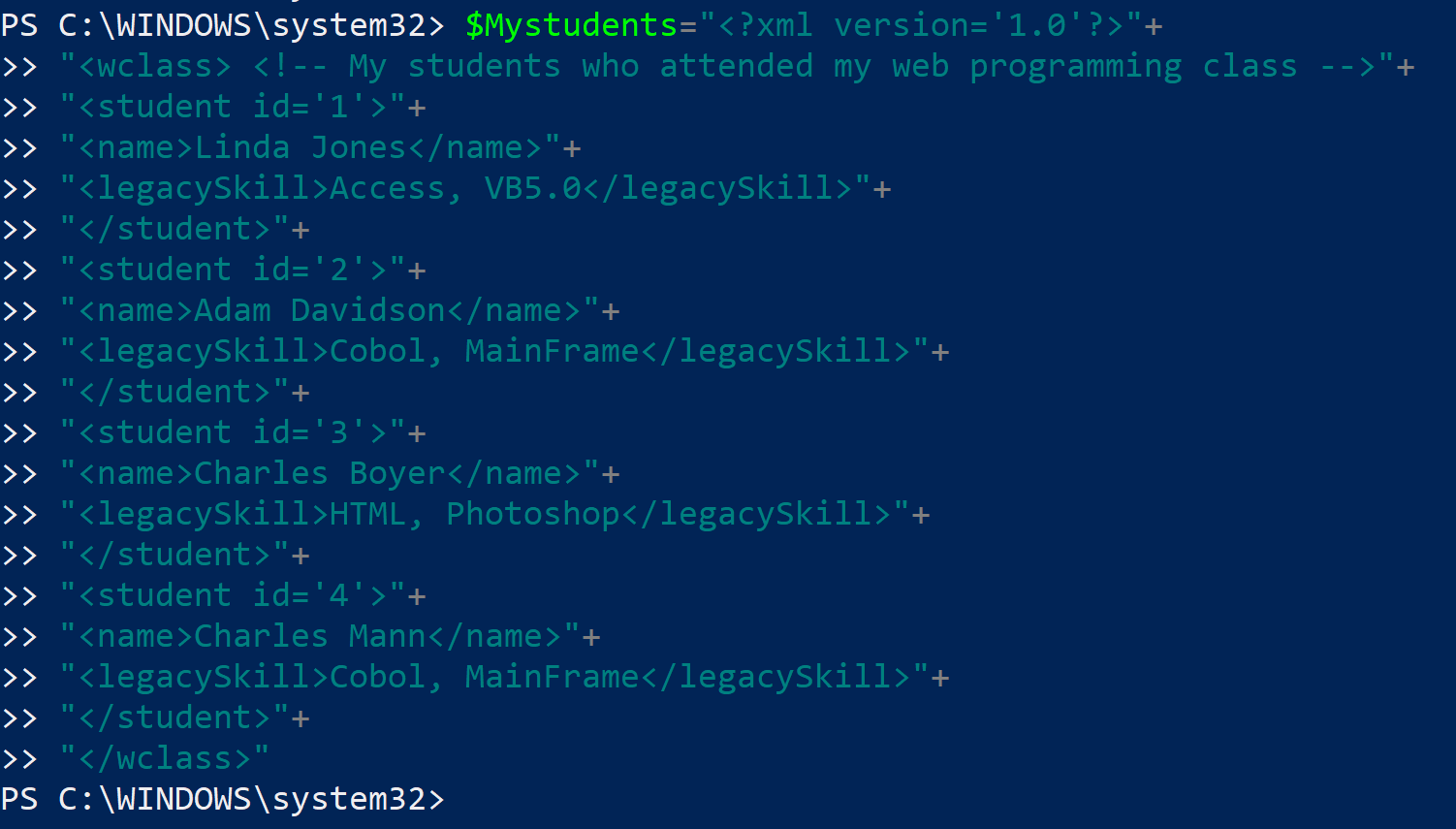
For example I have a XML document such as this one:

http://hodentek.blogspot.com/2007/07/simple-xml-file-aka-my-hello-world-for.html
-----------------


Review image 

-------------
How do I use this XML document?

Just assign this string to a PowerShell string variable as shown:(note the XML formatting has been changed slightly)
-------------

Sunday, May 21, 2017

How do you query the OpenJSON function with a SELECT statement?

OpenJSON converts an array of objects in a variable in JSON Format to a rowset
that can be queried with standard SQL Select statement.

Here is an example:

We are going to look at a JSON list of my first batch of students who took my course shown here. 

["wclass",
{"student":{"name":"Linda Jones","legacySkill":"Access, VB 5.0"}
},
{"student":{"name":"Adam Davidson","legacySkill":"Cobol, MainFrame"}
},
{"student":{"name":"Charles Boyer","legacySkill":"HTML, XML"}
}]

This is the result of running OpenJSON using the above:


Now you can run a SELECT query with a with clause on the rows returned by OpenJSON as shown here:

The first member "wclass" has nulls for the selected columns. It exists because it actually was in the original XML that got converted to JSON.
Here are my more recent JSON related articles:

JSON validation in SQL Server:
https://hodentekmsss.blogspot.com/2016/11/using-json-validator-in-sql-server.html

Nested JSON using SQL Server 2012:
https://hodentekmsss.blogspot.com/search?q=json

Retrieve JSON formatted data from SQL Anywhere 17
https://hodentekmsss.blogspot.com/2016/11/retrieve-data-from-sql-anywhere-17-in.html

Friday, July 1, 2016

How to parse a XML document in R?

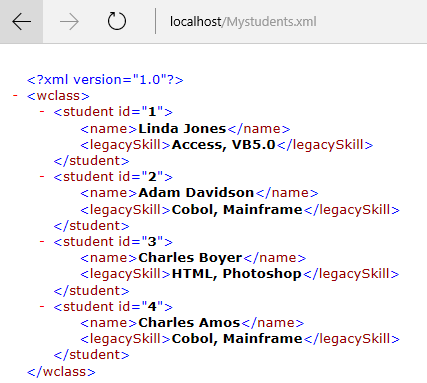
This post shows how to parse a XML document in R. I often use the following simple xml file for my posts and examples. Please find some precautions at the end of this post.


MyStudentsXMLDoc

If your xml doccument is not on the local server, you can easily place it on the server by copying and pasting the xml document(file) to the local server root (inetpub/wwwroot).

The steps to parse use the xml function xmlTreeParse as shown by the following:
The program uses the readLines() function to read the document as shown and you code these after launching R Studio or R Gui.


MyStudnetsXMLDoc_2

You immediately get the following response as shown here:

$doc
$file
[1] ""

$version
[1

$children
$children$wclass


  Linda Jones
  Access, VB5.0


  Adam Davidson
  Cobol, Mainframe


  Charles Boyer
  HTML, Photoshop


  Charles Amos
  Cobol, Mainframe


attr(,"class")
[1] "XMLDocumentContent"

$dtd
$external
NULL

$internal
NULL

attr(,"class")
[1] "DTDList"


1. R programs are case sensitive and pay attention to how they are typed-in
2. The Mystudents.xml file should have a final carriage return. If not you will end up with an error:
 incomplete final line found on 'http://localhost/Mystudents.xml'


Thursday, June 30, 2016

How do you install the XML library for R programming?

If you try to run the program to install the library for XML you would get an error as the library is not installed by default.
==
> library(XML)
Error in library(XML) : there is no package called ‘XML’

===
From Main menu Packages click Install package(s)...


You will get at list of Internet sites from where you can install.


Pick a site and the packages available there are displayed (USA[TN] was picked.


Pick XML from the drop-down and you will get the following response:


Once you have the package you can start programming.


Tuesday, September 15, 2015

How to access OData service with LINQ?

Open Data Protocol (OData) relates to creation and use of RESTful APIs. OData uses URIs to identify resources on the Internet. The generic syntax for accessing the root of such service is http://host/Service. OData is built upon HTTP, ATOMPub and JSON.

An example of such a resource is the Northwind Service:

http://services.odata.org/northwind/northwind.svc/

LINQ, short for Language Integrated Query, provides an object oriented approach to not only querying relational databases but also any kind of source such as XML, Collection of objects, etc.

Want to know more about LINQ, go here.
Accessing OData with LinqPad.

Launch LinqPad (version used here is v4.55.03) and click on Add Connection link shown here:


OData_02.png

Choose Data Context window opens.


OData_03.png

Click WCF Data Services 5.5 (OData 3) and Click Next.
 In the WCF Data Conneciton 5.5 window type in the URI as shown (you have seen what this is earlier). Leave username and password blank. You can get to the XML or the JSON formatted resources. Remembering this connection is OK for the next time you come here.

Hit Test with Default(XML) checked. Your connection gets populated as shown.


OData_04.png

In the Query pane, Click on Connection and choose the option shown. As to query language you have a number of options.


Odata_05.png

I have just chosen SQL as the language to query. It looks like the driver does not support SQL.


Odata_06.png

Change the language option to C# Expression. Query for Employees table contents as shown:

Odata_07.png

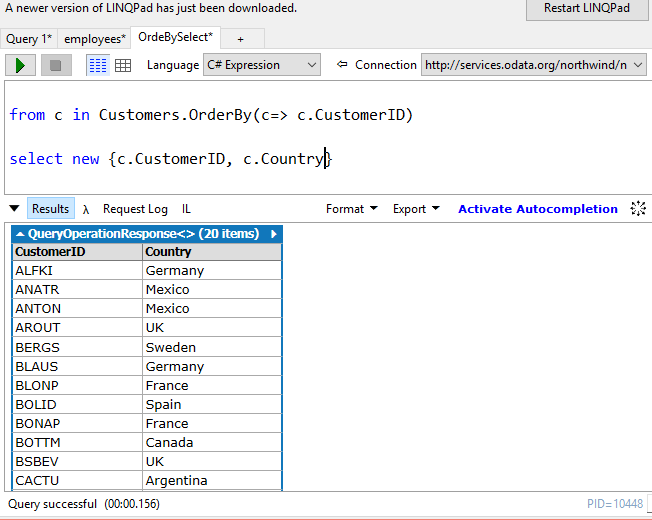
Here is another select statement choosing two columns from Customers table:

OData_08.png

You can easily query OData using C#, but this interface does not support SQL.

You can easily connect to OData using PowerBI, review this post:
http://hodentek.blogspot.com/2015/09/poweer-bi-using-data-from-odata-web.html

Monday, August 5, 2013

What is OpenOffice?

This is the free stuff that you can use if you cannot afford Microsoft Office. The installation is easy. The size of file is small. You also need to install Java Run time. You don't need to know Java for this, but the OpenOffice uses Java for some of the automated internal programs.


You can do most of the things you do in Microsoft with this. You can even open Microsoft documents.

Follow this link for details about from where to download.

http://hodentek.blogspot.com/2013/08/short-of-cash-get-apache-openoffice-40.html