Open Data Protocol (OData) relates to creation and use of RESTful APIs. OData uses URIs to identify resources on the Internet. The generic syntax for accessing the root of such service is http://host/Service. OData is built upon HTTP, ATOMPub and JSON.
An example of such a resource is the Northwind Service:
http://services.odata.org/northwind/northwind.svc/
LINQ, short for Language Integrated Query, provides an object oriented approach to not only querying relational databases but also any kind of source such as XML, Collection of objects, etc.
Want to know more about LINQ, go here.
Accessing OData with LinqPad.
Launch LinqPad (version used here is v4.55.03) and click on Add Connection link shown here:

OData_02.png
Choose Data Context window opens.
 OData_03.png
Click WCF Data Services 5.5 (OData 3) and Click Next.
In the WCF Data Conneciton 5.5 window type in the URI as shown (you have seen what this is earlier). Leave username and password blank. You can get to the XML or the JSON formatted resources. Remembering this connection is OK for the next time you come here.
Hit Test with Default(XML) checked. Your connection gets populated as shown.

OData_04.png
In the Query pane, Click on Connection and choose the option shown. As to query language you have a number of options.

Odata_05.png
I have just chosen SQL as the language to query. It looks like the driver does not support SQL.

Odata_06.png
Change the language option to C# Expression. Query for Employees table contents as shown:
 Odata_07.png
Here is another select statement choosing two columns from Customers table:
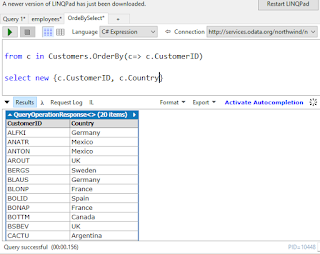 OData_08.png
You can easily query OData using C#, but this interface does not support SQL.
You can easily connect to OData using PowerBI, review this post:
http://hodentek.blogspot.com/2015/09/poweer-bi-using-data-from-odata-web.html
An example of such a resource is the Northwind Service:
http://services.odata.org/northwind/northwind.svc/
LINQ, short for Language Integrated Query, provides an object oriented approach to not only querying relational databases but also any kind of source such as XML, Collection of objects, etc.
Want to know more about LINQ, go here.
Accessing OData with LinqPad.
Launch LinqPad (version used here is v4.55.03) and click on Add Connection link shown here:

OData_02.png
Choose Data Context window opens.

Click WCF Data Services 5.5 (OData 3) and Click Next.
In the WCF Data Conneciton 5.5 window type in the URI as shown (you have seen what this is earlier). Leave username and password blank. You can get to the XML or the JSON formatted resources. Remembering this connection is OK for the next time you come here.
Hit Test with Default(XML) checked. Your connection gets populated as shown.

OData_04.png
In the Query pane, Click on Connection and choose the option shown. As to query language you have a number of options.

Odata_05.png
I have just chosen SQL as the language to query. It looks like the driver does not support SQL.

Odata_06.png
Change the language option to C# Expression. Query for Employees table contents as shown:

Here is another select statement choosing two columns from Customers table:
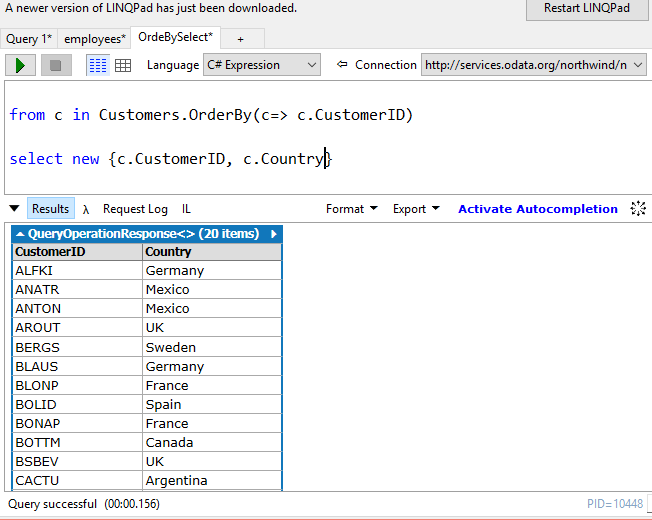
You can easily query OData using C#, but this interface does not support SQL.
You can easily connect to OData using PowerBI, review this post:
http://hodentek.blogspot.com/2015/09/poweer-bi-using-data-from-odata-web.html
