Showing posts with label Office 365. Show all posts

Saturday, August 2, 2025

When Identity Security Becomes a Wall — Not a Shield

After a breach that forced a reset of my digital identity, I hit a roadblock I never anticipated: multi-factor authentication (2FA) locked me out of critical Microsoft services with no reliable way to prove who I was.

Despite years of interaction, billing history, and documented correspondence, access couldn’t be restored. Support channels were opaque. Recovery methods? Virtually nonexistent.

🧩 The Fallout

This isn’t just a tale of frustration — it’s a wake-up call for anyone who depends on digital platforms for professional continuity. Here's what made this situation particularly troubling:

  • 2FA mechanisms ignored reset conditions and created a closed loop
  • Microsoft’s support structure lacked escalation flexibility for identity restoration
  • Existing billing relationships didn’t help validate re-entry
  • Submission of supporting materials was not possible due to access barriers
  • Communication was throttled by the very safeguards meant to protect users

📁 Appendix Overview (Bullet Format)

Though I’ve withheld raw screenshots for privacy, the underlying evidence includes:

  • Email chains across multiple support tiers
  • Billing confirmation across service subscriptions
  • Failed attempts to upload documents for verification
  • Timeline logs of authentication attempts
  • Chat transcripts documenting escalation effort
  • Account alerts post-identity reset
  • Case numbers and references from support tools
  • License access history and dashboard exclusions
  • Anomalies in MFA re-enrollment
  • Failed access attempts after password and device reset
  • Time-based snapshot of support delays and breakdowns

🔄 What’s Next?

This blog isn’t about placing blame — it’s about demanding resilience. If identity protection policies don’t account for edge-case scenarios, platform continuity suffers.

Lesson learned: Security tools should protect users with them, not from them.


Monday, July 9, 2018

What are Geography and Stock data types in MS Excel?

Stocks and Geography are the new data types in MS EXCEL Office 365.

I think you must have specific versions of Office 365 for you to work with these new data types.

Microsoft is excited but I am not, as I may have to pay up for (or upgrade subscription) something I may only use to see what it can do.

The nice thing about these are they are AI Powered and they search things out of Microsoft Knowledge Graph, the service that powerss their search engine, Bing.

What it does is it has a context and the search is in this context.

These are shots of Excel sheet with the Geography data type from the above link.


Monday, December 26, 2016

What's new in Office 365 features?


Microsoft is tops in Office applications with its Office 365 suite because of continuous development. Some of the features described here are available only if you have a subscription to Office 365 and Office Insiders.

In the latest version of Office 365 (November 2016)  these are the new features:

Learning tools for improved reading:

Use Read Mode with new commands and improve your reading skills. You can adjust text spacing, observe syllable breaks and highlight each word as document is read aloud.


Built-in accessibility
Improved support for asistive technology with Narrator. You can also create accessible documents as well.


Insert and edit icons:

Your document should have visible impact and to this end use icons available, some 500 of them. You can insert and edit icons


SVG images can now be used in Word:

You can now insert and edit SVG graphics without using any export software. Office 365 Word supports SVG graphics embedding.


Sunday, July 10, 2016

Can you send a post to your blog with Office 365?

Yes it is possible although there are quite a few places you may get stuck. I tried to post to Blogger to which I have been posting a large number of posts, but the Microsoft UI comes with a message that it cannot contact the provider. I assume it is going to be fixed.

It will be a nice feature, if this can be made to work  easily. It can embellish the blog and most of the typos can be resolved before publishing.

Well how do you post to Blogger from Word?

I followed the procedure outlined here to create a post. I did not completely succeed due to the above reason and hope it will be cleared. I will of course update this post when that happens. The other problem seems to do with how to manage images, how to manage videos, etc.

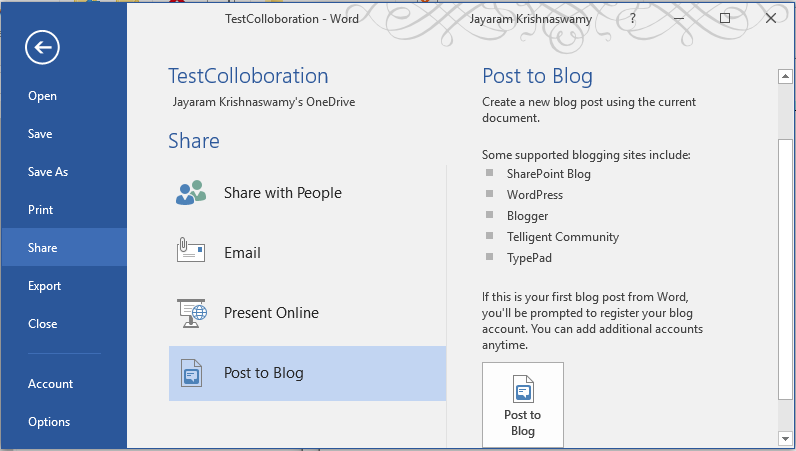
Open Office 365 (after April 2016 update) Word document and go to file to display the following:

BlogPost_01

Click Share to open the Share pane to display; click the navigation for Post to blog. You can see couple of blog provider options to which you can post.

 
BlogPost_02

Click on the icon Post to Blog to open the following. If it is the first time you need to register the blog accounts:

BlogPost_03

Click Register Now. You will need to provider the blog provider you are using.


BlogPost_04

My blog provider is 'Blogger'. If you do not have a provider or it is not listed, you can use the links on the above to create one.

Click on 'Blogger' in the drop-down. It gets entered and the screen changes as shown.

 
BlogPost_05

Click Next to open the username/password for you blogger account as shown.


 BlogPost_06

You need to enter your credentials for the Blog provider (Blogger). As to Picture options there are only two options, don't upload pictures or provide the address of My Server. 

Just to test how far I can go, I choose the option not to worry with images by choosing this option.

 
BlogPost_07
This is where the application needs to be improved! If I create a post with images inserted, the blog should be posted with the post with images. If I need to contend with yet another service, it gets complicated.
Also there appears to be some problem with registering.

After inserting credentials and clicking OK you may get this message.


BlogPost_08


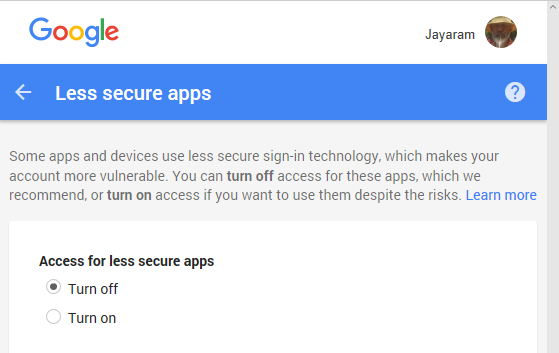
I take the remedy suggested by Microsoft to go to my Blogger site here and enable LessSecureApps as shown:


BlogPost_09

However, I still get the same registering failed message.

Once the registering is  resolved, I may need to find a solution for the images.

Monday, August 5, 2013

What is OpenOffice?

This is the free stuff that you can use if you cannot afford Microsoft Office. The installation is easy. The size of file is small. You also need to install Java Run time. You don't need to know Java for this, but the OpenOffice uses Java for some of the automated internal programs.


You can do most of the things you do in Microsoft with this. You can even open Microsoft documents.

Follow this link for details about from where to download.

http://hodentek.blogspot.com/2013/08/short-of-cash-get-apache-openoffice-40.html