Showing posts with label SQL Server. Show all posts

Thursday, January 9, 2020

Hands-on Learning Event in Honolulu 1 : Introduction to Structured Query Language

A new session is going to start soon. Sign-up here.


Microsoft SQL Azure Database: SQL Server in Microsoft Cloud
Windows PowerShell for SQL Server


My sincere thanks and best wishes to my students in the previous meets of this course.


Saturday, March 3, 2018

Where do you find the latest command-line query tool mssql-cli?

The public preview was announced in December last year. Now there is an update.

Read here.

You can download mssql-cli from here:


Using mssql-cli you get to do all this:

    T-SQL IntelliSense
    Syntax highlighting
    Pretty formatting for query results, including Vertical Format
    Multi-line edit mode
    Configuration file support

You can install mssql-cli if you have Python on your computer. For Windows you can install Python from here and make sure it is added to your PATH.


Friday, September 1, 2017

Is there a dashboard for SQL Server?

If you mean Server Dashboard, yes there is one.

You need to access from Reports.. menu as shown.


When you open Server Dashboard you would be able to see this one (specific to each installation).


If you do not see this and see a page full of errors, try logging in as an administrator.

Sunday, August 20, 2017

How do you decrypt encrypted cypher?

We saw in the previous post how to encrypt using the EncryptByPassPhrase() function.

We will use the same encrypted text and decrypt it using the same PassPhrase used to create it.

We use the reverse function DecryptByPassPhrase() which takes two arguments, the first is the PassPhrase and the second is the encrypted value (cyphertext). The PassPhrase generates the key for decryption.


MSSS2017\ENCRPTPSWD_04.pn

Saturday, November 12, 2016

Can you return data in JSON format from a web service in SQL Server?

The short answer is yes provided we run our queries in SQL Server 2016.

We have seen in an earlier post using ODATA service to generate a report from Power BI.

These were some example OData services that were considered in the previous mentioned link.

Northwind traders here:
http://services.odata.org/northwind/northwind.svc
http://services.odata.org/V4/Northwind/Northwind.svc

Adventure Works data here:
http://services.odata.org/AdventureWorksV3/AdventureWorks.svc

SQL Server 2016 supports JSON and it is possible to run a query in SQL Server Management Studio to return data from a ODATA service by running a query fashioned a shown.
=======
SELECT 'http://services.odata.org/V4/Northwind/Northwind.svc/$metadata#Products(ProductID,ProductName)/$entity' AS '@odata.context',  
ProductID, Name as ProductName  
FROM Production.Product 
WHERE ProductID<400 br="">
FOR JSON AUTO 
=======
This retrieves the following result:


Note that the size of text returned is limited by the settings.


Saturday, October 29, 2016

How do you change the compatibility level of a SQL Server database?

The compatibility level of a SQL Server database matters since the T-SQL code from a higher compatibility level will not work in a database with lower compatibility level.
How do you change the compatibility level?

Launch SQL Server Management Studio and pick the database for which you want to find the compatibility level.

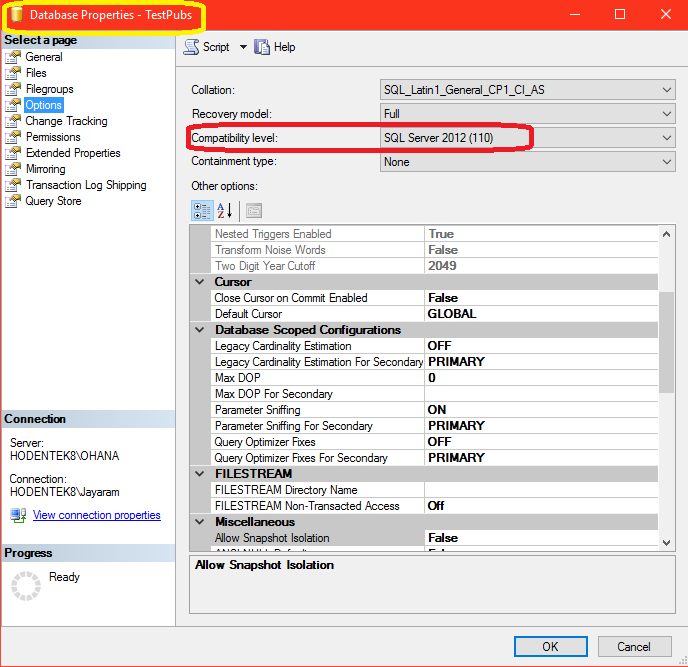
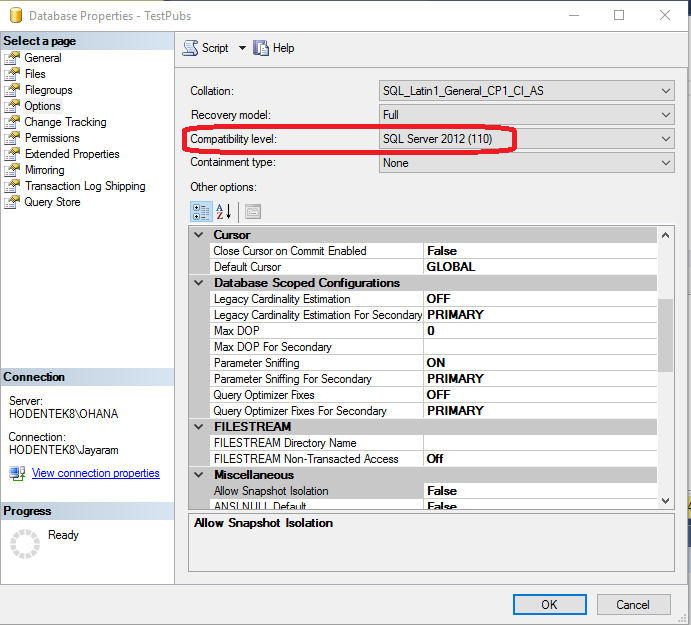
Right click the database node. From the drop-down pick Properties. In the properties page click Options and you will find the compatibitlity level as shown.

Compatibility_00.png

The TestPubs database (a renamed Microsoft legacy sample, pubs database) has a compatibility level of 110 (SQL Server 2012). This database was brought over to SQL Server 2016 by a process which did not change the comaptibility level.

Click on the Compatibility level and from the drop-down choose the one you want. For example to be cmpatible with SQL Server 2016 you would choose 130.

Compatibility_01.png

Of course you can always go back to the previous level any time.
 

Thursday, September 29, 2016

How do you find the compatibility level of a SQL Server database?

The compatibility level of a SQL Server database matters since the T-SQL code from a higher compatibility level will not work in a database with lower compatibility level.

How to find compatibility level?

Launch SQL Server Management Studio and pick the database for which you want to find the compatibility level.

Right click the database node. From the drop-down pick Properties. In the properties page click Options and you will find the compatibitlity level as shown. This is for SQL Server 2012.


Thursday, June 30, 2016

What is hierarchical data?

Hierarchical data is a set of data related to each other by hierarchical relationships. Here are some examples:

•Parent ->Children->Grand children
•File system
•Projects tasks
•Links between web pages
•Organizational Structures

You create table in SQL Server with hierarchyID data type to describe data with hierarchical data structure.
Hierarchical data in SQL Servers was first introduced in SQL Server 2008 by providing the hierarchy data type. This data type allows you to store and query hierarchical data.

Here us a screen shot of a table being created with hierarchical data type:


Hierarchical Data           Level in Hierarchy
-----------------------------------------------------
John/Mary Parents             /
Their children                    /1/
Their grand children          /1/2/

A slash separates a parents from their children schematically shown for a family relationship:

Monday, February 8, 2016

How do you create a script in SQL Server Management Studio?

  • This presentation is created using Microsoft's latest presentation program SWAY. This is my first shot at SWAY. The presentation may not be smooth. Would you kindly comment? Thanks


Test embed code:

Friday, January 22, 2016

Is it possible to access a Microsoft Report Server in Microsoft Edge?

What I have found so far is that you cannot access the Report Server using the Microsoft Edge browser.

Microsoft Edge, or simply Edge is the default browser in Windows 10. It is not designed to start with elevated permissions.

When you try to access Reporting Services Server  in the default Edge browser on Windows 10 and you end up with access denied message. The message as says , /  does not have sufficient permissions. One could use another browser such as Firefox but Reporting Services server cannot be accessed even when the browser is launched with elevated permissions. Firefox did not have problems in accessing the Report Server in SSRS 2012.


The way out for this in using the IE 11 browser that comes with Windows 10.

Friday, July 3, 2015

What are the different Web Apps you can build in Microsoft Azure?

Between Web Apps and Native apps, the browser based Web Apps have a lot of advantages while in some cases Native Apps are more advantageous.

In the beginning there were ASP.NET Web sites and Cloud Services made their appearance later on Windows Azure, and now there are lots of Web Apps.

Under Web Apps you can build the following kind of apps. Some of the web apps can be built in the Windows Azure Portal and those in preview can only be accssesed in the preview portal:

  • App Service Environment
  • Application Insights
  • Template deployment-classic
  • Web App
  • Web App+MySQL
  • Web App+SQL
  • ......
While the above are all from Microsoft, there are others from third party such as:
  • DNN Platform from DNN Corporation
  • Scalable Wordpress from WordPress
  • Engine Yard Platform as Service
  • SendGrid Email Delivery from SendGrid
  • Umbraco CMS from Umbraco.org
  • Notification Hub -not ready even for preview
  • Joomla! from Joomla
  • .....
There are many more and you login to the preview portal here to obtain the details (Search for Web+mobile).


Tuesday, April 28, 2015

Hands-on Learning Event in Honolulu: Introduction to Structured Query Language

This was offered once I 2012 and once in the beginning of the year and was a total success. It is offered once again to those who could not make it.

Please register at the PCATT.ORG site.


New in 2015: You will also get an introduction to Windows PowerShell. SQL Server 2012 Express will be used.
For details you can also write to:
Hodentek@live.com with course name in the Subject line.

Sunday, December 7, 2014

What is LINQ?

We know that a query is a question we pose to the database to retrieve some information that we would like to know. For example, in a database that consists of men and women, you may want to know how many men and how many women. Let us go a step further and say that there are people of all nationalities in the database of men and women. You may want to know how many women who hail from Europe are there. This is only filtering of the information but a query can much more complex. This is of course querying a database, let us say a relational database such as the SQL Server where you use the Structured Query Language(SQL), a special language you have to learn.

All data are not in relational databases and they could be in some kind of an XML document, a web service or something else. For example, in order to find some filtered content in an XML document you would use a language called XQuery which is not the same as SQL. This means there is need to learn another query language.

Beginning with Visual Studio 2008 and .NET Framework 3.5 Microsoft introduced LINQ which stands for Language-Integrated Query an innovation that made it possible to query a SQL Server database, an XML document, Web Services etc with a single lanugage and it is a first class query language.

In Visual Studio you can write LINQ in both VB and C# for any collection that supports IEnumerable or the generic IEnumerable interface (or to put it simply a collection in which one can go through the collection item by item).

For example you may have a list  of names ("John", "Tom", "June", "Diana") etc.  or  the number of rows in a database table , etc. and they can be queried using LINQ.

Need to query SQL Server with LinqPad, review the following posts:

http://hodentekmsss.blogspot.com/2014/12/learn-querying-sql-server-using-linq.html
http://hodentekmsss.blogspot.com/2014/12/learn-querying-sql-server-2012-using.html