Saturday, October 10, 2015

What is U-SQL?

While SQL covered the RDBMS landscape U-SQL covers a much larger data landscape.

At the same time as the announcement of Azure Data Lake Services, a new language under development at Microsoft, the U-SQL language was also announced. For the Azure Data Lake Service and what it means to business read here.

With the advent of Big Data and the task of mining all kinds of data, RDBMS suddenly found itself at a disadvantage. Structured Query Language (SQL) could only address what is in a relational data store. U-SQL was born to address this challenge posed by Big Data defined by volume, velocity and variety.

What is U-SQL
U-SQL deep dives into Big Data to extract the most relevant information. It is a powerful language (in the words of Microsoft):
  • Process any type of data. From analyzing BotNet attack patterns from security logs to extracting features from images and videos for machine learning, the language needs to enable you to work on any data.
  • Use custom code easily to express your complex, often proprietary business algorithms. The example scenarios above may all require custom processing that is often not easily expressed in standard query languages, ranging from user defined functions, to custom input and output formats.
  • Scale efficiently to any size of data without you focusing on scale-out topologies, plumbing code, or limitations of a specific distributed infrastructure.
Compared to HIVE, a SQL-Based language, U-SQL is flexible and does not have the limited capability to address the 'variety' in non-structured data requiring schema generation prior to running queries. U-SQL should prove more easy to use than Hive for complex scenarios.

U-SQL has been designed as declarative SQL based language with native extensibility through user code in C#. This approach:
  • Unifies SQL and C#
  • Unifies structured and Unstructured
  • Unifies declarative and custom code
U-SQL is based on SCOPE which is based on  existing prior languages, ANSI-SQL, T-SQL and HIVE. U-SQL should present a less steeper curve for those who are using SQL already.

U-SQL is an important development that developer need to jump on.

Wednesday, October 7, 2015

What is Azure Data Lake?

Recently announced Azure Data Lake addresses the big data  3V challenges; volume, velocity and variety. It is one more storage feature in addition to blobs and SQL Azure database. Azure Data Lake (should have been Azure Data Ocean IMHO) is really omnipotent. Just look at the key capabilities of Azure Data Lake:

Any Data
Native format, distributed data store. No need to pre-define schema information. From unstructured to structured data handling.

Any Size
Kilo bytes to Exa bytes OK. Ready for read/write.

At any scale
Scale to match your needs; high volume data handling of small writes and low latency. Can Aaddress near real-time web analytics scenarios.

HDFS Compatible
Works out-of-the box with Hadoop including services such as HD Insight

Full integration with Azure Active Directory
Supporting identity and access management over all of the data.

Azure Data Lake Store  is therefore a hyper-scale HDFS repositiory designed specifically for big data analytics in the cloud. It is order made for IoT and thorughput-intensive analytics for high volume data.

Read more here.
The graphic is from a  Microsoft Technet site
I checked out the preview portal (https://portal.azure.com/), I do not see it. Possible by the end of the year.

Tuesday, October 6, 2015

How do you access data using ODBC data connectivity in R?

R language is well suited for statistics and graphics. R is also good at handling data, perhaps not in large-scale. In order to connect to an ODBC source, it needs an ODBC connector which is found in a library called RODBC.

When you install a number of packages are available out of the box shown here:
 

Installed Packages.png

However you may not find the RODBC in the list. You need to install this library.
You can find RODBC library download here for WIndows.
https://cran.r-project.org/web/packages/RODBC/index.html

You will be downloading a zip file named RODBC_1.3-12.zip

You can download it to a location of your choice but move this file to the( library folder) in the folder created by the R installation.
 

The zip file from the download location(desktop) was moved to the folder C:\Program Files\R\R-3.2.2\library.

librarywithRODBC


Now if you bring up the installed packages from R-GUI you will see RODBC as shown.

LoadPackages2

Now you are ready to use the RODBC library in working with R.
In the RGUI(64-bit) just type library (RODBC) at the prompt as shown. You get another prompt but nothing else.
--------
> library(RODBC)
>
---------
For help with RODBC you can type the following at R prompt:
----------
>help(package=RODBC)
---------
This will open up the help file in HTML at : http://127.0.0.1:27629/library/RODBC/html/00Index.html as shown:


RODBCDoc.png

Now you can use this help file to explore RODBC further.

There are two groups of functions in RODBC, The internet odbc* commands implement low-level access to ODBC functions and the sql* functions operate at a higher level to read, save, copy etc. You can connect to hosts or DSNs.

Happy data hunting!

Monday, October 5, 2015

How do you import data in an Excel spreadsheet into R?

MS Excel is an excellent data cruncher which also has statistics related tools to process data in the sheets. R language has package can do staitstical processing of data. Once the data is processed it can be exported so as to create reports. This import and export can be frustrating in some cases taking more time than the statistical processing. R language is language of choice for statistical processing but for not for large scale data.

The easiest type of data that can be imported is the data on a text file. Text file based data is for small and medium amount of data.
I will describe three methods of importing data from a Excel spreadsheet.

First method:
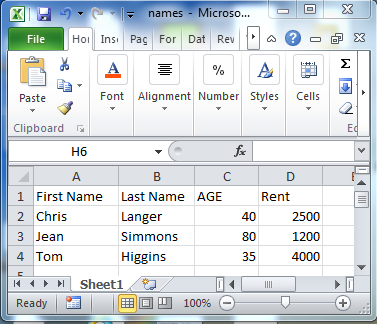
Let us take an example of data on a Excel spreadsheet as shown here:


ExcelOri

Save it as text file as shown in a previous post.

Launch R and in the prompt type as shown:
Enter the location of your .CSV file as shown and clilc Enter


You get an error:
Error: '\U' used without hex digits in character string starting ""C:\U"

We need to change the slash character as shown. Click Enter
Now you get the second error which shows all the needed attributes for calling reading a text file:
Error in scan(file, what, nmax, sep, dec, quote, skip, nlines, na.strings,  :
  line 2 did not have 3 elements


Just like Read.table(), Scan() is another function. In fact Read.table() calls Scan() to do the job. The sep in the list refers to what kind of a separator was used. In the .CSV file it is a comma.

Modify the statement to indicate that the separator is a comma and click enter.
Now the result is displayed. Row numbers and Column heading are added.

Use sep = " "  spaces or newlines
Use sep ="\t" for tab

Second method:
 
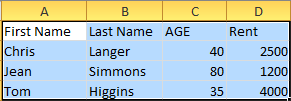
Open the Excel file shown at the top and copy the column heading and the data as shown:


R_clip
The contents are now in the "Clipboard".

Now in R enter the code as shown. After the error modify the separator (tab instead of comma)
-----------
> mydat <-read .table="" br="" file="clipboard" sep=",">> mydat
                             V1
1 First Name\tLast Name\tAGE\tRent
2         Chris \tLanger\t40\t2500
3          Jean\tSimmons\t80\t1200
4          Tom \tHiggins\t35\t4000
> mydat <-read .table="" br="" file="clipboard" sep="\t">> mydat
          V1        V2  V3   V4
1 First Name Last Name AGE Rent
2     Chris     Langer  40 2500
3       Jean   Simmons  80 1200
4       Tom    Higgins  35 4000
>

-------------------------------
Third method:

You can also use a statement like the following to display the contents of a .CSV file:
> read.csv("C:/Users/mysorian/Desktop/R_Related/names.csv")
  First.Name Last.Name AGE Rent
1     Chris     Langer  40 2500
2       Jean   Simmons  80 1200
3       Tom    Higgins  35 4000
>
=============================

Saturday, October 3, 2015

How do you find what packages are installed when you install R?

It is very easy to find.

1. Launch R

2. Click Packages as shown. Click Load Packages and this code is run.


> local({pkg <- all.available="TRUE)),graphics=TRUE)<br" packages="" select.list="" sort="">+ if(nchar(pkg)) library(pkg, character.only=TRUE)})

After a while the list of available packages appear and you can choose the one you want.

 
4. If click, say Matrix and click OK, the matrix related package gets loaded, you get just the R prompt and nothing else.

How to remove Ask.com from your computer?

This site is OK  is  OK but it hijacks other search engines and tries to show up first. It also seems to make search slow. I am sure it came from several other downloads I make often.

By following steps I have managed to get rid of it for now:
  • Removed all publisher references to ASK.com in Programs and Features

askcom02.png

Cleaned up the Managed Extensions in IE 11 Search Provider's list (Ask does not show up anymore).
In Internet Explorer's Manage Add-ons look for anything related to Ask.com. You may not be able to delete it but you can disable.

FoxPDF Creator Toolbar for example brought in ASK.com. I disabled it, although FoxPDF is an excellent PDF editor.
Make sure ASK is not in Search Providers as well. If it is remove it.

askcom03.png

In Internet Options | General page use any site other than ask.com for the Home Page
MSN.com is the default Home Page.

askcom04.png

If you find an executable ApnStub.exe on your computer, delete it.
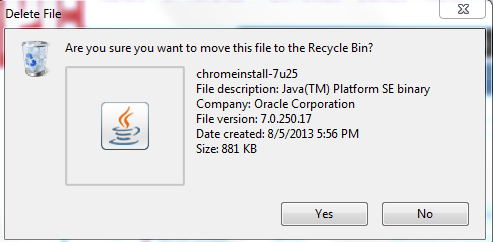
If you find ChromeInstall java program  such as this one remove it.

askcom01.png

Well I have my browser not showing ask.com suddenly. I hope it is gone for ever.
 

Is there a built-in web server for PHP?

Yes there is one which can be used for testing and designing web applications.

Runs in an environment similar to sandbox environment and does not have all features. If you need a full blown web server you can use Windows Internet Information Services (IIS).

You can start the web server with this command:

C:\Users\mysorian>php -S localhost:8083

PHP 5.4.14 Development Server started at Fri Sep 25 11:01:49 2015
Listening on http://localhost:8083
Document root is C:\Users\mysorian
Press Ctrl-C to quit.

The document you are viewing is in the Document root folder.

But if you try to access the localhost on Port 80 you would get this response.
C:\Users\mysorian>php -S localhost:80

[Fri Sep 25 11:01:12 2015] Failed to listen on localhost:80 (reason: An attempt was made to access a socket in a way forbidden by its access permissions.)