Showing posts with label PHP. Show all posts

Thursday, August 9, 2018

What programming language do you want to learn?


Of course, you want the most popular and the most valuable.

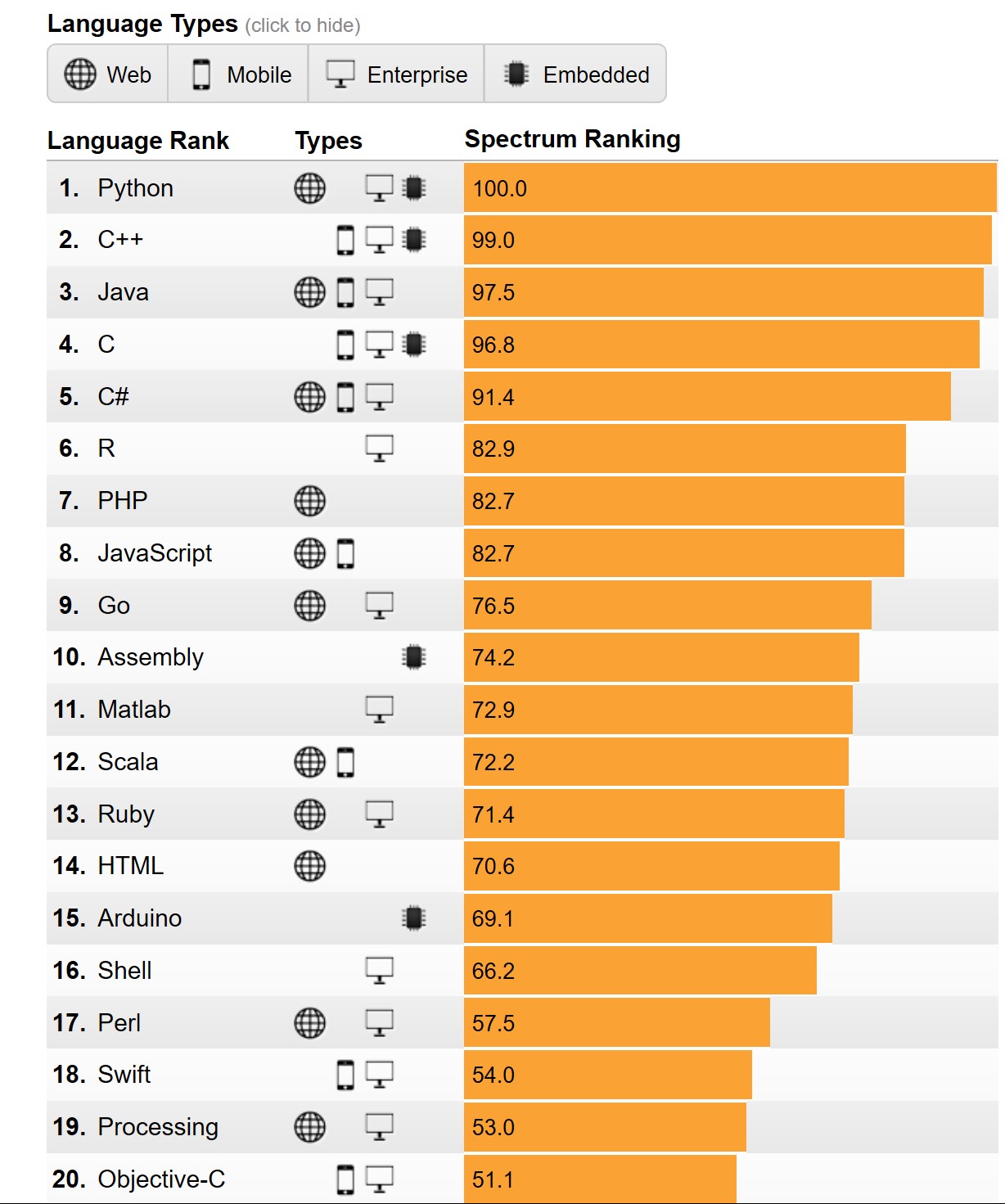
According to the Institute of Electrical and Electronics Engineers (IEEE) , it is Python, the clear winner.

Here are the top ten in its rankings:


Why Python?

The answer appears to the fact that it iss now used for embedded applications and because it has beefed up its repertoire related to AI and Machine learning. It is for this reason R language (somewhat specialized) has seen some decline.

Microsoft C# is still standing there at 5 and probably its place will be solid 5 for all types of programming - Web, desktop and Mobile. SQL is also there but does not show up as top 10 which is understandable given its area of usage.

Well here is the first 20. Find if your favorite is here


Well, you may want to know the basis for the ranking. You can get to know here.

You can find a lot of posts on R and Python on this site.


You can find a lot of Python and R posts in my blogs.

Friday, July 13, 2018

What is Dynamic Language Runtime (DLR)?

Dynamic Language Runtime(DLR) is a runtime environment that adds set of services for dynamic languages to the Common Language Runtime.

The difference between dynamic languages and statically typed languages such as C# and Visual Basic is that you need to specify the object type at design time for the latter.

There are a lot of popular dynamic languages such as the following:

LISP
SmallTalk
Javascript
PHP
Ruby
Python
ColdFusion, Lua
Cobra and
Groovy

Dynamic languages are also excellent scripting languages used in designing Web sites; data transformations; artificial intelligence, etc.

The main driver for DLR is to create the ability to run the dynamic languages on top of the CLR. Dynamic objects (in System.dynamic) now can be used in C# and Visual Basic. This in Visual studio Community 2017.


DLR_0
Here is the architecture of DLR for IronPython and IronRuby from Microsoft documentation in MSDN.


DLR.png

Wednesday, December 20, 2017

How do you create apps for SQL Server

This is a very useful site that you should acquaint yourself with. You can create apps that work with SQL Server with all of the following:

C#
Java
NodeJS
PHP
Python

on

Windows
macOS
RHEL
UBUNTU
SLES (Suse...)


You need to start at this link:

Sunday, November 15, 2015

Where can I find XAMPP download with MariaDB for Windows?

MariaDB does lot more than MySQL and it is MySQL's challenger arising out of MySQL (MariaDB is MySQL's fork). MySQL in LAMP stack has been replaced by MariaDB. The download link for XAMPP with MariaDB  is here.

The download versions are v5.5.30 and v5.6.14 (both x32bit). These versions have  the following components and they can be downloaded from here.

    Updated PHP to 5.5.30 / 5.6.14
    Updated Apache to 2.4.17
    Updated MariaDB to 10.0.17
    Updated phpMyAdmin to 4.5.0.2


Xampp_Maria.png

Sunday, November 8, 2015

What is SQL CLR or SQLCLR?

In order to understand what is SQLCLR, you need to know what the individual parts, Sequential Query Language (SQL) and Common Language Runtime (CLR) are.

Common Language Runtime is the programming that manages the execution of programs written in any of the supported languages such as C#, VB, Visual C++ etc to share common object orineted classes. Thiss is somewhat like Java Virtual Machine for programs run from Java. CLR is also called 'managed execution environment'. CLR is therefore related to .NET programming.

SQL is a language that is needed to run queries (post questions to) against SQL Server databases. It is not specific to Microsoft SQL Server. It can also be used with other databases like Oracle, Sybase, etc.
However Transact SQL (T-SQL) is the enhancement to add some progrmmability to SQL.
SQL Common Language Runtime (SQLCLR) is the combo technology (SQL Server and .NET) for hosting .NET common language runtime engine within SQL Server. In other words you can run managed code from within SQL Server.

Since T-SQL already adds to SQL the programming capability why does one need SQL CLR?

The reason I that there are certain useful class of programs that are just not handled by T-SQL, or make it much more complex and less secure. Of course there are more reasons why SQL CLR is needed. This is the reason for the development of SQL CLR. Also Microsoft made extensive integration of SQL Server with its massive .NET programming which makes it lot more flexible.

For, Creating a Visual C++ CLR Console Application in Visual Studio 2015 go here.

Tuesday, October 27, 2015

How do you use the PHP Explode function?

This post describes some examples run on a Windows 10's Internet Information Services. This is relevant for PHP 4 and PHP 5.


First directly from documentation:
array explode ( string $delimiter , string $string [, int $limit ] )

Returns an array of strings, each of which is a substring of string formed by splitting it on boundaries formed by the string delimiter.


Parameters 

delimiter

The boundary string.

string

The input string.

limit


If limit is set and positive, the returned array will contain a maximum of limit elements with the last element containing the rest of string.

If the limit parameter is negative, all components except the last -limit are returned.

If the limit parameter is zero, then this is treated as 1.

Here is an example PHP file (a text file saved with the extension php) in the root directory (wwwroot) of Inetpub on a computer running Windows 10.
============
explodephp.php
============


Explode Function


$str="A thing of beauty, is a joy for ever!";
print_r(explode(" ",$str));
?>

-----------------
At first the file should not be saved to wwwroot with extension txt, it must be php

In the SaveAs window it can he saved as ANSI, Unicode, UTF-8 or Unicode Big Endian - you have to choose the correct one.

In the first position of the explode() function you need to choose the delimiter which can be, space, comma, etc and then the $str variable is to be set.

Here are some examples with parsed content. If there is no response as in some examples here, a FALSE is returned. Also if a delimiter is not present, the whole string is returned.


Parsing a string in Japanese


Saturday, October 3, 2015

Is there a built-in web server for PHP?

Yes there is one which can be used for testing and designing web applications.

Runs in an environment similar to sandbox environment and does not have all features. If you need a full blown web server you can use Windows Internet Information Services (IIS).

You can start the web server with this command:

C:\Users\mysorian>php -S localhost:8083

PHP 5.4.14 Development Server started at Fri Sep 25 11:01:49 2015
Listening on http://localhost:8083
Document root is C:\Users\mysorian
Press Ctrl-C to quit.

The document you are viewing is in the Document root folder.

But if you try to access the localhost on Port 80 you would get this response.
C:\Users\mysorian>php -S localhost:80

[Fri Sep 25 11:01:12 2015] Failed to listen on localhost:80 (reason: An attempt was made to access a socket in a way forbidden by its access permissions.)

Friday, September 25, 2015

What does php.exe found in the PHP directory do?

It is the command line processor that processes a file with the .PHP extension as shown here:
------------------------------
C:\Windows\system32>php "C:\inetpub\wwwroot\phpinfo.php" > "C:\info"
----------------------------
The PHP processor processes the provied php file and the command line directs the result to a file "info'

The input file phpinfo.php is as shown here:
----------
phpinfo();
?>

----------
The above file is typed into Notepad and saved with the extension ".PHP".

Here is the beginning section of the long file 'info' opened in Windows Word program.
-------------------------
phpinfo()
PHP Version => 5.4.14

System => Windows NT HODENTEKWIN7 6.1 build 7601 (Windows 7 Ultimate Edition Service Pack 1) i586
Build Date => Apr 10 2013 21:15:43
Compiler => MSVC9 (Visual C++ 2008)
Architecture => x86
Configure Command => cscript /nologo configure.js  "--enable-snapshot-build" "--enable-debug-pack" "--disable-zts" "--disable-isapi" "--disable-nsapi" "--without-mssql" "--without-pdo-mssql" "--without-pi3web" "--with-pdo-oci=C:\php-sdk\oracle\instantclient10\sdk,shared" "--with-oci8=C:\php-sdk\oracle\instantclient10\sdk,shared" "--with-oci8-11g=C:\php-sdk\oracle\instantclient11\sdk,shared" "--with-enchant=shared" "--enable-object-out-dir=../obj/" "--enable-com-dotnet=shared" "--with-mcrypt=static" "--disable-static-analyze" "--with-pgo"
Server API => Command Line Interface
Virtual Directory Support => disabled
Configuration File (php.ini) Path => C:\Windows
Loaded Configuration File => C:\Program Files (x86)\iis express\PHP\v5.4\php.ini
Scan this dir for additional .ini files => (none)
Additional .ini files parsed => (none)
PHP API => 20100412
PHP Extension => 20100525
Zend Extension => 220100525
Zend Extension Build => API220100525,NTS,VC9
PHP Extension Build => API20100525,NTS,VC9
Debug Build => no
Thread Safety => disabled
Zend Signal Handling => disabled
Zend Memory Manager => enabled
Zend Multibyte Support => provided by mbstring
IPv6 Support => enabled
DTrace Support => disabled

Wednesday, August 6, 2014

Can you use Powershell to find the environmental variable Path?

It is very easy to find path using the command line as shown:
C:\>Path

If you want to use Power Shell then you should first start PowerShell with the following command:
C:\>Powershell

If powershell is installed you should see the following change:
C:\> changes  to PS C:\>

When you are in PS C:\

type exactly as shown.
PS C:\> get-item env:
Then you should see all the environmental variables (directories) separated by a semi-colon;
A sample listing is shown here:


If you want to get a single environmental variable such as 'Path' for example
You can do this:
PS C:\> $x="Path"PS C:\> get-item env:$x
or
PS C:\> get-item env:"Path"
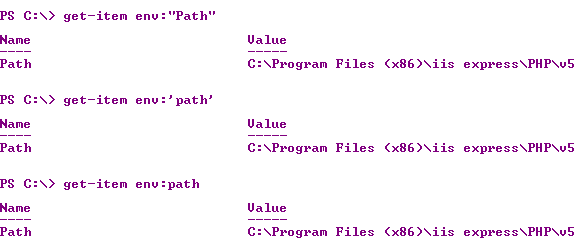
On this machine Windows 7 (x64) Ultimate, "Path", 'path', path all returned the 'PATH' variable.


If you want to know the version of your powershell, try this:


Have a look at this reference for PATH:
http://msdn.microsoft.com/en-us/library/aa922003.aspx
 

Sunday, February 9, 2014

On Installing Apache on Windows 7 64bit

The best way to install APACHE or the LAMP stack is to use the XAMPP cross-platform web server solution stack XAMPP. All you need to do is to downlaod, extract and start.

You can download XAMPP form here. You can install version 1.8.3 for Windows from the indicated link. XAMPP was howevver download from here:

http://download.cnet.com/XAMPP/3000-10248_4-10703782.html

The two latest versions are,

XAMPP is documented as a very easy program to install and run, but sometimes if your computer is running other programs like IIS, Skype, SQL Server Reporting Services, Oracle etc as it does on my computer you could get into a situation that makes it hard to install the XAMPP bundle.

The first mistake I made was to download XAMPP to a folder on my desktop. The recommended one is to use C:\XAMPP folder. As I installed on the desktop, the registration in my Windows Services,  the file for the service to run location here:
C:\Users\mysorian\Desktop\xampp\xampp\apache\bin\httpd.exe" -k runservice

Any number of install/uninstall operations did not change this path for the executable.


Later I installed XAMPP to C:\XAMPP but took 'apache/bin' contents to the path shown (above figure) in Apache2.4 Properties page.

The downloading and installing from CNET link was quite easy. Here are some screen shots. The next screen is dispalyed when you double click the XAMPP executable.


Click OK.


Click Next.

Click Next to indicate the location of the installation folder.


Click Next.


Click Next.


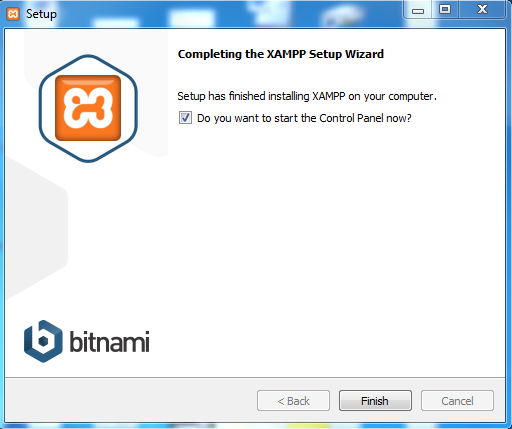
Click Finish

This completes the installation. Now you can double click xampp-control.exe in the installation directory that brings up the XAMPP Control Panel as shown. You can Start, stop and configure the packged programs Apache, MySql etc.


The problem that I encountered were the highlighted error messages reagrding Port 80 and Port 443. These ports are used by default by Internet Information Services and Skype. 

I managed to change the ports of Skype. Click here to see how it was done.
In spite of changing the SKYPE's Port 80 to something different and that of IIS binding to a different port, still the errors continued.


Since I could not succeed keeping 80 for APACHE, I decided to change APACHE to listen to a different port (8081) and reverted my IIS bound to its defult 80. I thought I could succeed and XAMPP control continued sending out error messages. 

I started apache service from Windows Services and the apache started without any problem after I made adjustment for bin/apache location as mentioned in the beginning.


------5:00:55 PM  [main] Initializing Control Panel
5:00:55 PM  [main] Windows Version: Windows 7 Ultimate SP1 64-bit
5:00:55 PM  [main] XAMPP Version: 1.8.3
5:00:55 PM  [main] Control Panel Version: 3.2.1  [ Compiled: May 7th 2013 ]
5:00:55 PM  [main] You are not running with administrator rights! This will work for
5:00:55 PM  [main] most application stuff but whenever you do something with services
5:00:55 PM  [main] there will be a security dialogue or things will break! So think
5:00:55 PM  [main] about running this application with administrator rights!
5:00:55 PM  [main] XAMPP Installation Directory: "c:\xampp\"
5:00:55 PM  [main] Checking for prerequisites
5:00:55 PM  [main] All prerequisites found
5:00:55 PM  [main] Initializing Modules
5:00:55 PM  [Apache] Apache Service detected with wrong path
5:00:55 PM  [Apache] Change XAMPP Apache and Control Panel settings or
5:00:55 PM  [Apache] Uninstall/disable the other service manually first
5:00:55 PM  [Apache] Found Path: "C:\Users\mysorian\Desktop\xampp\xampp\apache\bin\httpd.exe" -k runservice
5:00:55 PM  [Apache] Expected Path: "c:\xampp\apache\bin\httpd.exe" -k runservice
5:00:55 PM  [Apache] Problem detected!
5:00:55 PM  [Apache] Port 80 in use by "Unable to open process" with PID 4!
5:00:55 PM  [Apache] Apache WILL NOT start without the configured ports free!
5:00:55 PM  [Apache] You need to uninstall/disable/reconfigure the blocking application
5:00:55 PM  [Apache] or reconfigure Apache and the Control Panel to listen on a different port
5:00:55 PM  [Apache] Problem detected!
5:00:55 PM  [Apache] Port 443 in use by "C:\Program Files (x86)\Skype\Phone\Skype.exe" with PID 2624!
5:00:55 PM  [Apache] Apache WILL NOT start without the configured ports free!
5:00:55 PM  [Apache] You need to uninstall/disable/reconfigure the blocking application
5:00:55 PM  [Apache] or reconfigure Apache and the Control Panel to listen on a different port
5:00:55 PM  [Tomcat] Problem detected!
5:00:55 PM  [Tomcat] Port 8080 in use by "C:\oraclexe\app\oracle\product\11.2.0\server\BIN\tnslsnr.exe"!
5:00:55 PM  [Tomcat] Tomcat WILL NOT start without the configured ports free!
5:00:55 PM  [Tomcat] You need to uninstall/disable/reconfigure the blocking application
5:00:55 PM  [Tomcat] or reconfigure Tomcat and the Control Panel to listen on a different port

The XAMPP -Control contiues to show errors,


My guess is that this control has a problem. It is not related to the configuration of this controller.
But the XAMPP site working at http://127.0.0.1:8081
as shown.

Note: I also had MariaDB which was interfering with XAMPP's MySQL. I removed MariaDB which allowed me to run MySQL error free.

Summarize the important points:

1. Install XAMPP to C:\XAMPP folder
2. Do not try to change IIS bindings, but change the httpd.config file and choose Apache ports different from that of IIS and Skype.
3. Do the same for other contentions as well.



Wednesday, April 15, 2009

I installed MySQL, how do I know what version I have and how to start and stop it?

If you installed MySQL it is probably in the directory where it is installed. For example, I recently installed XMAPP which brings in a bundle of stuff like Apache, MySQL, PHP etc. In this case, it was installed in the Xampp directory in the C drive.

You have to see if you have an executable program called mysql.exe among many other executbles and confi files.

If you have mysql.exe you should try to connect to it as in the following
snippet:

C:\xampp\mysql\bin>mysql
Welcome to the MySQL monitor.  Commands end with ; or \g.
Your MySQL connection id is 36
Server version: 5.1.30-community MySQL Community Server (GPL)


Type 'help;' or '\h' for help. Type '\c' to clear the buffer.


Try the help and get everything you need

The control should now go over from C:\ to mysql>

The first thing to do is to verify the version you have on your computer.

For this, do this, do not forget the semi-colon:

mysql> Select version(),Current_Date;
+------------------+--------------+
| version()        | Current_Date |
+------------------+--------------+
| 5.1.30-community | 2009-04-13   |
+------------------+--------------+
1 row in set (0.05 sec)

I assume you have no start and stop shortcuts for the server. If you do have you can start and stop from the shortcuts or when you have a window with start and stop buttons for the server.