Thursday, August 9, 2018

What programming language do you want to learn?


Of course, you want the most popular and the most valuable.

According to the Institute of Electrical and Electronics Engineers (IEEE) , it is Python, the clear winner.

Here are the top ten in its rankings:


Why Python?

The answer appears to the fact that it iss now used for embedded applications and because it has beefed up its repertoire related to AI and Machine learning. It is for this reason R language (somewhat specialized) has seen some decline.

Microsoft C# is still standing there at 5 and probably its place will be solid 5 for all types of programming - Web, desktop and Mobile. SQL is also there but does not show up as top 10 which is understandable given its area of usage.

Well here is the first 20. Find if your favorite is here
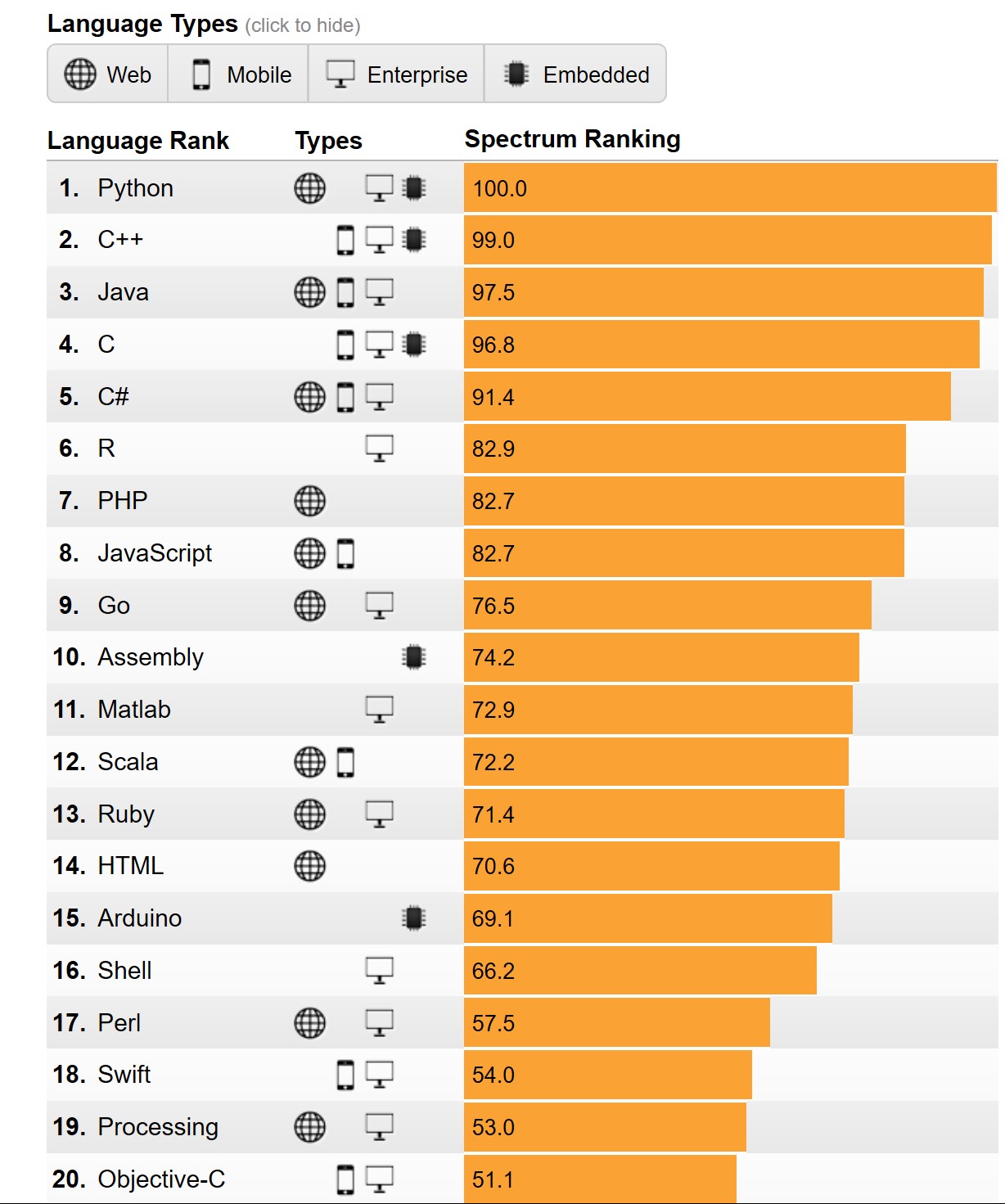


Well, you may want to know the basis for the ranking. You can get to know here.

You can find a lot of posts on R and Python on this site.


You can find a lot of Python and R posts in my blogs.

Wednesday, August 8, 2018

How do programming languages calculate PI approximations?


Two very well known approximations to PI are 22/7 (West) and 355/113 (Chinese).


As numbers how are they treated in Python, C#, SQL Server and the desktop 'Calculator' app?

It was fun looking into this. Here are how they work.

Python 3.6.4 |Anaconda, Inc.| (default, Jan 16 2018, 10:22:32) [MSC v.1900 64 bit (AMD64)] on win32
Type "help", "copyright", "credits" or "license" for more information.
>>> x=(355/113)
>>> x
3.1415929203539825
>>> y=(22/7)
>>> y
3.142857142857143
>>> x-y
-0.0012642225031602727
>>> y-x
0.0012642225031602727
>>>
----------------
Desktop Calculator

355/113=3.141592920353982
22/7=   3.142857142857143
PI=3.1415926535897932384626433832795
----------------

SQL Server 2017
Select cast((22.0000000000/7.0000000000) as numeric(30,25))
3.1428571428571428571428000

Select cast((355.0000000000/113.0000000000) as numeric(30,25))
3.1415929203539823008849550
-------------------------
C# Interactive in Visual Studio Community 2017
double y;
> y = 22 / 7;
> y
3
> y = 22.0000000000 / 7.0000000000;
> y
3.1428571428571428
> double x;
> x = 355 / 113;--delete this line
> x = 355.0000000000 / 113.0000000000;
> x
3.1415929203539825
>
I like the way Python spitted out the answer with lot less things to worry about.  Also, desktop calculator not to bad. What do you think?

Tuesday, August 7, 2018

How do you install SQL Server Managment Studio Version 17.8.1?

SQL Server Management Studio does not install when you install SQL Server 2017 (also in some previous versions). It is a separate install.

Kindly follow my previous post  to download the executable program for the installation.

Make sure you are not running SQL Server Management Studio (SSMS), if you are, close it.

Double clicking the execcuatable begins the installation as per the following screen shots. It may take a while (20 to 30 mts).


Close. Close SSMS and double click the executable to begin.


 Click Install.


It is done after a wait (20 to 30 minutes)


SSMS v17.8.1 and other components.


Thursday, August 2, 2018

How do I connect to SQLite database using Anaconda(Python)?

When I updated the Windows 10 OS to a new Build of OS, the installation spawned some warnings related to Anaconda. After taking care of the problem the installation completed. I believe the Anaconda I had was replaced by a new install.

The following programs appeared in my control panel:


AnacondaPython_2

This added Anaconda to All Programs as shown:


Anaconda3(x64).png

You can launch the Anaconda console and the console gets displayed:

AnacondaPrompt.png

At the prompt you launch Python as shown:

AnacondaPython.png

The version of Python is 3.6.4.

The Python 3.70b2 was removed from the computer.

Accessing SQLite (My persisted file on the computer) is easy using a cursor:

Type "help", "copyright", "credits" or "license" for more information.
>>> import sqlite3
>>> conn=sqlite3.connect("C:/Users/Owner/Desktop/Blog2017/MSSS2017/SQLite3_DBS/UsersOwnerApr25.sqlite")
>>> c=conn.cursor()
>>> for row in c.execute('Select * from friends'):
...    print(row)
...
('John', 'Chiavetta', 35)
>>>

How do you enable Machine Learning in SQL Server 2017?

The important question is whether Machine Learning (ML) is enabled or not.

You can find if ML is enabled or not by the following:


Launch SQL Server, the version for which you want to use and start a New Query. Run the following in the context of the server:


sp_configure 'external scripts enabled'

Depending on the response to this query, you can find whether Machine Learning is installed or not. If the run_value=0, ML is not enabled.

MachineLearning_0
However the following query gives more information.


MachineLearning_1
You need to install 'Advanced Analytics Extensions' to enable Machine Learning (Using R or Python)

Is this Build of Windows 10 Insider Preview really useful?

I do not believe it is working properly at all. There were no installation messages or errors.
It is bedeviled with too many apps that do not open.


The problems are so numerous, I will stop counting soon.

http://hodentek.blogspot.com/2018/07/installing-new-insider-preivew-of_30.html

http://hodentek.blogspot.com/2018/08/installing-new-insider-preview-of.html

http://hodentek.blogspot.com/2018/07/installing-new-insider-preivew-of.html