Showing posts with label Visual Studio community 2017. Show all posts

Sunday, August 19, 2018

How do you change the default language for installed templates in Visual Studio Community 2017?

You may find that after you launch the Visual Studio you may not see some of the templates that you were using previously. This is especially true after you install a new version or an upgrade. However you can correct this and is not a bug. I got the answer to this from Visual Studio Forum.

Here is how it started when it was launched after a version upgrade. I upgraded the version to Version 15.8.0.


Aug15_1580_0.png

Click Tools and click Import and Export Settings... shown.


Aug15_1580_1.png

The Import and Export Settings Wizard is displayed as shown.


Aug15_1580_2.png

I just took the default(first option on the above page) and clicked next>
Choose Settings to Export of the wizard is shown.


Aug15_1580_3.png

Click Next>

Name Your settings File page of wizard is displayed as shown.


Aug15_1580_4.png

I clicked Finish and my settings were saved.


Aug15_1580_5.png

When I launched Visual Studio nothing had changed. I still got the Visual Basic templates.

I went back to Import and Export to do a Reset All Settings as shown.


Aug15_1580_6.png

And then, I saved my settings in the next window.


Aug15_1580_7.png

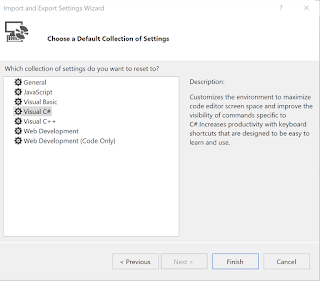
I chose Visual C# for Default Collection of Settings in the following window

Aug15_1580_8.png

I clicked Finish to complete the Reset as shown. I disregarded the error.


Aug15_1580_9.png

I closed the above window and lanuched Visual Studio and clicked the Fiel | New Project...
Now I could see the C# templates as shown.


Aug15_1580_10.png


Monday, August 13, 2018

Is the Visual Studio Community 2017 version 15.7.6 better than 15.7.5? - Part 2

This problem was reported to the FORUM and this was also put in triage.

The next step was to seek help. There was a chat help available and started a chat session with one of the help staff:

Here is the transcript:

Contact us

XXXXX
End chat
XXXXX
Thank you for contacting Microsoft Support. I am XXXXX. How can I help you today?
4:08 pm
XXXXX
Please be aware that if you switch apps or change focus to another window while working with us, you may get disconnected from your chat session. To ensure the best support experience, please stay active in this chat window.
4:08 pm
XXXXX
follow up with product team on that post
4:10 pm
XXXXX
you can do that
4:10 pm
Me
in 15.7.5 as well 15.7.6 the C# templates are in a different node in the New Project. However using the template lots of errors are spawned. I have reported to the forum in the last couple of days. All reported problems are in triage. What happens now?
4:10 pm
XXXXX
waiting for the product team to check whether it is a bug or not
4:11 pm
Me
How long this process takes?
4:11 pm
XXXXX
I am not sure about that. if there is no progress, you can raise new post to increase the visibility of the issue
4:12 pm
Me
In the absence of a reply from the forum, what is the best course of action? Surely, not waiting.
4:13 pm
Me
Hello.
4:14 pm
XXXXX
that is a free forum and here is the free chat
4:15 pm
XXXXX
and product team is already looking into it
4:15 pm
XXXXX
if you still want to chase it, then maybe paid techinical support is the next level
4:16 pm
I have replaced name of the Microsoft staff by XXXXX.

Looks like I will be just waiting for Microsoft to resolve this issue as I cannot afford paid technical help just to contribute to my blog (just to help Microsoft  improve its product).


Wednesday, August 8, 2018

How do programming languages calculate PI approximations?


Two very well known approximations to PI are 22/7 (West) and 355/113 (Chinese).


As numbers how are they treated in Python, C#, SQL Server and the desktop 'Calculator' app?

It was fun looking into this. Here are how they work.

Python 3.6.4 |Anaconda, Inc.| (default, Jan 16 2018, 10:22:32) [MSC v.1900 64 bit (AMD64)] on win32
Type "help", "copyright", "credits" or "license" for more information.
>>> x=(355/113)
>>> x
3.1415929203539825
>>> y=(22/7)
>>> y
3.142857142857143
>>> x-y
-0.0012642225031602727
>>> y-x
0.0012642225031602727
>>>
----------------
Desktop Calculator

355/113=3.141592920353982
22/7=   3.142857142857143
PI=3.1415926535897932384626433832795
----------------

SQL Server 2017
Select cast((22.0000000000/7.0000000000) as numeric(30,25))
3.1428571428571428571428000

Select cast((355.0000000000/113.0000000000) as numeric(30,25))
3.1415929203539823008849550
-------------------------
C# Interactive in Visual Studio Community 2017
double y;
> y = 22 / 7;
> y
3
> y = 22.0000000000 / 7.0000000000;
> y
3.1428571428571428
> double x;
> x = 355 / 113;--delete this line
> x = 355.0000000000 / 113.0000000000;
> x
3.1415929203539825
>
I like the way Python spitted out the answer with lot less things to worry about.  Also, desktop calculator not to bad. What do you think?

Tuesday, July 31, 2018

Why are the C# templates missing in Visual Studio Community 2017? - Part 2

Visual Studio's combo program Blend 2017 seems to have the C# templates missing in Visual Studio Community 2017, Version 15.7.5.

Here is a New Project window open in Blend 2017. There are C# Windows Universal Project templates.


It allows you create a new project, a UWP, C# Blank Project as shown but with errors.


For the above these (default) were chosen.


The design area of XAML displays System.Exception but the project builds alright.


It fails to deploy and this is the error message:

The package deployment operation is blocked by the "Allow deployment operations in special profiles" policy.
   at Microsoft.VisualStudio.DesignTools.UwpDesignerHost.UwpHostPlatform.<>c__DisplayClass31_0.b__0()
   at System.Threading.Tasks.Task.InnerInvoke()
   at System.Threading.Tasks.Task.Execute()
--- End of stack trace from previous location where exception was thrown ---
   at System.Runtime.CompilerServices.TaskAwaiter.ThrowForNonSuccess(Task task)
   at System.Runtime.CompilerServices.TaskAwaiter.HandleNonSuccessAndDebuggerNotification(Task task)
   at Microsoft.VisualStudio.DesignTools.DesignerHost.HostServices.HostPlatformBase.d__20.MoveNext()
--- End of stack trace from previous location where exception was thrown ---
   at System.Runtime.CompilerServices.TaskAwaiter.ThrowForNonSuccess(Task task)
   at System.Runtime.CompilerServices.TaskAwaiter.HandleNonSuccessAndDebuggerNotification(Task task)
   at Microsoft.VisualStudio.DesignTools.SurfaceDesigner.Documents.SurfaceIsolation.SurfaceProcessContext.d__82.MoveNext()
--- End of stack trace from previous location where exception was thrown ---
   at System.Runtime.CompilerServices.TaskAwaiter.ThrowForNonSuccess(Task task)
   at System.Runtime.CompilerServices.TaskAwaiter.HandleNonSuccessAndDebuggerNotification(Task task)
   at Microsoft.VisualStudio.DesignTools.SurfaceDesigner.Documents.SurfaceIsolation.SurfaceProcessContext.d__81.MoveNext()
--- End of stack trace from previous location where exception was thrown ---
   at Microsoft.VisualStudio.DesignTools.SurfaceDesigner.Documents.SurfaceIsolation.SurfaceProcessContext.d__81.MoveNext()
--- End of stack trace from previous location where exception was thrown ---
   at System.Runtime.CompilerServices.TaskAwaiter.ThrowForNonSuccess(Task task)
   at System.Runtime.CompilerServices.TaskAwaiter.HandleNonSuccessAndDebuggerNotification(Task task)
   at Microsoft.VisualStudio.DesignTools.XamlSurfaceDesigner.Views.IsolatedSurfaceImageHost.d__87.MoveNext()
--- End of stack trace from previous location where exception was thrown ---
   at Microsoft.VisualStudio.Telemetry.WindowsErrorReporting.WatsonReport.GetClrWatsonExceptionInfo(Exception exceptionObject)

System.AggregateException
One or more errors occur
------------------------------------
Deployment error, severity code are as shown.
Severity Code Description Project File Line Suppression State
Error DEP0800: The required framework "C:\Program Files (x86)\Microsoft SDKs\Windows Kits\10\ExtensionSDKs\Microsoft.NET.CoreRuntime\1.1\.\AppX\x64\Microsoft.NET.CoreRuntime.1.1.appx" failed to install. [0x80073D01] The package deployment operation is blocked by the "Allow deployment operations in special profiles" policy. ProjwithBlend
The files shown here do exist :
Microsoft.NET.CoreRuntime.1.1.appx


Saturday, July 21, 2018

What are class library projects in Visual Studio 2017?

In Visual Studio Community 2017 you come across a number of templates of type, class library as shown here only for C# and F#.


ClassLibraryCom2017_0

Well, is there a need for so many of them? Visual Studio 2017 is targeting many more platforms and it is nice to have templates for each of them. Actually templates are the best starting points for any development.

The project folder and the code for the Class Library .NET Core is shown here. It can be used for projects for several platforms where .NET core is supported. Review the dependencies.


The project folder and the code for the Class Library .NET Standard is shown here. The dependency is on .NET Standard Library.


The project folder and the code for the Class Library .NET Framework is shown here. You create .dll with this template.


With the development of projects for the Universal Windows Platform, a class library project that targets UWP is also available in Visual Studio Community 2017 (free).

However there is one detail that needs to be taken into consideration as to which version of Windows platform should be used.

In this present case the following version is chosen.


The template folder and code for the Class Library for creating applications for UWP is as shown. Note the reference to the Microsoft.NETCore.UniversalWindowsPlatform


In addition to the above there are many more template types summarized here for other specific platforms:

Class Library (Android) Creates Xamarin.Android class library

Bindings Library(Android) Xamarin.Android class library that binds to Java jar.

Class Library (watchOS) Xamarin.WatchOS library 

Class Library (tvOS)  Unified library project for tvOS

Class Library (iOS) creates a Xamarin.iOS library project for iOS

Class Library(U-SQL Application) is of type Azure Data Lake, a project for creating class library(.dll) that can run on U-SQL.

Class Library(Legacy Portable) is discontinued. It is suggested to use Class Library .NET Standard.


Friday, July 20, 2018

What is the difference between a C# Console application that uses .NET core and the other using .NET Framework?

Both of them create programs that can be run from command line.

While you can create both types using templates available in Visual Studio Community 2017 shown, there are many differences.


ConsoleCore-Frame_0

One major difference is that .NET Core application can be used for creating cross-platform (Windows, Linux and macOS) applications while .NET Framework is for those dependent on .NET Framework libraries, or those that do not have similar functionality in .NET Core.

Also there may be platforms that do not support .NET Core in which case you have to use .NET Framework.

Here is the template for a console application that uses .NET Core (both program folder and code)


ConsoleCore-Frame_1

The Microsoft.NETCore.App is a huge library

Here is the code for the console application that uses .NET Framework.

ConsoleCore-Frame_2

Friday, July 13, 2018

How come my Microsoft Lumia 950 not recognized by the File Explorer?

It has been quite strange the way Windows 10 works.

Few days ago Windows 10 was updated to Insider Preview Build 17692.rs_prerelease-flt.180625-1624 and now I cannot see my Microsoft Lumia 950 connected to the USB (there are three on this laptop) in the file explorer.

It is strange that I can connect to Flash Drives and WD's My Passport 1 TB drive connected to the USB drives.

Even stranger is, the fact that I can deploy UWP (Universal Windows Platform) projects from Visual Studio Community 2017 to the Microsoft Lumia 950 connected to the USB Drive.

I have done a hardware troubleshooting and restarted the laptop.

Still no good.

If I find a fix I will psot here for those who may hit the same wall.

Tuesday, July 3, 2018

How does namespace declaration helps name resolution?

Identifiers in C++ not being named uniquely leads to problems of name resoultion, inability for the program when ambiguity exists.

This is best seen here:

Namespce_1

Where the header files Test_1.h and Test_2.h are shown:


Namespce_3
 

Namespce_4

and the Namespce.cpp file is this:


Namespce_2

As you can see Test_1.h and Test_2.h have the same name defined, namely Test(int x, int y).

Given this situation, the main() program which is tasked to write to the console Test(5,6) is not able to process.

It throws up with a build error as shown.


Namespce_0

Let us now modify the Test_1.h slightly adding the namespace declaration a shown:


Namespce_5


Now we build and run the program and the following is written to the console.

Namespce_6

This means the program now used Test_2.h to write the above to the screen.

In this case how are we going to use the Test_1.h?

You can do this by using the namespace you declared. Intellisense assists you in doing it as shown. You need to use the scope resolution operator (::).

Namespce_7

Now you build and run, you get the following written to console:


Namespce_8

The example was run on Visual Studio Community 2017, 15.5.7

Sunday, July 1, 2018

How do you access class templates in Visual Studio Community 2017 Version 15.5.7?


Things move around; get renamed a lot, in Microsoft Products that includes Visual Studio. Here is a reference to the Visual Studio C++ team blog .

The blog traces changes from version 15.2 to 15.3.

I thought I would take a look at the C++ Class prject templates. I launched the VS Community 2017, version 15.5.7 and looked at what all I have in terms of C++ templates. This is what I find.


_DesktopCplusplusProgramsInst_3.png

Based on the team blog above,

Win32 Category has been renamed -----------> Windows Desktop
Win32 Console Application has been renamed-->Windows Console Application
Win32 Project templates has been renamed Windows Desktop Application


If you like to see the templates, try a Windows Desktop Application in the previous screen.

_DesktopCplusplusProgramsInst_4.png

Now double click Windows Desktop Wizard.
The Windows Desktop Project dialogue is displayed as shown.


_DesktopCplusplusProgramsInst_5.png

In Version 15.3, it is almost the same, except for one item. The 15.3 Windows Desktop Project from the team blog is shown here from the previously quoted reference.

_DesktopCplusplusProgramsInst_6.png

In the 15.5.7 version the following Applications types can be chosen.

_DesktopCplusplusProgramsInst_7.png

What is not happening is the alternate way to access class wizard.

The team blog says that Add Class Wizard accessible from right click context menu in Solution Explorer is a notable example and goes on to show this screen (in 15.3).

_DesktopCplusplusProgramsInst_8.png

Perhaps it does in version 15.3 but not in version 15.5.7. This is what you see in version 15.5.7.

_DesktopCplusplusProgramsInst_9.png

If you go ahead and choose to add a new item. This is what you will be adding.

_DesktopCplusplusProgramsInst_10.png
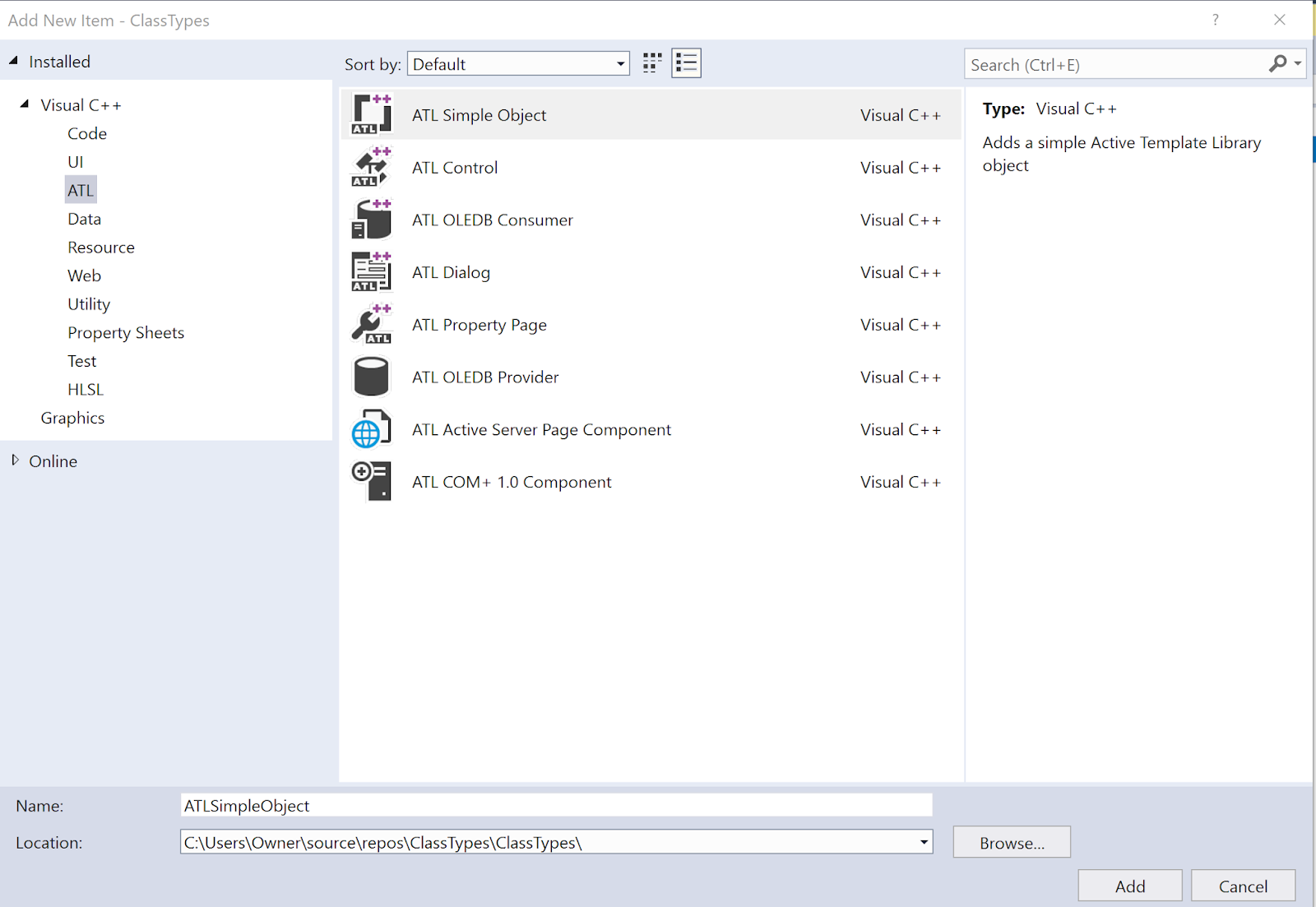
If you now choose ATL you will be seeing the following templates.

DesktopCplusplusProgramsInst_11.png

In the older version you had MFC which is missing in the present. However when you create a new project in C++ you will be seeing the MFC template.


DesktopCplusplusProgramsInst_12.png


You can wake up the Class Wizard while adding to the Source as shown here:


_DesktopCplusplusProgramsInst_13.png

The screen that shows up is not easy to use as there is no help attached to it.

_DesktopCplusplusProgramsInst_14.png

Although the team asserts they are trying to make it easy, it looks like it is not working.

Of course there is another thing that you need to be concerned about. You have to know what programs and workflows you have chosen to work with. This is what I have chosen so see all of the above.


DesktopCplusplusProgramsInst.png

Friday, June 29, 2018

How do you compile and run multiple files in a C++ project?

Projects can be simple, or complex and can run into many lines. You can write your code in multiple files, compile them together and run. You basically have a main program file that will call the other files. However, you need to indicate in the main file that you will be utilizing the other files.

Let us say, you want to calculate the area of a rectangle and the volume of rectangular solid and display them in the console. You can have a code file each, for calculating area and volume. You can display the calculated values in the main program.

This is carried out using Visual Studio Community (free) 2017.

Here is the project file

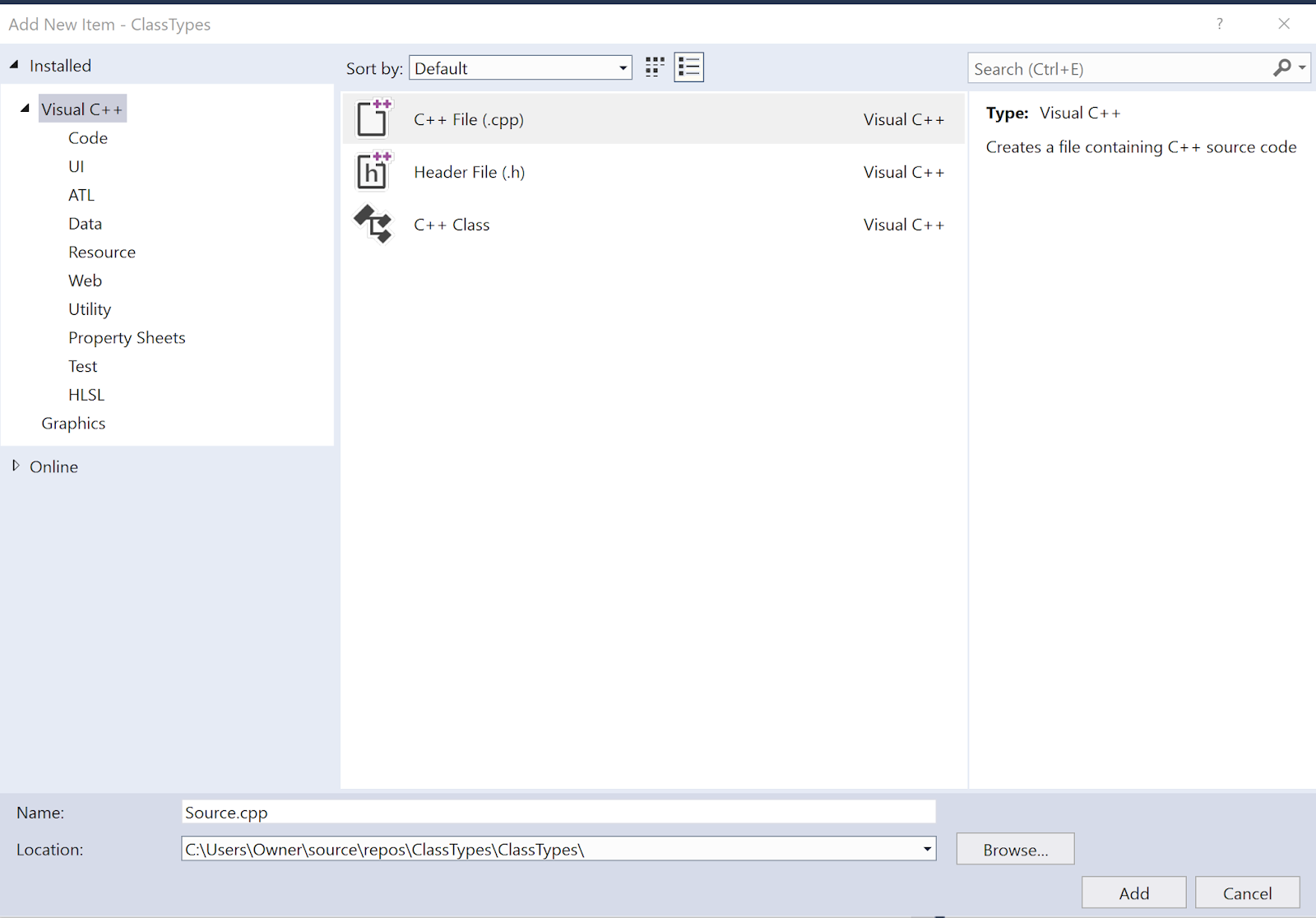
Here is how add a New CPP file.


A new file area.cpp was added and coded as shown.

Another new file vol.cpp was added as shown.


The AreaVolume project file AreaVolume.cpp is as shown. It calculates the area of a rectangle 5x5 and the volume of the solid with sides 4,5 and 6.

The two following two lines in AreaVoume.cpp reference the area.cpp and vol.cpp files:

int area(int x, int y);
int vol(int x, int y, int z);

If you compile and run this program you should see this in the display:


Note that the following is included in all the files: