Showing posts with label Windows PowerShell. Show all posts

Friday, May 17, 2024

How do you launch Python assuming it is installed?

Python from python.org and many other software programs installs python and they may choose to install in different folders or locations. Finding where it is installed is important. If you need to run python on a command prompt, the python executable should be in the environment's path. You may note that you may have multiple versions of Python installed on your computer for varying requirements. You should know what version is installed and where.

In this post you will get to know ways and means to find the python executable on your computer.

1. This is the easiest. You try to check for Python using your command prompt as shown. If you get the following reply:

This only means the python.exe is not in the path C:\

============================================

C:\>python -c Print 'Hello'

Python was not found; run without arguments to install from the Microsoft Store, or disable this shortcut from Settings > Manage App Execution Aliases.

============================================

If you find a python in the directory, it may be a short cut, if a file existed.

If I run without arguments as shown above, I am taken to the Windows Store to download Python 3.12 as shown.


I already have Python 3.12 installed when I installed PyCharm. 

You can check if the executable python is in the environment's path as shown:

========================

C:\Users\hoden>path

PATH=C:\WINDOWS\system32;C:\WINDOWS;C:\WINDOWS\System32\Wbem;C:\WINDOWS\System32\WindowsPowerShell\v1.0\;C:\WINDOWS\System32\OpenSSH\;C:\Users\hoden\AppData\Local\Programs\Python\Launcher\;C:\Users\hoden\AppData\Local\Microsoft\WindowsApps;;C:\Program Files\JetBrains\PyCharm Community Edition 2023.3.3\bin;

========================

The executable is in the JetBrains directory that was installed for PyCharm as shown.

2. There is another way to find where python is installed.


Run the following command at command prompt:

======================================

C:\>where python

C:\Users\hoden\AppData\Local\Microsoft\WindowsApps\python

C:\Users\hoden\AppData\Local\Microsoft\WindowsApps\python.exe

========================================

In this folder,

C:\Users\hoden\AppData\Local\Microsoft\WindowsApps

You find two other python executables as well, python and python3. These are in the environment's PATH as well.

Here is the properties pages of one of them,


As you can see this is an empty file. There are several reasons why this file exists here. It is more like a placeholder or a shortcut for a non existent file and sometimes open a link in the web browser for a download location (Windows Store) as we saw earlier.

3. This yet another way. Windows Powershell is a powerful program that can also be used.There are two ways of starting Powershell, as a command line program or an interactive way.

You could also use Windows Powershell as shown:

===============================

PS C:\Users\hoden> Get-Command python


CommandType     Name                                               Version    Source                                                             

-----------     ----                                               -------    ------                                                             

Application     python.exe                                         0.0.0.0    C:\Users\hoden\AppData\Local\Microsoft\WindowsApps\python.exe  

===================================================

This is similar what we saw earlier. It showed the same file we saw earlier.

3. The following is not run in PowerShell but on the C:\ prompt.

However, if you have multiple versions of python installed you can try this:

==========================================

C:\Windows\System32>py -0

 -V:3.12 *        Python 3.12 (64-bit)

===========================================

This does not show the path but flags the version. if you want both path and version try this:

================================

C:\Users\hoden>py --list-paths

 -V:3.12 *        C:\Users\hoden\AppData\Local\Programs\Python\Python312\python.exe

================================

You can check this here:

=============

 Directory of C:\Users\hoden\AppData\Local\Programs\Python\Python312


05/05/2024  05:33 PM    <DIR>          .

05/05/2024  05:32 PM    <DIR>          ..

05/05/2024  05:32 PM    <DIR>          DLLs

05/05/2024  05:32 PM    <DIR>          Doc

05/05/2024  05:32 PM    <DIR>          include

05/05/2024  05:32 PM    <DIR>          Lib

05/05/2024  05:32 PM    <DIR>          libs

10/02/2023  01:27 PM            36,874 LICENSE.txt

10/02/2023  01:28 PM         1,664,545 NEWS.txt

10/02/2023  01:27 PM           103,192 python.exe

10/02/2023  01:27 PM            68,376 python3.dll

10/02/2023  01:27 PM         6,972,184 python312.dll

10/02/2023  01:27 PM           101,656 pythonw.exe

05/05/2024  05:33 PM    <DIR>          Scripts

05/05/2024  05:32 PM    <DIR>          tcl

10/02/2023  01:27 PM           109,392 vcruntime140.dll

10/02/2023  01:27 PM            49,520 vcruntime140_1.dll

               8 File(s)      9,105,739 bytes

               9 Dir(s)  102,834,245,632 bytes free

===================================================================

There is also a executable pythonw.exe in the above folder. It will give no response should you click on it. It is supposed to work with a python GUI. If you need to use this you will have to use the other system files in the System.IO.

Finally, when we installed PyCharm from the JetBrains site, we created this directory. We also chose to include this in the PATH as shown.

C:\Program Files\JetBrains\PyCharm Community Edition 2023.3.3\bin;

What do we have in this directory?
The BIN folder has two Applications pycharm64 and jetbrains_client64. The jetbrains_client64.exe connects you to an external server if there is one installed. It is a thin client.

However, clicking python64.exe in the installation folder opens up the GUI of PyCharm as shown.


We will be using this for exploring the image recognition programs. Also, JetBrains created a shortcut for this executable on the desktop.


Thursday, July 29, 2021

Is it possible to convert from .json format to .xlsx format?

 The easiest way to do this is to use Windows Powershell as described here. It is enough if you convert .json to .csv. File format .cssv can be opened with EXCEL and saved.

This is the .json file:

============

{

   "Name": "James Bond",

   "Age": "35",

   "Profession": "Professional Killer",

   "Location": "London, UK"

}

===================

This file, JamesBond.json  is saved on my desktop.

Let us say that is the code you need to convert to from .json to .csv format

Create the above text in Notepad and save it with the extension .json (default is .txt for Notepad)


Open the Windows PowerShell ISE


Type in the following code (try to see what else you can convert from and convert to in the above images):

Get-Content C:\Users\TestUser\Desktop\JamesBond.json | ConvertFrom-Json|ConvertTo-Csv

Run the code in the Windows PowerShell ISE

You will see this result:

==========================

"Name","Age","Profession","Location"

"James Bond","35","Professional Killer","London, UK"

---------------------------------

You get the answer as shown. 

This is in CSV format and this can be opened with EXCEL.


This can be saved as .xlsx or various other formats.


Friday, October 26, 2018

How do you use cmdlet Add-Content in Windows PowerShell?

You can do a lot of  things with Add-Content.

These are all the parameters you can use with Add-Content.

Add-Content
   [-Value]
   [-PassThru]
   [-Path]
   [-Filter ]
   [-Include ]
   [-Exclude ]
   [-Force]
   [-Credential ]
   [-WhatIf]
   [-Confirm]
   [-UseTransaction]
   [-NoNewline]
   [-Encoding ]
   [-Stream ]
   []


The following example demonstrates on of them using the -Path parameter.

Now create two (or more) empty files in an allowed folder:
I created two text files (empty) and saved them to a folder:

C:\Users\Jayaram\Documents\Jay_1.txt
C:\Users\Jayaram\Documents\Jay_2.txt


Now using Add-Content, I will add current date to the end of these files. These being empty, the dates will added to the top of the files.

Now launch the Windows PowerShell ISE and run this code:


Now go check the files and you should see the dates added.


Sunday, October 21, 2018

Can you modify the Windows PowerShell ISE User Interface?

The short answer is 'Yes'.

Windows PowerShell ISE has a Scripting Object Mdel which is hierarchical. The root object is: $psISE object which is an instance of Microsoft.PowerSehll.Host.ISE.ObjectModelRoot class.

Under the 'root' there are many other objects such as; CurrentFile, CurrentPowerShellTab etc.


Here are some $psISE properties:


ISE_0


ISE_1


ISE_2


ISE_3

From the 'root. object I can create a new tab in the Windows PowerShell ISE with a name to display it as shown.

You can create a new tab 'Test' using this code. A new tab 'Test' is added to the UI as shown.:


ISE_04

Tuesday, July 3, 2018

Are there Visual Studio Extensions to work with PowerShell?

I see there is at least one extension, PowerShell Pro Tools that you can download.

You can find it in the Visual Studio Community 2017.


 You can get the installer to modify the Visual Studio IDE


You need to relaunch Visual Studio to see the next screen.  Just for trying it out you can give an email and get a temp license.


This is from GitHub site listing all that you can do with this.


This is the site info for this tool


Monday, January 22, 2018

How do you restore a database from its backup using Microsoft SQL Operations Studio?

It is quite easy. In fact you can restore Northwind database from the CodePlex site to SQL Server 2017 Developers edition.

Watch this video on YouTube:
https://www.youtube.com/edit?o=U&video_id=-KOXjlRACSU

Read this post of how you may do this using SQL Server Management Studio:
http://hodentekhelp.blogspot.com/2017/07/how-do-you-restore-database-from-its.html


If you are interested in installing SQL Server 2017 Developer Edition on Windows 10 Pro.
Read this post:
https://hodentekmsss.blogspot.com/2017/12/installing-sql-server-2017-developer-on.html

Restore using Windows PowerShell:
https://hodentekmsss.blogspot.com/2016/03/easy-way-to-backup-sql-server-database.html

Monday, December 21, 2015

Windows Mail app does nothing when clicked, how do you fix it?

Windows 10 Mail App stops responding and probably Calendar and People apps as well. When you click on the app nothing happens. You go to settings to see if you can uninstall. You will find there is no uninstall for this. It is part of the operating system and you cannot uninstall it.

This happened on my Windows 10 Pro on my Toshiba Satellite S70 series as well as Toshiba's Windows tablet running Windows 10.

What now?

You can run the following (System File Checker) on the command-line with elevated permissions. It will try to verify and fix problems with files (http://hodentekhelp.blogspot.com/2015/05/how-to-run-system-file-checkersfc.html).

However, this did not solve the problem on both the devices.

Next following this thread I launched Windows PowerShell with elevated permissions and ran the following statement:

Get-appxprovisionedpackage –online | where-object {$_.packagename –like "*windowscommunicationsapps*"}
| remove-appxprovisionedpackage –online

Here is the screen shot of this run:

MailAppProblem

This fixed the problem on my laptop, but the Tablet is still having the same problem- non-responsive mail app.

Just before I ran the PowerShell application I had noticed that there was a new Windows Update and the Windows 10 build was 10586.

My tablet still had the build 10240 which I am upgrading to 10586. Let me see if this fixes the problem. Since these are Windows 10 programs, Microsoft should make sure they work all the time as most users may not even know what powershell is not to speak of elevated permissions, sfc etc.

Tuesday, July 14, 2015

How many powershell modules should I have on my computer?


It depends on what version of Windows you have on your computer (the version of Powershell).

On my windows 8.1 computer, I can get the version of powershell by running this code in powershell:
--------------
PS C:\Users\Jayaram> Get-host


Name             : Windows PowerShell ISE Host
Version          : 4.0
InstanceId       : 88471f59-d3a1-4cfe-8293-717336f8bdde
UI               : System.Management.Automation.Internal.Host.InternalHostUserInterface
CurrentCulture   : en-US
CurrentUICulture : en-US
PrivateData      : Microsoft.PowerShell.Host.ISE.ISEOptions
IsRunspacePushed : False
Runspace         : System.Management.Automation.Runspaces.LocalRunspace
-------------------
The number of modules and their listing can be obtained by the following:
-------------------------
PS C:\Users\Jayaram> Get-module -ListAvailable


    Directory: C:\Windows\system32\WindowsPowerShell\v1.0\Modules


ModuleType Version    Name                                ExportedCommands                                                                    
---------- -------    ----                                ----------------                                                                    
Manifest   1.0.0.0    ActiveDirectory                     {Add-ADCentralAccessPolicyMember, Add-ADComputerServiceAccount, Add-ADDomainContro...
Manifest   1.0.0.0    AppBackgroundTask                   {Disable-AppBackgroundTaskDiagnosticLog, Enable-AppBackgroundTaskDiagnosticLog, Se...
Manifest   2.0.0.0    AppLocker                           {Get-AppLockerFileInformation, Get-AppLockerPolicy, New-AppLockerPolicy, Set-AppLo...
Manifest   2.0.0.0    Appx                                {Add-AppxPackage, Get-AppxPackage, Get-AppxPackageManifest, Remove-AppxPackage...}  
Script     1.0.0.0    AssignedAccess                      {Clear-AssignedAccess, Get-AssignedAccess, Set-AssignedAccess}                      
Manifest   1.0        BestPractices                       {Get-BpaModel, Get-BpaResult, Invoke-BpaModel, Set-BpaResult}                       
Manifest   1.0.0.0    BitLocker                           {Unlock-BitLocker, Suspend-BitLocker, Resume-BitLocker, Remove-BitLockerKeyProtect...
Manifest   1.0.0.0    BitsTransfer                        {Add-BitsFile, Complete-BitsTransfer, Get-BitsTransfer, Remove-BitsTransfer...}     
Manifest   1.0.0.0    BranchCache                         {Add-BCDataCacheExtension, Clear-BCCache, Disable-BC, Disable-BCDowngrading...}     
Manifest   1.0.0.0    CimCmdlets                          {Get-CimAssociatedInstance, Get-CimClass, Get-CimInstance, Get-CimSession...}       
Binary     2.0.0.0    ClusterAwareUpdating                {Get-CauPlugin, Register-CauPlugin, Unregister-CauPlugin, Invoke-CauScan...}        
Manifest   1.0        Defender                            {Get-MpPreference, Set-MpPreference, Add-MpPreference, Remove-MpPreference...}      
Manifest   1.0        DFSN                                {Get-DfsnRoot, Remove-DfsnRoot, Set-DfsnRoot, New-DfsnRoot...}                      
Binary     1.0        DFSR                                {New-DfsReplicationGroup, Get-DfsReplicationGroup, Set-DfsReplicationGroup, Remove...
Manifest   2.0.0.0    DhcpServer                          {Add-DhcpServerInDC, Add-DhcpServerv4Class, Add-DhcpServerv4ExclusionRange, Add-Dh...
Manifest   1.0.0.0    DirectAccessClientComponents        {Disable-DAManualEntryPointSelection, Enable-DAManualEntryPointSelection, Get-DACl...
Script     3.0        Dism                                {Add-AppxProvisionedPackage, Add-WindowsDriver, Add-WindowsImage, Add-WindowsPacka...
Manifest   1.0.0.0    DnsClient                           {Resolve-DnsName, Clear-DnsClientCache, Get-DnsClient, Get-DnsClientCache...}       
Manifest   2.0.0.0    DnsServer                           {Add-DnsServerConditionalForwarderZone, Add-DnsServerDirectoryPartition, Add-DnsSe...
Manifest   2.0.0.0    FailoverClusters                    {Add-ClusterCheckpoint, Add-ClusterDisk, Add-ClusterFileServerRole, Add-ClusterGen...
Manifest   1.0.0.0    GroupPolicy                         {Backup-GPO, Block-GPInheritance, Copy-GPO, Get-GPInheritance...}                   
Binary     1.1        Hyper-V                             {Add-VMDvdDrive, Add-VMFibreChannelHba, Add-VMHardDiskDrive, Add-VMMigrationNetwor...
Manifest   2.0.0.0    International                       {Get-WinDefaultInputMethodOverride, Set-WinDefaultInputMethodOverride, Get-WinHome...
Manifest   2.0.0.0    IpamServer                          {Get-IpamDhcpConfigurationEvent, Remove-IpamDhcpConfigurationEvent, Get-IpamConfig...
Manifest   1.0.0.0    iSCSI                               {Get-IscsiTargetPortal, New-IscsiTargetPortal, Remove-IscsiTargetPortal, Update-Is...
Manifest   2.0.0.0    IscsiTarget                         {Add-ClusteriSCSITargetServerRole, Add-IscsiVirtualDiskTargetMapping, Checkpoint-I...
Script     1.0.0.0    ISE                                 {New-IseSnippet, Import-IseSnippet, Get-IseSnippet}                                 
Manifest   1.0.0.0    Kds                                 {Add-KdsRootKey, Get-KdsRootKey, Test-KdsRootKey, Set-KdsConfiguration...}          
Manifest   3.0.0.0    Microsoft.PowerShell.Diagnostics    {Get-WinEvent, Get-Counter, Import-Counter, Export-Counter...}                      
Manifest   3.0.0.0    Microsoft.PowerShell.Host           {Start-Transcript, Stop-Transcript}                                                 
Manifest   3.1.0.0    Microsoft.PowerShell.Management     {Add-Content, Clear-Content, Clear-ItemProperty, Join-Path...}                      
Manifest   3.0.0.0    Microsoft.PowerShell.Security       {Get-Acl, Set-Acl, Get-PfxCertificate, Get-Credential...}                           
Manifest   3.1.0.0    Microsoft.PowerShell.Utility        {Format-List, Format-Custom, Format-Table, Format-Wide...}                          
Manifest   3.0.0.0    Microsoft.WSMan.Management          {Disable-WSManCredSSP, Enable-WSManCredSSP, Get-WSManCredSSP, Set-WSManQuickConfig...
Manifest   1.0        MMAgent                             {Disable-MMAgent, Enable-MMAgent, Set-MMAgent, Get-MMAgent...}                      
Manifest   1.0.0.0    MsDtc                               {New-DtcDiagnosticTransaction, Complete-DtcDiagnosticTransaction, Join-DtcDiagnost...
Manifest   2.0.0.0    NetAdapter                          {Disable-NetAdapter, Disable-NetAdapterBinding, Disable-NetAdapterChecksumOffload,...
Manifest   1.0.0.0    NetConnection                       {Get-NetConnectionProfile, Set-NetConnectionProfile}                                
Manifest   1.0.0.0    NetEventPacketCapture               {New-NetEventSession, Remove-NetEventSession, Get-NetEventSession, Set-NetEventSes...
Manifest   2.0.0.0    NetLbfo                             {Add-NetLbfoTeamMember, Add-NetLbfoTeamNic, Get-NetLbfoTeam, Get-NetLbfoTeamMember...
Manifest   1.0.0.0    NetNat                              {Get-NetNat, Get-NetNatExternalAddress, Get-NetNatStaticMapping, Get-NetNatSession...
Manifest   2.0.0.0    NetQos                              {Get-NetQosPolicy, Set-NetQosPolicy, Remove-NetQosPolicy, New-NetQosPolicy}         
Manifest   2.0.0.0    NetSecurity                         {Get-DAPolicyChange, New-NetIPsecAuthProposal, New-NetIPsecMainModeCryptoProposal,...
Manifest   1.0.0.0    NetSwitchTeam                       {New-NetSwitchTeam, Remove-NetSwitchTeam, Get-NetSwitchTeam, Rename-NetSwitchTeam...}
Manifest   1.0.0.0    NetTCPIP                            {Get-NetIPAddress, Get-NetIPInterface, Get-NetIPv4Protocol, Get-NetIPv6Protocol...} 
Manifest   1.0.0.0    NetWNV                              {Get-NetVirtualizationProviderAddress, Get-NetVirtualizationGlobal, Get-NetVirtual...
Manifest   1.0.0.0    NetworkConnectivityStatus           {Get-DAConnectionStatus, Get-NCSIPolicyConfiguration, Reset-NCSIPolicyConfiguratio...
Manifest   2.0.0.0    NetworkLoadBalancingClusters        {Add-NlbClusterNode, Add-NlbClusterNodeDip, Add-NlbClusterPortRule, Add-NlbCluster...
Manifest   1.0.0.0    NetworkTransition                   {Add-NetIPHttpsCertBinding, Disable-NetDnsTransitionConfiguration, Disable-NetIPHt...
Manifest   1.0        NFS                                 {Get-NfsMappedIdentity, Get-NfsNetgroup, Install-NfsMappingStore, New-NfsMappedIde...
Manifest   1.0.0.0    PcsvDevice                          {Get-PcsvDevice, Start-PcsvDevice, Stop-PcsvDevice, Restart-PcsvDevice...}          
Manifest   1.0.0.0    PKI                                 {Add-CertificateEnrollmentPolicyServer, Export-Certificate, Export-PfxCertificate,...
Manifest   1.1        PrintManagement                     {Add-Printer, Add-PrinterDriver, Add-PrinterPort, Get-PrintConfiguration...}        
Binary     1.0        PSDesiredStateConfiguration         {Set-DscLocalConfigurationManager, Start-DscConfiguration, Configuration, Get-DscC...
Script     1.0.0.0    PSDiagnostics                       {Disable-PSTrace, Disable-PSWSManCombinedTrace, Disable-WSManTrace, Enable-PSTrace...
Binary     1.1.0.0    PSScheduledJob                      {New-JobTrigger, Add-JobTrigger, Remove-JobTrigger, Get-JobTrigger...}              
Manifest   2.0.0.0    PSWorkflow                          {New-PSWorkflowExecutionOption, New-PSWorkflowSession, nwsn}                        
Manifest   1.0.0.0    PSWorkflowUtility                   Invoke-AsWorkflow                                                                   
Manifest   2.0.0.0    RemoteAccess                        {Add-DAAppServer, Add-DAClient, Add-DAClientDnsConfiguration, Add-DAEntryPoint...}  
Manifest   2.0.0.0    RemoteDesktop                       {Get-RDCertificate, Set-RDCertificate, New-RDCertificate, New-RDVirtualDesktopDepl...
Manifest   1.0.0.0    ScheduledTasks                      {Get-ScheduledTask, Set-ScheduledTask, Register-ScheduledTask, Unregister-Schedule...
Manifest   2.0.0.0    SecureBoot                          {Confirm-SecureBootUEFI, Set-SecureBootUEFI, Get-SecureBootUEFI, Format-SecureBoot...
Script     2.0.0.0    ServerManager                       {Get-WindowsFeature, Install-WindowsFeature, Uninstall-WindowsFeature, Enable-Serv...
Cim        1.0.0.0    ServerManagerTasks                  {Get-SMCounterSample, Get-SMPerformanceCollector, Start-SMPerformanceCollector, St...
Manifest   2.0.0.0    SmbShare                            {Get-SmbShare, Remove-SmbShare, Set-SmbShare, Block-SmbShareAccess...}              
Manifest   2.0.0.0    SmbWitness                          {Get-SmbWitnessClient, Move-SmbWitnessClient, gsmbw, msmbw...}                      
Manifest   1.0.0.0    StartScreen                         {Export-StartLayout, Import-StartLayout, Get-StartApps}                             
Manifest   2.0.0.0    Storage                             {Add-InitiatorIdToMaskingSet, Add-PartitionAccessPath, Add-PhysicalDisk, Add-Targe...
Manifest   2.0.0.0    TLS                                 {New-TlsSessionTicketKey, Enable-TlsSessionTicketKey, Disable-TlsSessionTicketKey,...
Manifest   1.0.0.0    TroubleshootingPack                 {Get-TroubleshootingPack, Invoke-TroubleshootingPack}                               
Manifest   2.0.0.0    TrustedPlatformModule               {Get-Tpm, Initialize-Tpm, Clear-Tpm, Unblock-Tpm...}                                
Manifest   2.0.0.0    UpdateServices                      {Add-WsusComputer, Approve-WsusUpdate, Deny-WsusUpdate, Get-WsusClassification...}  
Manifest   2.0.0.0    VpnClient                           {Add-VpnConnection, Set-VpnConnection, Remove-VpnConnection, Get-VpnConnection...}  
Manifest   1.0.0.0    Wdac                                {Get-OdbcDriver, Set-OdbcDriver, Get-OdbcDsn, Add-OdbcDsn...}                       
Manifest   1.0.0.0    WebAdministration                   {Start-WebCommitDelay, Stop-WebCommitDelay, Get-WebConfigurationLock, Remove-WebCo...
Manifest   1.0.0.0    WindowsDeveloperLicense             {Get-WindowsDeveloperLicense, Show-WindowsDeveloperLicenseRegistration, Unregister...
Script     1.0        WindowsErrorReporting               {Enable-WindowsErrorReporting, Disable-WindowsErrorReporting, Get-WindowsErrorRepo...
Manifest   1.0.0.0    WindowsSearch                       {Get-WindowsSearchSetting, Set-WindowsSearchSetting}                                


    Directory: C:\Program Files (x86)\Microsoft SQL Server\110\Tools\PowerShell\Modules


ModuleType Version    Name                                ExportedCommands                                                                    
---------- -------    ----                                ----------------                                                                    
Manifest   1.0        SQLASCMDLETS                        {Add-RoleMember, Backup-ASDatabase, Invoke-ASCmd, Invoke-ProcessCube...}            
Manifest   1.0        SQLPS                               {Backup-SqlDatabase, Add-SqlAvailabilityDatabase, Disable-SqlAlwaysOn, Enable-SqlA...


    Directory: C:\Program Files (x86)\Microsoft SDKs\Azure\PowerShell\ServiceManagement


ModuleType Version    Name                                ExportedCommands                                                                    
---------- -------    ----                                ----------------                                                                    
Manifest   0.8.10.1   Azure                               {Disable-AzureServiceProjectRemoteDesktop, Enable-AzureMemcacheRole, Enable-AzureS...


    Directory: C:\Program Files (x86)\Microsoft SQL Server\130\Tools\PowerShell\Modules


ModuleType Version    Name                                ExportedCommands                                                                    
---------- -------    ----                                ----------------                                                                    
Manifest   1.0        SQLASCMDLETS                        {Add-RoleMember, Backup-ASDatabase, Invoke-ASCmd, Invoke-ProcessCube...}            
Manifest   1.0        SQLPS                               {Backup-SqlDatabase, Save-SqlMigrationReport, Add-SqlAvailabilityDatabase, Add-Sql...

Sunday, June 7, 2015

Can you have a variable in PowerShell here-strings?

Yes.

Review this link before you begin.

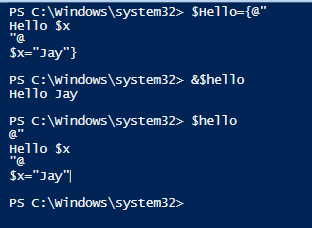
You can have a variable in Here-strings but you need to define the variable in the same session. Here is how you do it:

Declare $hello as follows:

$Hello={@"
Hello $x
"@
$x="Jay"}


In order that the variable is expanded run the following:

&$Hello
(This is not case sensitive, you can as well run, &$hello)
and you will get the response:
Hello Jay


(hello or Hello: not case sensitive)
Variable declaration can be in the beginning also as shown:

PS C:\Windows\system32> $Hello={$x="Jay"
@"
Hello $x
"@
}
PS C:\Windows\system32> &$hello
Hello Jay

PS C:\Windows\system32>

Note that defining the variable in single quotes will not alter the response.

Monday, November 10, 2014

What is the difference between Windows PowerShell and Windows PowerShell ISE?

Windows PowerShell is not a GUI application and it runs the PowerShell engine in the host program. You will see the following screen displayed when you access Windows PowerShell from the Search charm on Windows 8.1.


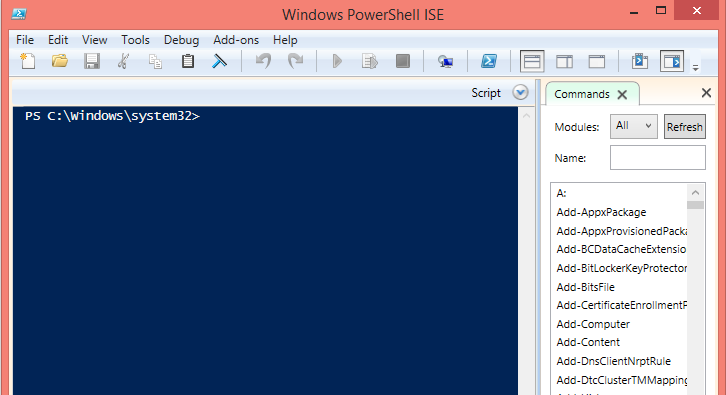
If you choose to launch you should search for 'Windows PowerShell ISE. The following screee will be displaced. It is rich interface that has many features including interactive help in scripting. If you are new to Power Shell you should begin your learning with this tool.


You can launch them as administrator which gives you more power (Run as Administrator) and is called launching with elevated permissions.

You can launch multiple instances.

You may be interested in these two posts as well:
http://hodentekmsss.blogspot.com/2014/11/a-quick-note-on-writing-powershell_12.html
http://hodentekmsss.blogspot.com/2014/11/a-quick-note-on-writing-powershell.html

Do you know that Here-Strings are?
Find it here:
http://hodentekhelp.blogspot.com/2015/06/what-is-here-string-in-windows.html