Showing posts with label Path. Show all posts

Wednesday, March 7, 2018

How do you launch python from the C:\> prompt?

Launching Python from Command-line

Python installed using the pyton-3.7.0b2-webinstall installs python to the following directory on your computer:

C:\Users\Owner\AppData\Local\Programs\Python\Python37-32\

However if you want to run python (python3.7(32bit)) you can either go the above directory and launch or by double-clicking the shortcut on All programs.

However if you wish to launch python from the C:\> prompt, you should add the above folder to the PATH environment variable.


Enter environmental variables in the search charm.
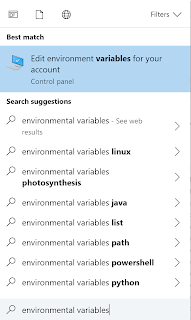


Click to open the System Properties as shown.
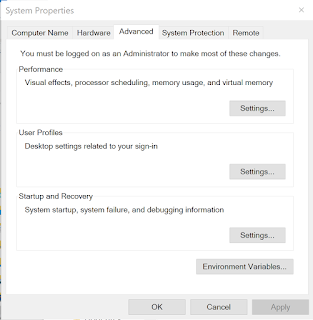


Click Environmental Variables...


Highlight Path in the top pane and click Edit...


Click New and add the installed directory as shown.

Now you can lunch python from the C:>/ prompt as shown.


Wednesday, August 6, 2014

Can you use Powershell to find the environmental variable Path?

It is very easy to find path using the command line as shown:
C:\>Path

If you want to use Power Shell then you should first start PowerShell with the following command:
C:\>Powershell

If powershell is installed you should see the following change:
C:\> changes  to PS C:\>

When you are in PS C:\

type exactly as shown.
PS C:\> get-item env:
Then you should see all the environmental variables (directories) separated by a semi-colon;
A sample listing is shown here:


If you want to get a single environmental variable such as 'Path' for example
You can do this:
PS C:\> $x="Path"PS C:\> get-item env:$x
or
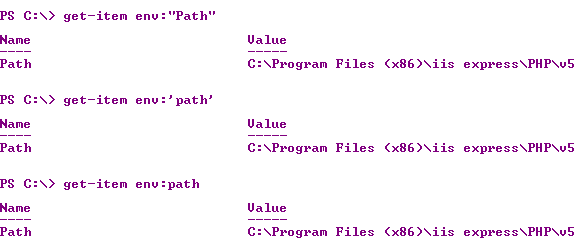
PS C:\> get-item env:"Path"
On this machine Windows 7 (x64) Ultimate, "Path", 'path', path all returned the 'PATH' variable.


If you want to know the version of your powershell, try this:


Have a look at this reference for PATH:
http://msdn.microsoft.com/en-us/library/aa922003.aspx
 

Sunday, August 3, 2014

What is 'Path' in Windows 7 and how do you find it?

What is 'Path'?
Path is an environmental variable.

It is a list of directory paths where the computer looks for a command to execute although the full path to the executable is not given.

For example ,

if you type 'Notepad' at a command prompt a Notepad application opens immediately, although its location on your computer is at:
%windir%\system32\notepad.exe which is the same as C:\windows\system32\notepad.exe.

This is because C:\windows\system32\ is in the list of directories in the path.

How do you find the 'Path'?
You can simply type path at a command prompt and the computer prints to the screen the list of directories as shown:
----------------
C:\>path
PATH=C:\Program Files (x86)\iis express\PHP\v5.4;C:\Program Files\Internet Explorer;;C:\oraclexe\app\oracle\product\11.2.0\se
rver\bin;;C:\Windows\system32;C:\Windows;C:\Windows\System32\Wbem;C:\Windows\System32\WindowsPowerShell\v1.0\;C:\Program File
s\Microsoft SQL Server\110\Tools\Binn\;c:\Program Files (x86)\Microsoft SQL Server\100\Tools\Binn\;c:\Program Files\Microsoft
 SQL Server\100\Tools\Binn\;c:\Program Files\Microsoft SQL Server\100\DTS\Binn\;C:\Program Files\Microsoft\Web Platform Insta
ller\;c:\Program Files (x86)\Microsoft ASP.NET\ASP.NET Web Pages\v1.0\;C:\Program Files\SQL Anywhere 16\bin64;C:\Program File
s\SQL Anywhere 16\bin32;c:\Program Files (x86)\Microsoft SQL Server\110\Tools\Binn\;c:\Program Files\Microsoft SQL Server\110
\DTS\Binn\;c:\Program Files (x86)\Microsoft SQL Server\110\Tools\Binn\ManagementStudio\;c:\Program Files (x86)\Microsoft Visu
al Studio 10.0\Common7\IDE\PrivateAssemblies\;c:\Program Files (x86)\Microsoft SQL Server\110\DTS\Binn\;;C:\Windows\System32\
WindowsPowerShell\v1.0\;C:\Program Files (x86)\Microsoft SDKs\TypeScript\1.0\;C:\Program Files (x86)\Java\jre7\bin\;

You can also find it another way using the Computer Properties as shown here:
http://hodentekhelp.blogspot.com/2010/08/compiling-java-in-windows-7.html