Showing posts with label Options. Show all posts

Wednesday, January 15, 2020

What are the scripting options in SQL Server 2019?

What are the scripting options in SQL Server 2019?
The Scripting options can be accessed from Tools: Options in the SQL Server Management Studio v18.4.


In the Options window drill-down on SQL Server Object Explorer | Scripting as shown.

 Expand the node, General scripting options to display the following:


 Expand the node, Object scripting options to display the following:


 Expand the node, Table and view options to display the following:

 Expand the node, Version options to display the following:

In each version of SSMS, the Options window is slightly different or arranged differently.

Wednesday, August 12, 2015

How do you bring in Solver to Microsoft Excel?

Microsoft's Mathematical Solver Foundation APIs can run on Excel as an add-in.

Adding Solver to your Excel application is quite easy.

Presently I have Microsoft Excel 2013 which is a subscription (~$10/month) I have for Microsoft Office 365 Business shown here:


Office365.png

Launch a new Excel application from its shortcut. The Book1-Excel window will be open as shown. Note that the Data menu is highlighted here. If Solver is already added you should see it in this menu.

SolverAddIn_0.png

Click File | Options to open the Excel Options window.

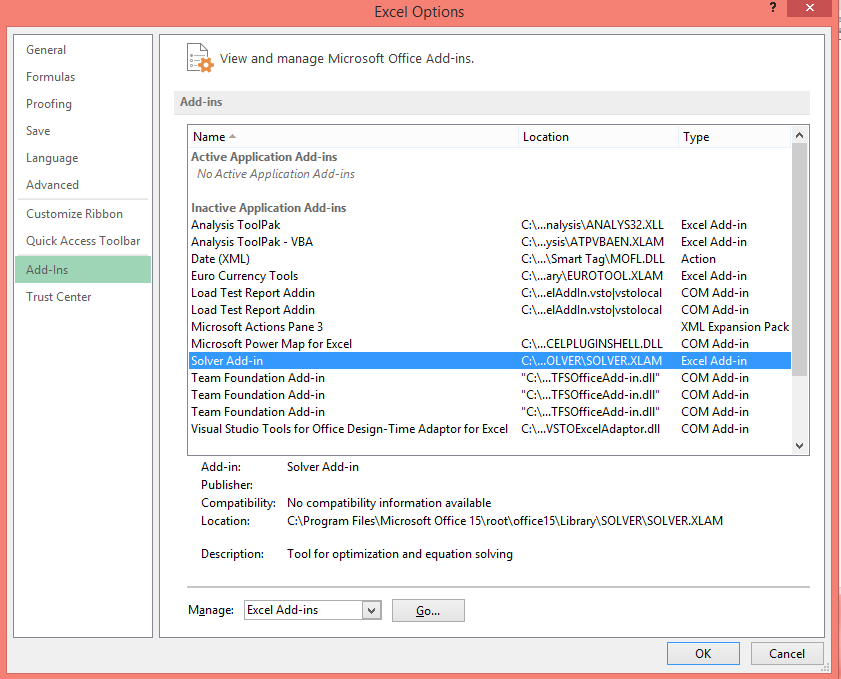
Click Add-ins to open the Microsoft Add_ins as shown.


SolverAddin.png

Click on Solver Add-in and click OK to open this picklist Add-ins window.

SolverAddin_2.png

Place check mark for Solver Add-in  and click OK.

The Solver gets into the Data menu as shown. From where you can launch it.

SolverAddin_3.png