Showing posts with label Open Source. Show all posts

Wednesday, November 29, 2017

What is OWIN? How does it relate to Web?

.NET is Microsoft Specific which is also featuring in some Open source projects. Believe me it is true, read here:

https://opensource.com/business/14/11/microsoft-dot-net-empower-open-source-communities

'Microsoft is providing the full .NET server stack in open source, including ASP.NET, the compiler, the .NET Core Runtime, Framework and libraries, enbaling devvelopers to build with .NET across Windows, Mac or Linux'.

This is old story, since 2004 the 'mono project' was a open source implementation of .NET platform.

Now coming to OWIN, which is short for Open Web Interface for .NET OWIN) defines a standard interface between .NET web servers and web applications.

You can find everything you want to know about OWIN here at this master site.
http://owin.org/

These are some of OWIN compatible projects:
Servers and Hosts
    Katana
    Nowin
    Suave
Frameworks
    Jasper
    Nancy
    SignalR
    WebApi
    WebSharper
    DuoVia.Http
    Simplify.Web
    Wisej
Implementations
    Katana
    Freya
    ASP.NET vNext

Microsoft uses OWIN for building ASP.NET Single-Page applications and several of the assemblies used are OWIN based as shown here:


MicrosoftOwinAssmeblies.png

Tuesday, May 24, 2016

How do you get the node.js project templates in Visual Studio 2015?

In a recent post I tried to install Node.js tools that is supposed to help create node.js project types in Visual Studio Community 2015. After installing, I realized that I could not access the node.js templates in Visual Studio. I noted however that the installer version was NTVS 1.1.1 VS2015.msi.

As an after thought I found an easier route to get the node.js support for Visual Studio 2015 Community. This post describes the steps.

After launching Visual Studio 2015 Community ( I have the Update 2, version 14.0.25123.00 Update 2) you can access Extensions and Updates menu item as shown.

NodeJsTools_07.png

Click on the menu item. The Extension and Updates window appears as shown. You need to search for node.js in Visual Studio Gallery. You will find both 1.1 and 1.2 versions.


NodeJSToolsPlug_inVS2015.png

Click Download button for version 2.

The related msi file gets downloaded. The version is


NodeJsTools1point2.png

You may double click the downloaded file to install the plug-in. But first take care of the Apache license.


NodeJsTools_001.png

The extension gets updated as the program installs.


NodeJsTools_001_2.jpg

Once the extension is installed, when you create a New Project... in Visual Studio 2015 Community you should be able to see all the node.js templates as shown in the next image.


NodeJsTools_05.jpg

Monday, May 23, 2016

How can you program IOT controllers using JavaScript?

Arduino boards can be programmed using Arduino software and Intel IOT boards can be programmed using Intel XDK IOT. Using JavaScript to program controllers would be very useful as most browsers are HTMl5 compliant. The Johnny-Five Robotics and IOT program is an interesting option.

Johnny-Five is the JavaScript Robotics & IOT platform released by the Bocoup group. Johnny-Five is maintained by a growing number of talented developers.

What is Bocoup?
Bocoup  is a group that championed the cause of Open tools and Work Flow. They really seems to have people with very varied and diverse talents to tackle web, data, and visualization.

How does Johnny-Five handle the Hello World (or Blink for that matter)?
It looks like 1-2-3 really.

1. Install Node.js(Prefer 4.2.1 LTS)
2. Setup your board
3. Run: npm install johnny-five

What else is needed?

You also need to run the Firmata protocol for the controller board to communicate with the computer.
Interestingly Johnny-Five can handle over 30 different arduino compatible boards from the likes of Raspberry, Intel, Arduino, Sparkfun and many more.

This is very impressive indeed as each of these boards are handled by their vendors like Arduino, Intel and others.

How about non-arduino boards?

There are platform specific IO Plugins (for example, Galileo-IO plugin) .These plugins can speak the language of the platform as they implement Firmata compatible interfaces.

You will be hearing more about Johnny-Five in my blogs, here and here, keep reading....

Sunday, November 15, 2015

What is Bitnami?

If you want to work in Open Source, this is where you should look into.

This is a very useful site to keep in touch. It is a great resource if you want to work with Open Source stuff. Millions of developers use this site and you should too. This is great if you are trying to teach to yourself or doing some computer stuff for the non-profits. The pre-packaged apps and development environments are free to use and share.

These are some of the things you can do:
  • Running apps in production
  • Complete software development environment for your team
  • Develop locally, deploy in the cloud
  • Quickly test new apps
  • Running your business
  • Maintain parallel environments
  • Research and learn new technologies
  • Launch apps without extensive expertise
It does cover all OSs, Virtualization Platforms; and Cloud Platforms. It covers the whole universe of computer software.

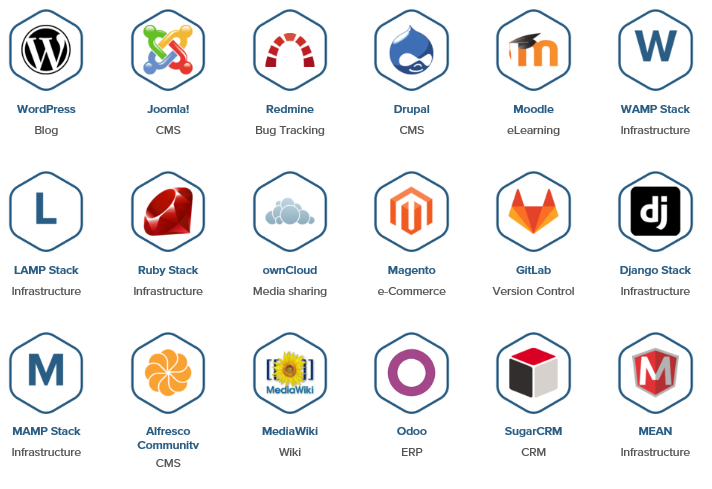
The number of applications that you can get on to is really impressive. Here is a screen shot of the more popular applications.
  
Microsoft Web Platform Installer (WPI) is another similar program geared towards all the different Microsoft Technologies although WPI also offers many Open Source programs .

Here and here you have two detailed posts to get on to Microsoft Web Platform Installer.