Showing posts with label WordPress. Show all posts

Sunday, September 1, 2024

How do you use AI in WordPress website/blog?

 AI is recently making rounds in all sorts of software. How it is doing, or whether or it makes things better is hard to judge.


Let us say, this is how your Header looks in the Appearances->Editor of your site or blog.

Let us say we want to edit the logo, then we place our cursor on the logo as shown in the picture above.

Choosing the three starts brings up the Jetpack AI Generator which uses the description of the site to create an appropriate logo. If the one suggested by the AI is acceptable, then the existing one will be replaced by the Ai created logo.

Click Generate button and the AI starts working. The image created trying first time is shown in the same picture. The image after the second run appears as shown and gets saved.

It may be possible to change the prompt by clicking enhance the prompt.  It provides a prompt which can be further tweaked. The highlighted words are mine.

"Create a logo for a website catering to condominium owners in Oahu, capturing the essence of island living and community connection in a clean and modern design that reflects a sense of belonging and pride in ownership [with subtle tropical elements] [using a bright and refreshing color scheme] [incorporating a modern and sleek font that contain the letter H]"

I ask for a more vibrant color. Again, one more round of generation yields this.


All these AI generated images gets uploaded to the MEDIA storage.

I am not sure whether the AI generated logo is better than one I have. You be the judge. AI surely generated an image based on the description, which is everything it can do, but not what is in my mind.

For example, I asked for a more vibrant color and I got this. It forgot to add the letter H totally. These lapses in following a thread in an iteration loop is something common to all of the AI's I have had a look at recently.

Did I like it? I think, no. It seems in general, the more vibrant, the more flashy is considered 'amateurish' and the more boring, professional.

More here, https://jetpack.com/ai/


Saturday, August 31, 2024

Is it possible to connect to your WordPress server using Visual Studio Community edition?

 It is possible to connect to your WordPress server using VS Community Edition application. However, while installing Visual Studio Community you should also install ASP.NET and Web Tools (in here installed 17.10.344.38934). Without this you cannot connect to the WEB.

After installing the above (the ASP.NET and Web Tools can be installed from within an Open Visual Studio window), you can connect to the WEB as shown.


When you click Web to connect, you will get this response.


It does not get connected using the URL of your website, but the FTP site.

Finding the FTP site of WordPress:

On WordPress FTP is not supported on any kind of plan, be it premium or business. WordPress uses the Secure File Transfer Protocol (SFTP) for secure file transfers.

SFTC access is tied to the subscribers of the Business or eCommerce plans. If you are on any other plan, you need to upgrade.

You need to access the WordPress server's from your site as shown.

I only have a premium plan and I have no access.


Sunday, November 15, 2015

What is Bitnami?

If you want to work in Open Source, this is where you should look into.

This is a very useful site to keep in touch. It is a great resource if you want to work with Open Source stuff. Millions of developers use this site and you should too. This is great if you are trying to teach to yourself or doing some computer stuff for the non-profits. The pre-packaged apps and development environments are free to use and share.

These are some of the things you can do:
  • Running apps in production
  • Complete software development environment for your team
  • Develop locally, deploy in the cloud
  • Quickly test new apps
  • Running your business
  • Maintain parallel environments
  • Research and learn new technologies
  • Launch apps without extensive expertise
It does cover all OSs, Virtualization Platforms; and Cloud Platforms. It covers the whole universe of computer software.

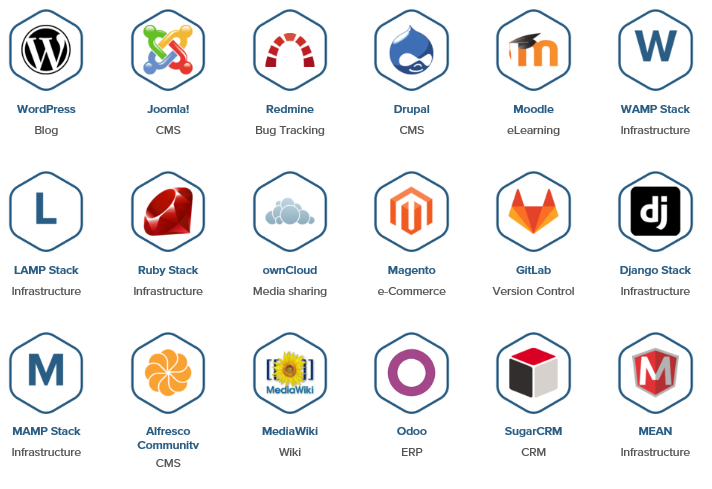
The number of applications that you can get on to is really impressive. Here is a screen shot of the more popular applications.
  
Microsoft Web Platform Installer (WPI) is another similar program geared towards all the different Microsoft Technologies although WPI also offers many Open Source programs .

Here and here you have two detailed posts to get on to Microsoft Web Platform Installer.


Friday, July 3, 2015

What are the different Web Apps you can build in Microsoft Azure?

Between Web Apps and Native apps, the browser based Web Apps have a lot of advantages while in some cases Native Apps are more advantageous.

In the beginning there were ASP.NET Web sites and Cloud Services made their appearance later on Windows Azure, and now there are lots of Web Apps.

Under Web Apps you can build the following kind of apps. Some of the web apps can be built in the Windows Azure Portal and those in preview can only be accssesed in the preview portal:

  • App Service Environment
  • Application Insights
  • Template deployment-classic
  • Web App
  • Web App+MySQL
  • Web App+SQL
  • ......
While the above are all from Microsoft, there are others from third party such as:
  • DNN Platform from DNN Corporation
  • Scalable Wordpress from WordPress
  • Engine Yard Platform as Service
  • SendGrid Email Delivery from SendGrid
  • Umbraco CMS from Umbraco.org
  • Notification Hub -not ready even for preview
  • Joomla! from Joomla
  • .....
There are many more and you login to the preview portal here to obtain the details (Search for Web+mobile).