Showing posts sorted by relevance for query powershell. Sort by date Show all posts

Saturday, March 14, 2015

How do you install Windows PowerShell 4.0 on Windows 7?

Windows PowerShell 3.0 is installed on Windows 7 by default but not Windows PowerShell 4.0.
You can check for version and verify if you have Windows PowerShell 4.0 as detailed in the following post:
http://hodentekhelp.blogspot.com/2014/08/if-you-have-multiple-versions-of-power.html

Review this image:

So, how do you install Windows PowerShell 4.0 on Windows 7?

First of all lets take a look at what are the new features that we can use in Windows PowerShell 4.0
Here are the Windows PowerShell 4.0 new features:

 •Support for workflow and remote script debugging
•Improved workflow authoring experience to make it more consistent with script authoring
•Added PipelineVariable as a common parameter
•Better support for downloading updatable help by using Save-Help and Update-Help in offline scenarios
•Updated version from 3.0 to 4.0
•Several bug fixes and performance improvements

Read more here:
http://www.microsoft.com/en-us/download/details.aspx?id=40855

In order to get Windows PowerShell 4.0 you need to install Windows Management Framework 4.0. This can be installed on Windows 7 SP1.
 I am not focussing on Windows Servers for this post.
It is not available for Windows 8.0 but installs by default when you upgrade to Windows 8.1
 
You can download WMF 4.0 from the previous link.
The download  has multiple files as shown here:

WMF40files.png

Installing WMF 40 confers the following functionality:
•Windows PowerShell 4.0
•Windows PowerShell ISE
•Windows PowerShell Web Services (Management OData IIS Extension)
•Windows Remote Management (WinRM)
•Windows Management Instrumentation (WMI)
•The Server Manager WMI provider
•A new feature for 4.0, Windows PowerShell Desired State Configuration (DSC)

You have a much more power full interface now.
 

Tuesday, July 14, 2015

How many powershell modules should I have on my computer?


It depends on what version of Windows you have on your computer (the version of Powershell).

On my windows 8.1 computer, I can get the version of powershell by running this code in powershell:
--------------
PS C:\Users\Jayaram> Get-host


Name             : Windows PowerShell ISE Host
Version          : 4.0
InstanceId       : 88471f59-d3a1-4cfe-8293-717336f8bdde
UI               : System.Management.Automation.Internal.Host.InternalHostUserInterface
CurrentCulture   : en-US
CurrentUICulture : en-US
PrivateData      : Microsoft.PowerShell.Host.ISE.ISEOptions
IsRunspacePushed : False
Runspace         : System.Management.Automation.Runspaces.LocalRunspace
-------------------
The number of modules and their listing can be obtained by the following:
-------------------------
PS C:\Users\Jayaram> Get-module -ListAvailable


    Directory: C:\Windows\system32\WindowsPowerShell\v1.0\Modules


ModuleType Version    Name                                ExportedCommands                                                                    
---------- -------    ----                                ----------------                                                                    
Manifest   1.0.0.0    ActiveDirectory                     {Add-ADCentralAccessPolicyMember, Add-ADComputerServiceAccount, Add-ADDomainContro...
Manifest   1.0.0.0    AppBackgroundTask                   {Disable-AppBackgroundTaskDiagnosticLog, Enable-AppBackgroundTaskDiagnosticLog, Se...
Manifest   2.0.0.0    AppLocker                           {Get-AppLockerFileInformation, Get-AppLockerPolicy, New-AppLockerPolicy, Set-AppLo...
Manifest   2.0.0.0    Appx                                {Add-AppxPackage, Get-AppxPackage, Get-AppxPackageManifest, Remove-AppxPackage...}  
Script     1.0.0.0    AssignedAccess                      {Clear-AssignedAccess, Get-AssignedAccess, Set-AssignedAccess}                      
Manifest   1.0        BestPractices                       {Get-BpaModel, Get-BpaResult, Invoke-BpaModel, Set-BpaResult}                       
Manifest   1.0.0.0    BitLocker                           {Unlock-BitLocker, Suspend-BitLocker, Resume-BitLocker, Remove-BitLockerKeyProtect...
Manifest   1.0.0.0    BitsTransfer                        {Add-BitsFile, Complete-BitsTransfer, Get-BitsTransfer, Remove-BitsTransfer...}     
Manifest   1.0.0.0    BranchCache                         {Add-BCDataCacheExtension, Clear-BCCache, Disable-BC, Disable-BCDowngrading...}     
Manifest   1.0.0.0    CimCmdlets                          {Get-CimAssociatedInstance, Get-CimClass, Get-CimInstance, Get-CimSession...}       
Binary     2.0.0.0    ClusterAwareUpdating                {Get-CauPlugin, Register-CauPlugin, Unregister-CauPlugin, Invoke-CauScan...}        
Manifest   1.0        Defender                            {Get-MpPreference, Set-MpPreference, Add-MpPreference, Remove-MpPreference...}      
Manifest   1.0        DFSN                                {Get-DfsnRoot, Remove-DfsnRoot, Set-DfsnRoot, New-DfsnRoot...}                      
Binary     1.0        DFSR                                {New-DfsReplicationGroup, Get-DfsReplicationGroup, Set-DfsReplicationGroup, Remove...
Manifest   2.0.0.0    DhcpServer                          {Add-DhcpServerInDC, Add-DhcpServerv4Class, Add-DhcpServerv4ExclusionRange, Add-Dh...
Manifest   1.0.0.0    DirectAccessClientComponents        {Disable-DAManualEntryPointSelection, Enable-DAManualEntryPointSelection, Get-DACl...
Script     3.0        Dism                                {Add-AppxProvisionedPackage, Add-WindowsDriver, Add-WindowsImage, Add-WindowsPacka...
Manifest   1.0.0.0    DnsClient                           {Resolve-DnsName, Clear-DnsClientCache, Get-DnsClient, Get-DnsClientCache...}       
Manifest   2.0.0.0    DnsServer                           {Add-DnsServerConditionalForwarderZone, Add-DnsServerDirectoryPartition, Add-DnsSe...
Manifest   2.0.0.0    FailoverClusters                    {Add-ClusterCheckpoint, Add-ClusterDisk, Add-ClusterFileServerRole, Add-ClusterGen...
Manifest   1.0.0.0    GroupPolicy                         {Backup-GPO, Block-GPInheritance, Copy-GPO, Get-GPInheritance...}                   
Binary     1.1        Hyper-V                             {Add-VMDvdDrive, Add-VMFibreChannelHba, Add-VMHardDiskDrive, Add-VMMigrationNetwor...
Manifest   2.0.0.0    International                       {Get-WinDefaultInputMethodOverride, Set-WinDefaultInputMethodOverride, Get-WinHome...
Manifest   2.0.0.0    IpamServer                          {Get-IpamDhcpConfigurationEvent, Remove-IpamDhcpConfigurationEvent, Get-IpamConfig...
Manifest   1.0.0.0    iSCSI                               {Get-IscsiTargetPortal, New-IscsiTargetPortal, Remove-IscsiTargetPortal, Update-Is...
Manifest   2.0.0.0    IscsiTarget                         {Add-ClusteriSCSITargetServerRole, Add-IscsiVirtualDiskTargetMapping, Checkpoint-I...
Script     1.0.0.0    ISE                                 {New-IseSnippet, Import-IseSnippet, Get-IseSnippet}                                 
Manifest   1.0.0.0    Kds                                 {Add-KdsRootKey, Get-KdsRootKey, Test-KdsRootKey, Set-KdsConfiguration...}          
Manifest   3.0.0.0    Microsoft.PowerShell.Diagnostics    {Get-WinEvent, Get-Counter, Import-Counter, Export-Counter...}                      
Manifest   3.0.0.0    Microsoft.PowerShell.Host           {Start-Transcript, Stop-Transcript}                                                 
Manifest   3.1.0.0    Microsoft.PowerShell.Management     {Add-Content, Clear-Content, Clear-ItemProperty, Join-Path...}                      
Manifest   3.0.0.0    Microsoft.PowerShell.Security       {Get-Acl, Set-Acl, Get-PfxCertificate, Get-Credential...}                           
Manifest   3.1.0.0    Microsoft.PowerShell.Utility        {Format-List, Format-Custom, Format-Table, Format-Wide...}                          
Manifest   3.0.0.0    Microsoft.WSMan.Management          {Disable-WSManCredSSP, Enable-WSManCredSSP, Get-WSManCredSSP, Set-WSManQuickConfig...
Manifest   1.0        MMAgent                             {Disable-MMAgent, Enable-MMAgent, Set-MMAgent, Get-MMAgent...}                      
Manifest   1.0.0.0    MsDtc                               {New-DtcDiagnosticTransaction, Complete-DtcDiagnosticTransaction, Join-DtcDiagnost...
Manifest   2.0.0.0    NetAdapter                          {Disable-NetAdapter, Disable-NetAdapterBinding, Disable-NetAdapterChecksumOffload,...
Manifest   1.0.0.0    NetConnection                       {Get-NetConnectionProfile, Set-NetConnectionProfile}                                
Manifest   1.0.0.0    NetEventPacketCapture               {New-NetEventSession, Remove-NetEventSession, Get-NetEventSession, Set-NetEventSes...
Manifest   2.0.0.0    NetLbfo                             {Add-NetLbfoTeamMember, Add-NetLbfoTeamNic, Get-NetLbfoTeam, Get-NetLbfoTeamMember...
Manifest   1.0.0.0    NetNat                              {Get-NetNat, Get-NetNatExternalAddress, Get-NetNatStaticMapping, Get-NetNatSession...
Manifest   2.0.0.0    NetQos                              {Get-NetQosPolicy, Set-NetQosPolicy, Remove-NetQosPolicy, New-NetQosPolicy}         
Manifest   2.0.0.0    NetSecurity                         {Get-DAPolicyChange, New-NetIPsecAuthProposal, New-NetIPsecMainModeCryptoProposal,...
Manifest   1.0.0.0    NetSwitchTeam                       {New-NetSwitchTeam, Remove-NetSwitchTeam, Get-NetSwitchTeam, Rename-NetSwitchTeam...}
Manifest   1.0.0.0    NetTCPIP                            {Get-NetIPAddress, Get-NetIPInterface, Get-NetIPv4Protocol, Get-NetIPv6Protocol...} 
Manifest   1.0.0.0    NetWNV                              {Get-NetVirtualizationProviderAddress, Get-NetVirtualizationGlobal, Get-NetVirtual...
Manifest   1.0.0.0    NetworkConnectivityStatus           {Get-DAConnectionStatus, Get-NCSIPolicyConfiguration, Reset-NCSIPolicyConfiguratio...
Manifest   2.0.0.0    NetworkLoadBalancingClusters        {Add-NlbClusterNode, Add-NlbClusterNodeDip, Add-NlbClusterPortRule, Add-NlbCluster...
Manifest   1.0.0.0    NetworkTransition                   {Add-NetIPHttpsCertBinding, Disable-NetDnsTransitionConfiguration, Disable-NetIPHt...
Manifest   1.0        NFS                                 {Get-NfsMappedIdentity, Get-NfsNetgroup, Install-NfsMappingStore, New-NfsMappedIde...
Manifest   1.0.0.0    PcsvDevice                          {Get-PcsvDevice, Start-PcsvDevice, Stop-PcsvDevice, Restart-PcsvDevice...}          
Manifest   1.0.0.0    PKI                                 {Add-CertificateEnrollmentPolicyServer, Export-Certificate, Export-PfxCertificate,...
Manifest   1.1        PrintManagement                     {Add-Printer, Add-PrinterDriver, Add-PrinterPort, Get-PrintConfiguration...}        
Binary     1.0        PSDesiredStateConfiguration         {Set-DscLocalConfigurationManager, Start-DscConfiguration, Configuration, Get-DscC...
Script     1.0.0.0    PSDiagnostics                       {Disable-PSTrace, Disable-PSWSManCombinedTrace, Disable-WSManTrace, Enable-PSTrace...
Binary     1.1.0.0    PSScheduledJob                      {New-JobTrigger, Add-JobTrigger, Remove-JobTrigger, Get-JobTrigger...}              
Manifest   2.0.0.0    PSWorkflow                          {New-PSWorkflowExecutionOption, New-PSWorkflowSession, nwsn}                        
Manifest   1.0.0.0    PSWorkflowUtility                   Invoke-AsWorkflow                                                                   
Manifest   2.0.0.0    RemoteAccess                        {Add-DAAppServer, Add-DAClient, Add-DAClientDnsConfiguration, Add-DAEntryPoint...}  
Manifest   2.0.0.0    RemoteDesktop                       {Get-RDCertificate, Set-RDCertificate, New-RDCertificate, New-RDVirtualDesktopDepl...
Manifest   1.0.0.0    ScheduledTasks                      {Get-ScheduledTask, Set-ScheduledTask, Register-ScheduledTask, Unregister-Schedule...
Manifest   2.0.0.0    SecureBoot                          {Confirm-SecureBootUEFI, Set-SecureBootUEFI, Get-SecureBootUEFI, Format-SecureBoot...
Script     2.0.0.0    ServerManager                       {Get-WindowsFeature, Install-WindowsFeature, Uninstall-WindowsFeature, Enable-Serv...
Cim        1.0.0.0    ServerManagerTasks                  {Get-SMCounterSample, Get-SMPerformanceCollector, Start-SMPerformanceCollector, St...
Manifest   2.0.0.0    SmbShare                            {Get-SmbShare, Remove-SmbShare, Set-SmbShare, Block-SmbShareAccess...}              
Manifest   2.0.0.0    SmbWitness                          {Get-SmbWitnessClient, Move-SmbWitnessClient, gsmbw, msmbw...}                      
Manifest   1.0.0.0    StartScreen                         {Export-StartLayout, Import-StartLayout, Get-StartApps}                             
Manifest   2.0.0.0    Storage                             {Add-InitiatorIdToMaskingSet, Add-PartitionAccessPath, Add-PhysicalDisk, Add-Targe...
Manifest   2.0.0.0    TLS                                 {New-TlsSessionTicketKey, Enable-TlsSessionTicketKey, Disable-TlsSessionTicketKey,...
Manifest   1.0.0.0    TroubleshootingPack                 {Get-TroubleshootingPack, Invoke-TroubleshootingPack}                               
Manifest   2.0.0.0    TrustedPlatformModule               {Get-Tpm, Initialize-Tpm, Clear-Tpm, Unblock-Tpm...}                                
Manifest   2.0.0.0    UpdateServices                      {Add-WsusComputer, Approve-WsusUpdate, Deny-WsusUpdate, Get-WsusClassification...}  
Manifest   2.0.0.0    VpnClient                           {Add-VpnConnection, Set-VpnConnection, Remove-VpnConnection, Get-VpnConnection...}  
Manifest   1.0.0.0    Wdac                                {Get-OdbcDriver, Set-OdbcDriver, Get-OdbcDsn, Add-OdbcDsn...}                       
Manifest   1.0.0.0    WebAdministration                   {Start-WebCommitDelay, Stop-WebCommitDelay, Get-WebConfigurationLock, Remove-WebCo...
Manifest   1.0.0.0    WindowsDeveloperLicense             {Get-WindowsDeveloperLicense, Show-WindowsDeveloperLicenseRegistration, Unregister...
Script     1.0        WindowsErrorReporting               {Enable-WindowsErrorReporting, Disable-WindowsErrorReporting, Get-WindowsErrorRepo...
Manifest   1.0.0.0    WindowsSearch                       {Get-WindowsSearchSetting, Set-WindowsSearchSetting}                                


    Directory: C:\Program Files (x86)\Microsoft SQL Server\110\Tools\PowerShell\Modules


ModuleType Version    Name                                ExportedCommands                                                                    
---------- -------    ----                                ----------------                                                                    
Manifest   1.0        SQLASCMDLETS                        {Add-RoleMember, Backup-ASDatabase, Invoke-ASCmd, Invoke-ProcessCube...}            
Manifest   1.0        SQLPS                               {Backup-SqlDatabase, Add-SqlAvailabilityDatabase, Disable-SqlAlwaysOn, Enable-SqlA...


    Directory: C:\Program Files (x86)\Microsoft SDKs\Azure\PowerShell\ServiceManagement


ModuleType Version    Name                                ExportedCommands                                                                    
---------- -------    ----                                ----------------                                                                    
Manifest   0.8.10.1   Azure                               {Disable-AzureServiceProjectRemoteDesktop, Enable-AzureMemcacheRole, Enable-AzureS...


    Directory: C:\Program Files (x86)\Microsoft SQL Server\130\Tools\PowerShell\Modules


ModuleType Version    Name                                ExportedCommands                                                                    
---------- -------    ----                                ----------------                                                                    
Manifest   1.0        SQLASCMDLETS                        {Add-RoleMember, Backup-ASDatabase, Invoke-ASCmd, Invoke-ProcessCube...}            
Manifest   1.0        SQLPS                               {Backup-SqlDatabase, Save-SqlMigrationReport, Add-SqlAvailabilityDatabase, Add-Sql...

Monday, May 21, 2018

Can you connect to PowerShell from SQL Server Management Studio 17.7?

PowerShell is very well supported in SQL Server and it is true with the latest version as well.

What you begin with in Power Shell depends on from where it is invoked in the SQL Server Management Studio.

You can invoke (or start) PowerShell from various objects and it will be contextual in relation to the object.

If you right click the Server as shown you poup-up a mneu from which you can access PowerShell as shown.


PS_0

When you click Start PowerShell, the PowerShell window gets displayed as shown.


PS_1


Similarly the next image shows PowerShell being invoked in other contexts.

PS_2

These are not the only objects to invoke PowerShell, many more objects can be used to invoke PowerShell contextually.

Once you get to the object you want to review, the database can be accessed like folder/files using windows commands as shown.


PS_3

Read many more related PowerShell posts here.

Wednesday, June 19, 2024

How to discover Bluetooth connections with PowerShell?


About PowerShell:


Powershell is one of Microsoft's extremely useful and powerful tool. It is installed on most of the Microsoft computers and laptops.

Just open type in PowerShell in Windows Search as shown.

The Search brings up the following screen:

There are two versions of PowerShell for x86 and x64 architectures and there is also an Integrated Scripting Environment(ISE), a very useful option that can do a lot more than the command line tool.

I will be using this to discover Bluetooth devices on my laptop that are discoverable.

Let me open the x64 bit version with Administrator rights (also known as elevated permissions). I do this because, the program may not allow you to do certain things otherwise.


The red arrows are Running the code, or running a section of the code that you choose to run. Since, we are not using the ISE, these are greyed out.

Working with Bluetooth:

Bluetooth is a Pnp device and it is called Bluetooth. Run the following code as shown:


PS C:\WINDOWS\system32> Get-PnpDevice | Where-Object {$_.Class -eq "Bluetooth"}

After typing the code click Enter key. The following is displayed,

=====================

PS C:\WINDOWS\system32> Get-PnpDevice | Where-Object {$_.Class -eq "Bluetooth"}


Status     Class           FriendlyName                                                                     InstanceId     

------     -----           ------------                                                                     ----------     

OK         Bluetooth       Object Push Service                                                              BTHENUM\{000...

OK         Bluetooth       Bluetooth LE Generic Attribute Service                                           BTHLEDEVICE\...

OK         Bluetooth       Generic Attribute Profile                                                        BTHLEDEVICE\...

Unknown    Bluetooth       Jayaram's S23+ Avrcp Transport                                                   BTHENUM\{000...

OK         Bluetooth       Microsoft Bluetooth Enumerator                                                   BTH\MS_BTHBR...

OK         Bluetooth       Generic Access Profile                                                           BTHLEDEVICE\...

OK         Bluetooth       Intel(R) Wireless Bluetooth(R)                                                   USB\VID_8087...

OK         Bluetooth       Jayaram's S23+ Avrcp Transport                                                   BTHENUM\{000...

OK         Bluetooth       Microsoft Bluetooth LE Enumerator                                                BTH\MS_BTHLE...

OK         Bluetooth       Phonebook Access Pse Service                                                     BTHENUM\{000...

OK         Bluetooth       Personal Area Network Service                                                    BTHENUM\{000...

OK         Bluetooth       Bluetooth Device (RFCOMM Protocol TDI)                                           BTH\MS_RFCOM...

OK         Bluetooth       Jayaram's S23+                                                                   BTHLE\DEV_6A...

OK         Bluetooth       Jayaram's S23+                                                                   BTHENUM\DEV_...

OK         Bluetooth       Bluetooth LE Generic Attribute Service                                           BTHLEDEVICE\...

Unknown    Bluetooth       Jayaram's S23+ Avrcp Transport                                                   BTHENUM\{000...

OK         Bluetooth       Personal Area Network NAP Service                                                BTHENUM\{000...

OK         Bluetooth       Bluetooth LE Generic Attribute Service                                           BTHLEDEVICE\...

OK         Bluetooth       Jayaram's S23+ Avrcp Transport                                                   BTHENUM\{000...

===========================================

The InstanceID cannot be fully seen.

You need to format the output. The best way is to run the following:

PS C:\WINDOWS\system32>  Get-PnpDevice | Where-Object {$_.Class -eq "Bluetooth"} | Export-Csv -Path "C:\Users\Me\Desktop\listing.csv" -NoTypeInformation

This will provide a more complete output in the exported listing.csv file at the indicated location.

The CSV file has much more information in tabulated columns.


Although this gives some idea of connected devices, there are repetitions and somewhat difficult to look for specific information.

I not only want Bluetooth devices discovered but I would also like to get the ones that are ready for pairing with the laptop's Bluetooth.

This next code and the response makes it little more clear.

================================

PS C:\WINDOWS\system32> $devices = Get-ChildItem -Path HKLM:\\SYSTEM\\ControlSet001\\Services\\BTHPORT\\Parameters\\Devices

foreach ($device in $devices) {

    $address = $device.pschildname.ToUpper()

    $name = $device.GetValue("Name")

    if ($name -ne $null) {

        $printableName = ($name -notmatch 0 | ForEach-Object {[char]$_}) -join ""

        echo "Address: $address, Name: $printableName"

    }

}

Here is the response:

Address: 6A185BABF058, Name: Jayara's S3+

Address: 9C73B16CBD32, Name: Jayara's S3+

Address: FB621134FEF9, Name: KS01


PS C:\WINDOWS\system32> 

========================

In the above, I see my paired Samsung S23+ Smartphone and a Smartwatch, KS01. However, I do not see the paired Samsung Smart TV. That's something I need to troubleshoot.

In this post, discovering devices connected by Bluetooth was correctly identified using the PowerShell.


More on PowerShell here: Just search for PowerShell in this blog and You can get dozens of posts that deal with all aspects of Powershell.


Monday, January 30, 2017

Is it possible to use PowerShell to work with Hyper-V?


The short answer is yes. On a Windows 10 machine you can use Hyper-V to work with VMs. On a Windows 10 machine you need to enable Hyper-V using the 'Turn Windows features on or off' pop-up from the Program and Features in the Control Panel. When you enable it you should be able to see this.


You can then search for Hyper-V and start the GUI.


Clicking on Hyper-V Manager brings up the graphic user interface.

Hyper-V with PowerShell

It is also possible to use Hyper-V PowerShell module to simplify and automate management tasks. Most of what you do on the GUI can be carried out using PowerShell.

The advantages of using PowerShell is that you can automate most of the actions with flexibility. It can also provide you with features not implemented in the GUI.

If Hyper-V is already present, as in the present case (or machine) you can check if the Hyper-V module is available by using the Get-Command as in the following statement after bringing up the PowerShell command prompt:
Get-Command -module Hyper-V

This brings up the following response when run. The following is a screen shot of PowerShell ISE from the present machine. I have only included a portion of the result and most commandlets are named after their task.


For example:

Get-VMHOST gets the host information as shown.

PS C:\Users\Jayaram> get-vmhost

Name      LogicalProcessorCount MemoryCapacity(M) VirtualMachineMigrationEnabled
----      --------------------- ----------------- ------------------------------
HODENTEK8 8                     8116.2734375      False


PS C:\Users\Jayaram> get-vmhost|Select *


Just peruse the list and you can do many things with PowerShell.

If you are looking for installing Hyper-V on Windows 8.1 or Windows 10 go here:

Install Hyper-V on Windows 10:
http://hodentekhelp.blogspot.com/2016/04/how-do-you-install-hyper-v-on-windows-10.html

Install Hyper-V on Windows 8.1:
http://hodentekhelp.blogspot.com/2015/05/how-do-you-enable-hyper-v-in-windows-81.html

Tuesday, August 19, 2014

Can multiple versions of PowerShell exist on a computer?

Power Shell is one of the most powerful scripting languages to use if are working with Windows. Often you may want to know what version you have on your computer and you may also want to know whether multiple versions can exist side-by-side on a computer.

I purchased a Windows 8.0 laptop and a few days later it was upgraded to Windows 8.1. There have been many Windows Updates since I bought the computer and I am not sure if a version of PowerShell was installed. Also a few months later I installed SQL Server 2012 Developer Edition.
After looking through I discovered that I have two versions 2.0 and 4.0; and they can exist side-by-side.

In my previous post here, I mentioned that you can find the version of your PowerShell installation using the following commandlet.

PS C:\>$PSVersionTable.psversion

As you can see from this post that I had PowerShell Version 3.0 on my Windows 7 (x64) machine

http://hodentekhelp.blogspot.com/2014/08/can-you-use-powershell-to-find.html

In Windows 8.1 using the same commandlet I find the following:
-------------------
Windows PowerShell
Copyright (C) 2013 Microsoft Corporation. All rights reserved.

PS C:\Users\Jayaram> $psversionTable.psversion
Major  Minor  Build  Revision
-----  -----  -----  --------
4      0      -1     -1

---------------------
However when invoked PS from SQL Server as mentioned in this post:
http://hodentekmsss.blogspot.com/2014/04/starting-power-shell-from-sql-server.html

I see that the version is 2.0
--------------------------------
PS SQLSERVER:\SQL\HODENTEK8\REGENCYPARK> $psversionTable.psversion
Major  Minor  Build  Revision
-----  -----  -----  --------
2      0      -1     -1

------------------------------------
This means that the versions 2.0 and 4.0 can exist side-by-side

May be you are interested in these as well:
http://hodentekmsss.blogspot.com/2014/11/a-quick-note-on-writing-powershell_12.html
http://hodentekmsss.blogspot.com/2014/11/a-quick-note-on-writing-powershell.html

Monday, November 10, 2014

What is the difference between Windows PowerShell and Windows PowerShell ISE?

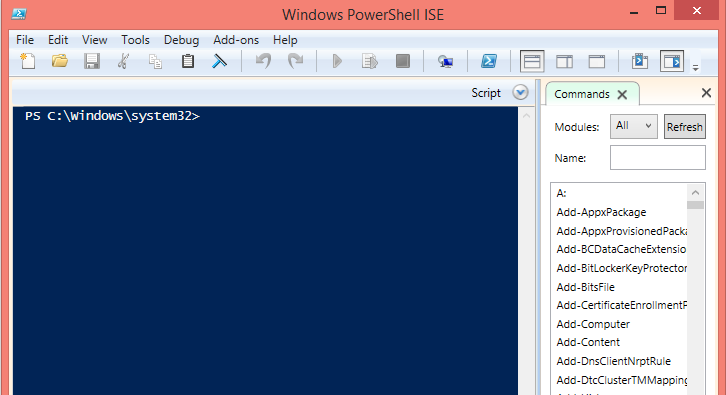
Windows PowerShell is not a GUI application and it runs the PowerShell engine in the host program. You will see the following screen displayed when you access Windows PowerShell from the Search charm on Windows 8.1.


If you choose to launch you should search for 'Windows PowerShell ISE. The following screee will be displaced. It is rich interface that has many features including interactive help in scripting. If you are new to Power Shell you should begin your learning with this tool.


You can launch them as administrator which gives you more power (Run as Administrator) and is called launching with elevated permissions.

You can launch multiple instances.

You may be interested in these two posts as well:
http://hodentekmsss.blogspot.com/2014/11/a-quick-note-on-writing-powershell_12.html
http://hodentekmsss.blogspot.com/2014/11/a-quick-note-on-writing-powershell.html

Do you know that Here-Strings are?
Find it here:
http://hodentekhelp.blogspot.com/2015/06/what-is-here-string-in-windows.html

Tuesday, October 14, 2014

What is SQL Server PowerShell provider and how do you use it?

SQL Server PowerShell provider enables you easily and interactively look at all objects much like you look at all the objects in a folder/file system.  You can use the command line to traverse paths in a SQL Server.

The server objects available as folders when you use Windows Power Shell are:
SQL
SQL Policy
SQL Registration
Utility
DAC
Data Collection
SQL Server Integration Services
SQL Server Analysis Services


In order to acces objects on SQL Server you need to run SQLPS.exe which you find in the following directory:
---------------------------------------------
C:\Program Files (x86)\Microsoft SQL Server\110\Tools\PowerShell\Modules>dir
 Volume in drive C is TI10672700E
 Volume Serial Number is 16FB-D230

 Directory of C:\Program Files (x86)\Microsoft SQL Server\110\Tools\PowerShell\M
odules

 
07/06/2014  06:33 PM              .
07/06/2014  06:33 PM              ..
07/06/2014  06:37 PM              SQLASCMDLETS
07/06/2014  06:40 PM              SQLPS
               0 File(s)              0 bytes
               4 Dir(s)  880,764,026,880 bytes free

----------------------
When you run SQLPS by double-clicking the file you spawn a new scripting shell 

------------
Microsoft SQL Server PowerShell
Version 11.0.2100.60
Microsoft Corp. All rights reserved.

which you can use with SQL Server as shown:
PS SQLSERVER:\>
--------------
In this shell you can access the previously mentioned SQL Objects much like you would acces folders/files using you DOS commands as shown here.
---------------
PS SQLSERVER:\> cd SQL
PS SQLSERVER:\SQL> cd..
PS SQLSERVER:\> cd SQLPolicy
PS SQLSERVER:\SQLPolicy> cd..
PS SQLSERVER:\> cd SQLRegistration
PS SQLSERVER:\SQLRegistration> cd..
PS SQLSERVER:\> cd Utility


How do we access the Server databases?
In order to do this you have to know the SQL Server Instance(s) and then the objects can be accessed as shown here:
-------
Get the instance name:
--------------------------
PS SQLSERVER:\> cd SQL
PS SQLSERVER:\SQL> dir

MachineName
-----------
HODENTEK8
localhost


PS SQLSERVER:\SQL> cd LocalHost
PS SQLSERVER:\SQL\LocalHost> dir
Instance Name
-------------
REGENCYPARK
------------------------------
Let us say we want all the objects on the AdventureWorks 2012 database on this instance.
You can find them as shown here:
--------------
PS SQLSERVER:\SQL\LocalHost\RegencyPark\Databases\AdventureWorks2012>
ApplicationRoles
Assemblies
AsymmetricKeys
Certificates
DatabaseAuditSpecifications
Defaults
ExtendedProperties
ExtendedStoredProcedures
Federations
FileGroups
FullTextCatalogs
FullTextStopLists
LogFiles
PartitionFunctions
PartitionSchemes
PlanGuides
Roles
Rules
Schemas
SearchPropertyLists
Sequences
ServiceBroker
StoredProcedures
SymmetricKeys
Synonyms
Tables
Triggers
UserDefinedAggregates
UserDefinedDataTypes
UserDefinedFunctions
UserDefinedTableTypes
UserDefinedTypes
Users
Views
XmlSchemaCollections

That's all for now.

Mahalo

Accessing PowerShell in SSMS go here:
http://hodentekmsss.blogspot.com/2014/04/starting-power-shell-from-sql-server.html

Saturday, October 20, 2018

What verb-noun pairs are available in PowerShell?

In PowerShell, verb-name pair refers to naming of Cmdlets.

Here is an example:
---------------
Verb-Noun
Get-Command

---------------

Get is the verb and Command is the noun. This cmdlet retrieves all commands registered in PowerShell

PowerShell has an extensive set of Cmdlets to cover various aspects of Management.
These are the principle high-level verbs.

Common Verbs
  
System.Management.Automation.VerbsCommon enumeration class to define generic actions that can apply to almost any cmdlet.

Communication Verbs
System.Management.Automation.VerbsCommunications class to define actions that apply to communications.

Data Verbs
System.Management.Automation.VerbsData class to define actions that apply to data handling.

Diagnostic Verbs
System.Management.Automation.VerbsDiagnostic class to define actions that apply to diagnostics

Lifecycle Verbs
System.Management.Automation.VerbsLifeCycle class to define actions that apply to the lifecycle of a resource

Security Verbs

System.Management.Automation.VerbsSecurity class to define actions that apply to security.

Other Verbs
System.Management.Automation.VerbsOther class to define canonical verb names that do not fit into a specific verb name category such as the common, communications, data, lifecycle, or security verb names verbs.

Read more here:
https://docs.microsoft.com/en-us/powershell/developer/cmdlet/approved-verbs-for-windows-powershell-commands

Tuesday, September 27, 2016

How do you get date and time information using PowerShell?

PowerShell has a cmdlet for most of the usual things including date and time.

The basic cmdlet to get the current date and time is Get-Date.

Start Windows PowerShell by typing powershell in the search box (Windows 10).


PowershellSearch.png

Click Windows PowerShell ISE to open the window shown.


PowershelSE.png

Enter Get-Date in the top pane and click the right pointing arrow to run the script.


PowersheGetDateCmdLet.PNG

You immediately get the response in the bottom pane as shown.

 PowerShellGetDateResponse.png

Now you can the date and time parts of current date using the DisplayHint parameter specifying which part you need. Here is the modified script to get the date part.

The ISE has intellisense and you do get support as shown

PowersheGetDateDisplay.PNG


PowersheGetDateParams.png
Click on DisplayHint and enter a space to get the params that you can access with the DisplayHint


PowershellDisplayHintParams.png

Run the script as shown below in the top pane and hitting the 'green' arrow and you will see the following in the bottom pane.
Get-Date -DisplayHint Date
The response in the bottom pane: 
PS C:\Users\Jayaram> Get-Date -DisplayHint Date
Tuesday, September 27, 2016

How to get the year part of the date?
If you pick year from the drop-down box, you end up with an error

PS C:\Users\Jayaram> Get-Date -Year
Get-Date : Missing an argument for parameter 'Year'. Specify a parameter of type
'System.Int32' and try again.
At line:1 char:10
+ Get-Date -Year
+          ~~~~~
    + CategoryInfo          : InvalidArgument: (:) [Get-Date], ParameterBindingExcept
   ion
    + FullyQualifiedErrorId : MissingArgument,Microsoft.PowerShell.Commands.GetDateCo
   mmand

In order to get around this, you change it to:
PS C:\Users\Jayaram> $x=Get-Date
$x.Year
2016

Another way would be to get the date in a string; split it and take the last part as in the following:

$g="Tuesday, September 27, 2016"
$y=$g.Split()
$y[3]
PS C:\Users\Jayaram> $g="Tuesday, September 27, 2016"
$y=$g.Split()
$y[3]
2016

Monday, July 13, 2015

How do you customize Windows PowerShell ISE?

You can change many of the settings as well as fonts & Colors in the Windows PowerShell ISE.

Code coloring, intellisense settings; script pane  customization; and other settings can be changed in Windows PowerShell ISE.

Launch Windows PowerShell ISE from the run program as shown:


CusotmizePSISE.png

In the Windows PowerShell ISE displayed click to open Tools | Options to display the Options window as shown. In the tabbed page (2 tabs) General you will see the following. These are (may be) the defaults.


PsIseOptions1.png

In the tabbed page Colors and Fonts you can set the changes you want to make or use defaults for Script Pane as well as Console Panes.


PsIseOptions2.png

Friday, July 20, 2018

How do you run a C# Console Application using PowerShell?

How do you run C# Console Application using PowerShell?

Microsoft.PowerShell.Utility module has a cmdlet, Add-Type. Add-Type can be used to execute the code from PowerShell command shell.

The Add-Type has a large number of parameters and using these Add-Type will define and generate the class. If you specify source code, Add-Type compiles the source code and generates an in-memory assembly that contains the .NET Framework types.

Here are some of the parameters of Add-Type from Microsoft documentation here.

Add-Type
   [-CodeDomProvider ]
   [-CompilerParameters ]
   [-TypeDefinition]
   [-Language ]
   [-ReferencedAssemblies ]
   [-OutputAssembly ]
   [-OutputType ]
   [-PassThru]
   [-IgnoreWarnings]
   []


Here is an example of using the source code in a here-string.


Now we use this string in TypeDefinition that takes a String as follows:

Add-Type -TypeDefinition $Source

Now the code is executed using the following:

[Joinstring]::Add("Jay"," Krishnaswamy"

Here is the code in Windows PowerShell ISE.


Wednesday, March 2, 2016

How can I backup a SQL Database to a folder on my computer?

You can do it using SQL Server Management Studio(SSMS) or Windows PowerShell. If you are a 'click' expert you would choose SSMS, but if you are a 'dba' type you would rather choose the key board.

The backup-sqldatabase commandlet in Windows Powershell can do it in no time at all. There are only two lines of code.

Let me show the database Northwind in the Object Browser of my SQL Server 2012 Instance.
The name of the instance with the domain is Hodentek8\RegencyPark. On this instance there are several databases. we will backup 'Northwind'


SQLServerRPark.jpg

Launch Windows PowerShell ISE by typing in 'Windows PowerShell ISE' in the searchbox('cortana') in Windows 10.

LaunchISE.jpg

In the Script Pane of Windows PowerShell ISE type in the following lines as shown:


backupcode.jpg
------------
$sqlServer = new-object ("Microsoft.SqlServer.Management.Smo.Server") "Hodentek8\RegencyPark"
Backup-SqlDatabase -ServerInstance "Hodentek8\RegencyPark"
                   -Database "Northwind"
                   -BackupFile "\\HODENTEK8\Users\Public\nwind.bak"

------------
After this code is processed the backup file will be found in the UNC location shown above.

You may want to review this post:
http://hodentekhelp.blogspot.com/2016/08/what-is-easy-way-to-move-database-from.html