Tuesday, July 10, 2018

How do you install IronPython?


You can get the program from this site. I downloaded the .msi file for installing IronPython from this site.


It is easy once you have the .msi file. These are some screen shots.


Once installed you should find it in All Programs as shown.


You can launch from the above. 


How do you convert a List to a Tuple and vice-versa in Python?

You can easily convert from one to the other using the list() and tuple() as shown here.

Here is how from List to Tuple:


And, here is how from Tuple to List:

You can get a hint from Python 3.7.0b2 (v3.7.0b2:b0ef5c979b, Feb 28 2018, 01:32:48) [MSC v.1912 32 bit (Intel)] on win32

as shown here:


What is IronPython?

Python is the object oriented, Open source programming language that has become very popular because of a large support group as well as best suited for AI and Machine learning. Some say it is even more powerful than Matlab (numerical computing environment and programming).

.NET Framework is Microsoft's code foundation with Common Language Runtime and a huge class library that connects all Microsoft products.

If there is something that works with both with .NET leveraging Python and Python leveraging Python then one can have the best of both.

Well, IronPython is supposed to embody this important role. This is what on finds on IronPython site

"IronPython is an open-source implementation of the Python programming language which is tightly integrated with the .NET Framework. IronPython can use the .NET Framework and Python libraries, and other .NET languages can use Python code just as easily"

You can download IronPython 2.7.x from here.

IronPython is dubbed the Python programming for the .NET Framework.

Monday, July 9, 2018

What are Geography and Stock data types in MS Excel?

Stocks and Geography are the new data types in MS EXCEL Office 365.

I think you must have specific versions of Office 365 for you to work with these new data types.

Microsoft is excited but I am not, as I may have to pay up for (or upgrade subscription) something I may only use to see what it can do.

The nice thing about these are they are AI Powered and they search things out of Microsoft Knowledge Graph, the service that powerss their search engine, Bing.

What it does is it has a context and the search is in this context.

These are shots of Excel sheet with the Geography data type from the above link.


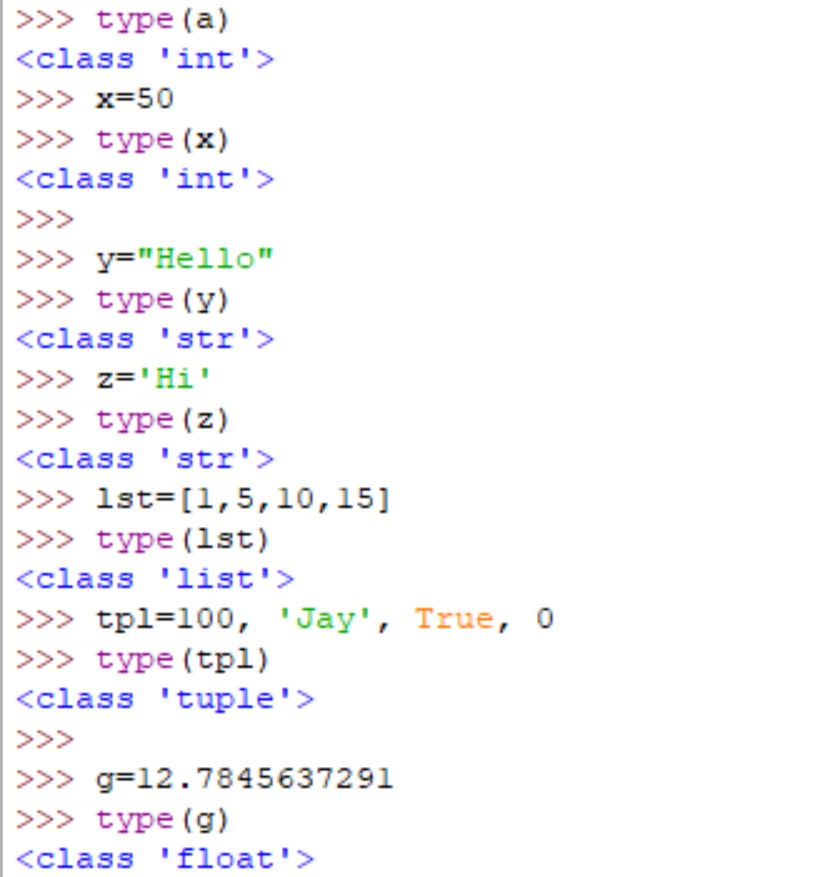
How do you find the type of a variable in Python?

Sometimes they can be found by inspection but the correct way is to use the type() function.

These are the standard data types in Python.

Numbers
String
List
Tuple
Dictionary
Bool

But there are many more.

You can easily find the type using the type() function in Python. Here are some examples.


type_0

Here are some more.

type_1

Sunday, July 8, 2018

Can you create an empty class in python?

Yes you can. The following code creates an empty class named joke.
------------
>>> class joke:
 pass


-----------------------
The 'pass' needed but does not perform anything. It is needed for the definition syntactically but does not perform or execute any code.
If you want to test whether you created a class, try this:

-------------------
>>> type(joke)

>>> 


---------------------

Saturday, July 7, 2018

How do you create a 3D model using Paint 3D?

There was Paint which was Paint 2d. Recently after Windows 10 debut Microsoft added Paint 3D.
Using Paint 3D you can create 3D objects or use existing 3D models.

In what follows you will be using Paint 3D app which you can download from Windows Store, or it may even bundled with some of the computers with Microsoft OS.


PowerPoint3d_0
Launch Paint 3D and this user interface will be displayed where you can create a 3D object or use an existing model.


PowerPoint3d_1

In what follows you will be using an existing models.

Click on the available 3D models and click the dog icon shown.


PowerPoint3d_2


After clicking DOG enter the editor area, your cursor arrow turns to a cross. Now move your cursor without lifting on the surface and you will see a dog model on the editor area.


PowerPoint3d_3

You can edit the color with various options as shown.


PowerPoint3d_4


You can save to your computer using Save As. It can be anywhere you save to, or to the 3D Objects directory.

PowerPoint3d_6

Take note of the different formats that you can save to.