Wednesday, June 10, 2015

How do you convert a string to integer in Powershell?


It is easy to convert a number represented as a string into an Integer.

Here is a string declaration:
$str1="123"

Declare the string in the command window is as shown:
PS C:\Users\Jayaram> $str1="123"  

The displayed value in the command window is as shown:
PS C:\Users\Jayaram> $str1
123

You can get to find the data type by running the following:
PS C:\Users\Jayaram> $str1.GetType().FullName
System.String

==============================
Now we convert this to an integer

The following line converts the string to an Integer
PS C:\Users\Jayaram> $foo=[INT]$str1

This is the value in the $foo variable
PS C:\Users\Jayaram> $foo
123

Now we get the type of data in $foo
PS C:\Users\Jayaram> $foo.GetType().FullName
System.Int32

Difference between GetType().FullName and just GetType()
 

PowerShell has intellisense support and you should make use of it in your coding as shown here:
After typing $foo insert a . and wait for the pop-up menu with various possible items as shown.

                                                                                                           
A string such as "555-5555-1212" is a string but will return an error as the variable is not in the correct format.
PS C:\Users\Jayaram> $str2="555-5555-1212"

PS C:\Users\Jayaram> $boo=[INT]$str2
Cannot convert value "555-5555-1212" to type "System.Int32". Error: "Input
string was not in a correct format."
At line:1 char:1
+ $boo=[INT]$str2
+ ~~~~~~~~~~~~~~~
    + CategoryInfo          : InvalidArgument: (:) [], RuntimeException
    + FullyQualifiedErrorId : InvalidCastFromStringToInteger

Monday, June 8, 2015

What is Windows Essentials?

It was formerly known as Windows Live Essentials, Windows program suite consisting of freeware applications from Microsoft. It is essentially a bundle of programs consisting of:

The latest one available is Windows Essentials 2012 which you can download and install on your computer.
The 2011 version is available here:
http://download.cnet.com/Windows-Live-Essentials-2011/3000-2150_4-10805747.html

The 2012 version details are here including download link:
http://hodentekhelp.blogspot.com/2015/06/how-to-remove-red-eye-from-image-in.html
 

Sunday, June 7, 2015

How to remove red eye from an image in Windows 8.1?

The removal of red eye is quite easy but you need to download and install Windows Photo Gallery from Microsoft site here:
http://windows.microsoft.com/en-US/windows-live/photo-gallery

Let us first install Photo Gallery.

Download this file


The system requirements for Windows Essentials 2012 which has Photo Gallery and other programs.


Select how you want to install.


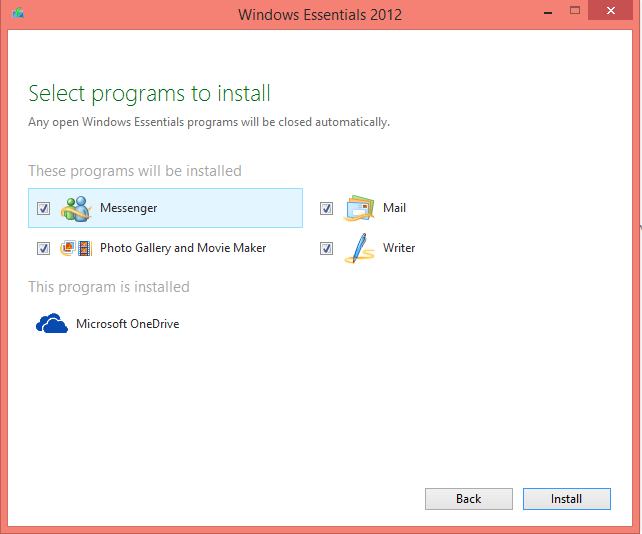
Select items you want to install.


Sign the license agreement.


In Photo Gallery import the picture. This was imported from a Nokia Icon camera and there is a menu item to fix the red eye. Just follow the procedure(shown inside rectangle in the image below).

 
 That's as simple as that. The red color just vanishes.


Can you have a variable in PowerShell here-strings?

Yes.

Review this link before you begin.

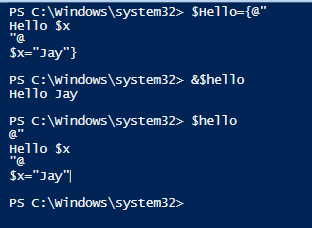
You can have a variable in Here-strings but you need to define the variable in the same session. Here is how you do it:

Declare $hello as follows:

$Hello={@"
Hello $x
"@
$x="Jay"}


In order that the variable is expanded run the following:

&$Hello
(This is not case sensitive, you can as well run, &$hello)
and you will get the response:
Hello Jay


(hello or Hello: not case sensitive)
Variable declaration can be in the beginning also as shown:

PS C:\Windows\system32> $Hello={$x="Jay"
@"
Hello $x
"@
}
PS C:\Windows\system32> &$hello
Hello Jay

PS C:\Windows\system32>

Note that defining the variable in single quotes will not alter the response.

Saturday, June 6, 2015

What is here-string in Windows PowerShell and how do you use it?

Here-string is a generic way of denoting a file literal or an input stream. It is used to treat a part of the source code file as a separate file. Here-string finds its origin in UNIX Shell

Like other shell programs Here-strings is also a feature of PowerShell.

Probably you be able to comprehend it better by looking at how it is used.
First of all how do you create a string from a block of text?
Let us take the Hello World example.
The Here-string variable $hello is to be declared as shown:
$hello=@"
Hello World
"@

It has to be declared exactly as shown.
For example if you declare it as,
$hello=@"Hello World"@

then immediately when you try to run this script you get the following error:
--
At line:1 char:10
+
$hello=@"Hello World"@
+          ~
No characters are allowed after a here-string header but before the end of the line.
    + CategoryInfo          : ParserError: (:) [], ParentContainsErrorRecordException
    + FullyQualifiedErrorId : UnexpectedCharactersAfterHereStringHeader

 ----------
Of course you will notice that the following declaration also produces an error:
$hello=@"
Hello World"@


The error if you run this is:
The string is missing the terminator: "@.
    + CategoryInfo          : ParserError: (:) [], ParentContainsErrorRecordException
    + FullyQualifiedErrorId : TerminatorExpectedAtEndOfString

Now that it is correctly declared if you run the script you get the response as

Hello World
See the response in Windows PowerShell as shown:


Her-String01
The point to remember is the declaration starts with @" and whatever else start on the next line
and Ends with "@ on a new line. In between you can have strings, variables, formatted text etc.


Thursday, June 4, 2015

What is Polybase?

It is a Microsoft Data tool. It simplifies management of relational and non-relational data with the ability to query both.

You want to query non-relational data. Do you modify it and bring it into SQL Server which is relational and then query it? Or do you buy another product to query non-relational data (like data in Hadoop, blobs and files)?

Well Polybase provides the capability to query non-relational data in-situ using the SQL Server using T-SQL. You need not move the data over to SQL Server although SQL Server gives the option to store in SQL Server if you want to do so. Polybase is supported out of the box in SQL Server 2016 CTP2 which means it will be available in SQL Server 2016.

Polybase was not supported out of the box in earlier version. Of course Polybase can process the queries whether it is on the premises or in the cloud.

Here is a rough schematic of what it is about.


Tuesday, June 2, 2015

What is Microsoft Solver Foundation?

It is a set of tools to work on mathematical simulation, optimization and modelling. It uses the managed execution and common language runtime (CLR). This means you can use any of the CLR languages including VB, Visual C++, Visual C#, Visual F#, and IronPython.
Of course you can also use ASP.NET and Silverlight in your mathematical operations.

Mathematical Solver Foundation APIs
  • Can run remotely as a service within IIS and ASP.NET
  • Can run in Excel as an add-in
  • Integrate with other .NET Framework apps
  • Embed as DSL within CLR languages
  • Embed as a CLR compliant module.
Review this link for more:
https://msdn.microsoft.com/en-us/library/ff524497(v=vs.93).aspx