The Process of importing was round about but works alright.
I did not use Google's Transcription for this
My name in Kannada
ಜಯರಾಮ್
Tuesday, September 9, 2008

Thursday, September 4, 2008
How do I connect to ODBC data in MS Access?
In MS Access you click on File | Get External Data | Import...
In the Import window click as shown to connect to a ODBC source. Scroll all the way down, last item.

This opens the Select Data Source window where you can use the existing ones are create a brand new DSN.

Have fun!
In the Import window click as shown to connect to a ODBC source. Scroll all the way down, last item.

This opens the Select Data Source window where you can use the existing ones are create a brand new DSN.

Have fun!
Wednesday, September 3, 2008
DOJO 111 Test page on Google Chrome
Here are five shots of the same DoJO test page on server rendered on different browsers.
Top left: Google Chrome
Top right: IE 7.0
BottomLeft: Safari 3.1.1
Bottom Right: Firefox 3.0.1

This one is from Opera 9.1

True to form IE is different.
Google Chrome is ready for down load. Look for details at:
http://hodentek.blogspot.com/2008/09/no-fuss-install-of-google-chrome.html
Top left: Google Chrome
Top right: IE 7.0
BottomLeft: Safari 3.1.1
Bottom Right: Firefox 3.0.1

This one is from Opera 9.1

True to form IE is different.
Google Chrome is ready for down load. Look for details at:
http://hodentek.blogspot.com/2008/09/no-fuss-install-of-google-chrome.html
Tuesday, September 2, 2008
Google Chrome Beta install page does not work
Tried to down load from this link:
http://gears.google.com/chrome/eula.html?hl=en
It does not like to install.
In IE 7.0 errors on Line 133 and 146
In Mozilla/5.0 Firefox 3.0.1 nothing happens, no messages nada
In Safari 3.1.1 nothing happens, no messages
Anyone find a better site to down load?
http://gears.google.com/chrome/eula.html?hl=en
It does not like to install.
In IE 7.0 errors on Line 133 and 146
In Mozilla/5.0 Firefox 3.0.1 nothing happens, no messages nada
In Safari 3.1.1 nothing happens, no messages
Anyone find a better site to down load?
Tuesday, August 26, 2008
My Oracle 10G XE is on port 8080. Can I change the port?
If you have port conflict and you want to change Oracle 10G XE's HTTP port (default is 8080) you can change it.
This is what you do in the Windows XP machine.
Make sure OracleServiceXE and OracleXETNSListener have started in the Control Panel.
From Start | Run open a command window.
Assuming your environmental variables are set correctly start with the following: (Reds are what you type-in and blues are what the computer writes to screen)
C:\>sqlplus /nolog
SQL*Plus: Release 10.2.0.1.0 - Production on Tue Aug 26 10:40:44 2008
Copyright (c) 1982, 2005, Oracle. All rights reserved.
SQL> connect
Enter user-name: system
Enter password: >enter password if will not be visible >
Connected.
SQL> Exec DBMS_XDB.SETHTTPPORT(8087); [Assuming you want to have HTTP going to this port]
PL/SQL procedure successfully completed.
SQL>quit
Disconnected from Oracle Database 10g Express Edition Release 10.2.0.1.0 - Production
This is what you do in the Windows XP machine.
Make sure OracleServiceXE and OracleXETNSListener have started in the Control Panel.
From Start | Run open a command window.
Assuming your environmental variables are set correctly start with the following: (Reds are what you type-in and blues are what the computer writes to screen)
C:\>sqlplus /nolog
SQL*Plus: Release 10.2.0.1.0 - Production on Tue Aug 26 10:40:44 2008
Copyright (c) 1982, 2005, Oracle. All rights reserved.
SQL> connect
Enter user-name: system
Enter password: >enter password if will not be visible >
Connected.
SQL> Exec DBMS_XDB.SETHTTPPORT(8087); [Assuming you want to have HTTP going to this port]
PL/SQL procedure successfully completed.
SQL>quit
Disconnected from Oracle Database 10g Express Edition Release 10.2.0.1.0 - Production
I have a bunch of articles on Oracle 10G XE at the following link:
http://hodentek.blogspot.com/2006/11/links-to-my-oracle-10g-xe-articles.htmlThursday, August 21, 2008
How do you turn on and turn off Report Server Web Service functionality in SQL Server 2008?
You can turn off and turn on Reporting services functionality using the SQL Server Management Studio.
Step 1: Connect to the Report Server from File |Connect Object Explorer... to open the
Connect to Server window.

Step 2: Pick Reporting Services and click [assumed authentication is OK].
After a while the Report Server opens in Management Studio as shown.
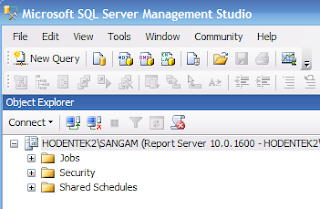
Step 3: Right click the Report Server node to reveal drop-down menu as shown.

Step 4: Click on Facets.
The View Facets window opens. It shows the surface area exposed with all reporting services programs running. You can change the TRUE to FALSE for these services to turn them off for one reason or another. Suppose you are managing reports and viewing them without a need for a Report Manager, then you can turn off Report Manager here. Later if you do need you can turn it on. Similarly for Scheduled events and Web Services as well. After making changes click OK.

Step 1: Connect to the Report Server from File |Connect Object Explorer... to open the
Connect to Server window.

Step 2: Pick Reporting Services and click [assumed authentication is OK].
After a while the Report Server opens in Management Studio as shown.

Step 3: Right click the Report Server node to reveal drop-down menu as shown.

Step 4: Click on Facets.
The View Facets window opens. It shows the surface area exposed with all reporting services programs running. You can change the TRUE to FALSE for these services to turn them off for one reason or another. Suppose you are managing reports and viewing them without a need for a Report Manager, then you can turn off Report Manager here. Later if you do need you can turn it on. Similarly for Scheduled events and Web Services as well. After making changes click OK.

Saturday, August 16, 2008
How does an Access table copy over to MS SQL Server 2008?
Here is an example of how Categories table in Northwind database would copy over to the SQL Server 2008 Database Nwind2008.
MS Access:
Category ID Primary Key Data Type: AutoNumber Long Integer Indexed:Yes(No dups)
CategoryName: Data Type: Text FieldSize:15 AllowZeroLength:No Indexed:Yes(No dups)
Required:Yes
Descripton: Data Type:Memo AllowZeroLength+NO, Indexed:No, Required:no
Picture: OLE Object Required:NO
SQL Server 2008:
CategoryID: Int AllowNulls:NO
CategoryName: nvarchar(15) AllowNulls:No
Description: nvarchar(MAX) allowNulls:Yes
Picture: Data Type: image Allow Nulls:Yes
MS Access:
Category ID Primary Key Data Type: AutoNumber Long Integer Indexed:Yes(No dups)
CategoryName: Data Type: Text FieldSize:15 AllowZeroLength:No Indexed:Yes(No dups)
Required:Yes
Descripton: Data Type:Memo AllowZeroLength+NO, Indexed:No, Required:no
Picture: OLE Object Required:NO
SQL Server 2008:
CategoryID: Int AllowNulls:NO
CategoryName: nvarchar(15) AllowNulls:No
Description: nvarchar(MAX) allowNulls:Yes
Picture: Data Type: image Allow Nulls:Yes
Subscribe to:
Posts (Atom)