Friday, May 26, 2017

Microsoft BitLocker saga..

This is the classic example of getting out of one problem and getting into another.

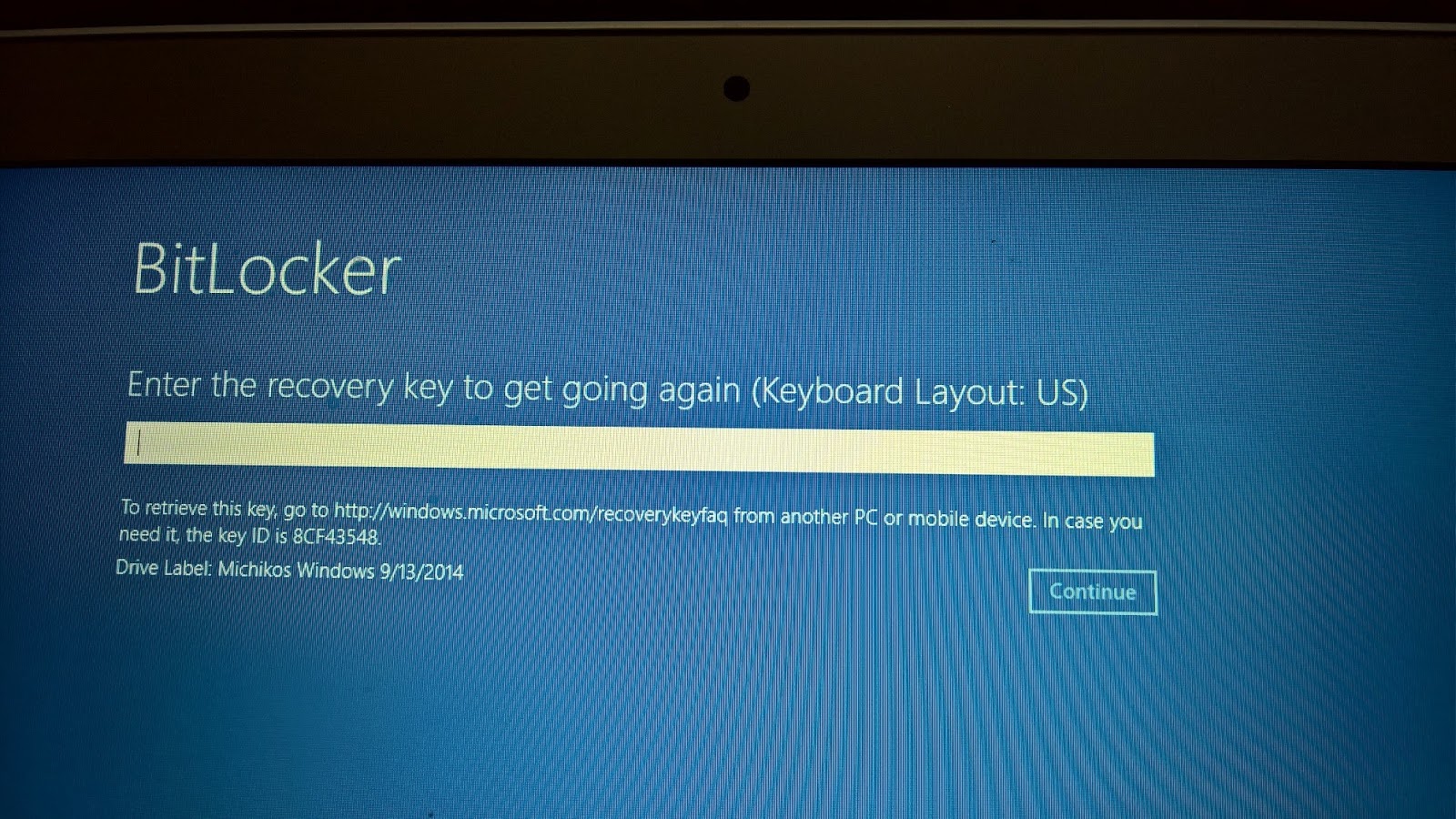
I had the virus problem (probably the ransomeware except that I did not click on any link and the threatening page did not go away after a reboot, etc.) on my Toshiba tablet with Windows 10 and decided to System Reset to clean the tablet. It went through the process and now requesting entering of a recovery key. There is a Key ID on the tablet (8 alphanumeric characters) and if I try to enter I get a basic numeric keypad like on a calculator with keys marked with only numbers.
It may work if I can enter. But how can I enter this 8 character ID using this calculator-like numeric keypad? and Drive Label with a date.


The tablet is on a Wi-Fi network with 3 other laptops (two running Windows 10 Pro and the other Windows 7 Pro)

It turns out that I am supposed to have a key and what was shown above was the KeyID (only the first part of it). The key itself is all numeric with 48 characters.

Finally I used the manage-bde commandline command to see what is going on.
Finally using manage-bde, I could find out that I have only the recovery key id without a recovery key.


What surprises me is that I never meddled with BitLocker as I do not have great secrets to guard. How come the BitLocker was locked in the first place? I toook the tablet to the Microsoft Store where they might be able to find some thing.

 It is not I don't have a key, I believe there never was one!

It is still puzzling, that since I did not lock the machine with BitLocker, who did?

According to Microsoft Store, when I signed into Microsoft Account the BitLocker by default locks it. It did not seem credible to me. I did not get the impression the technician was fully conversant with BitLocker. I avoided BitLocker for the simple reason, I did not want another layer of complexity to my files/folder that do not contain sensitive information.

One of the members of Microsoft Forum provided some background information of BitLocker's evolution. This is what might have happenned (his words):

"Earlier, Microsoft used to enable bitlocker on the home version of windows if
A a microsoft account was used
B the computer fulfilled the hardware requirements (TPM chip, instant-go compatible).
That was quite an idea... they even shot the recovery key through the network in plain text - some german IT magazine ("IX") discovered that. By now, they stopped it."

Thursday, May 25, 2017

How do you create a Full-Text Catalog to a database in SQL Server?

A full-text catalog is a logical container where a group of full-text indexes are stored. A full-text catalog is needed before you can create a full-text index. Full-text catalog is a virtual object and does not belong to the file group.

In order to text search an full-text index will be needed. For example, the Categories table in Northwind does not have a full-text indexed column. If you try to create a Full-Text indexed column you will get this error:
-----------
Msg 9967, Level 16, State 1, Line 11
A default full-text catalog does not exist in database 'Northwind' or user does not have permission to perform this action.

--------------

You can create a Full-text catalog using the SQL Server Management Studio or using Transact-SQL(T-SQL)
---------
Here is how it is created for Northwind database in SQL Server 2016 using T-SQL. Read to end this post for error messages.

USE Northwind
Go
Create FULLTEXT CATALOG ftCat_Nwind as default
Go

------
Before the above statement was run there was no Catalog:


After the above statement was processed the named catalog was created:


You can access the properties as shown here


All tables and views are eligible and you can assign the objects to the Catalog by transferring using the > button.

Creating a Full-Text catalog for Northwind using SQL Server Management Studio is easy. Right click Full-Text Catalogs in the Storage node and provide a name for the catalog and a owner. Choose the accent sensitivity and click OK to create.


The Catalog gets created as shown.


Caution:

Although SQL Server 2016 SP1 allows you to create a Full-Text Catalog, you will find it missing in the System Views as in the following query.

This feature has not improved even from the older versions. It has not been fixed and the error messages that you get such as the following does not give a clue.

Property IsAccentSensitive is not available for the Full-Text catalog
Property PopulationStatus is not available for FullTextCatalog

The reason for this error is that the Full-Text feature was not installed in the first place.
Watch the video and review features not installed:

https://hodentekmsss.blogspot.com/2017/05/installing-sql-server-2016-sp1-for.html


How do you use the table hint TABLOCK in a SQL Query?


Here is a query that updates a value in the Northwind Shippers table using TABLOCK:
----------
Use Northwind
GO
UPDATE  Shippers
WITH (TABLOCK)
SET CompanyName='Speedy Gonsalez'
WHERE ShipperID=1

--
SELECT * from Shippers
------------
The query updates the name of the shipping company whose ID=1 to a new name. When TABLOCK is used in the above manner it should be within the parenthesis.


Read this recommendation from Microsoft:

"An UPDATE statement always acquires an exclusive (X) lock on the table it modifies, and holds that lock until the transaction completes. With an exclusive lock, no other transactions can modify data. You can specify table hints to override this default behavior for the duration of the UPDATE statement by specifying another locking method, however, we recommend that hints be used only as a last resort by experienced developers and database administrators"

TABLOCK is one of several table hints in SQL Server which includes the following:

   FORCESCAN 
   FORCESEEK 
   HOLDLOCK  
   NOLOCK  
   NOWAIT 
   PAGLOCK  
   READCOMMITTED  
   READCOMMITTEDLOCK  
   READPAST  
   READUNCOMMITTED  
   REPEATABLEREAD  
   ROWLOCK  
   SERIALIZABLE  
   SNAPSHOT  
   SPATIAL_WINDOW_MAX_CELLS = integer 
   TABLOCK  
   TABLOCKX  
   UPDLOCK  
   XLOCK 

Table hints can be used with any of the following operations:
Applies to:
DELETE
INSERT
SELECT
UPDATE
MERGE

Sunday, May 21, 2017

Is it JSON or not?

The following is formatted in JSON

["wclass",
{"student":{"name":"Linda Jones","legacySkill":"Access, VB 5.0"}etc..
},
{  "student":{"name":"Adam Davidson","legacySkill":"Cobol, MainFrame"}
},
{"student":{"name":"Charles Boyer","legacySkill":"HTML, XML"}
}]

This is a valid JSON according to RFC 4627.


json_01

However when you use this in SQL Server to look at the JSON using the OpenJSON, for example, you will get this error:


json_00

The reason for this error:
Msg 103, Level 15, State 4, Line 2
The identifier that starts with "wclass"...
lies in the fact that SQL Server string starts with a single quote and therefore you need to provide this declaration:

declare @json nvarchar(Max)
set @json=
'["wclass",
{"student":{"name":"Linda Jones","legacySkill":"Access, VB 5.0"}
},
{"student":{"name":"Adam Davidson","legacySkill":"Cobol, MainFrame"}
},
{"student":{"name":"Charles Boyer","legacySkill":"HTML, XML"}
}]'


When you do this the error goes away as shown:


json_02


The character count in @json is also important as you see in this SQL query:


json_03

The answer is that RFC 4627 validation requires a string to start with a double quote("), but the SQL Server's JSON validation requires the JSON to begin with a single quote(') as we saw in this post.

How do you query the OpenJSON function with a SELECT statement?

OpenJSON converts an array of objects in a variable in JSON Format to a rowset
that can be queried with standard SQL Select statement.

Here is an example:

We are going to look at a JSON list of my first batch of students who took my course shown here. 

["wclass",
{"student":{"name":"Linda Jones","legacySkill":"Access, VB 5.0"}
},
{"student":{"name":"Adam Davidson","legacySkill":"Cobol, MainFrame"}
},
{"student":{"name":"Charles Boyer","legacySkill":"HTML, XML"}
}]

This is the result of running OpenJSON using the above:


Now you can run a SELECT query with a with clause on the rows returned by OpenJSON as shown here:

The first member "wclass" has nulls for the selected columns. It exists because it actually was in the original XML that got converted to JSON.
Here are my more recent JSON related articles:

JSON validation in SQL Server:
https://hodentekmsss.blogspot.com/2016/11/using-json-validator-in-sql-server.html

Nested JSON using SQL Server 2012:
https://hodentekmsss.blogspot.com/search?q=json

Retrieve JSON formatted data from SQL Anywhere 17
https://hodentekmsss.blogspot.com/2016/11/retrieve-data-from-sql-anywhere-17-in.html

Friday, May 19, 2017

What are geometry primitives in GeoJSON?

In Eucledian geometry we were taught about the concepts of 'Point' and straight line being the shortest distance between two points.

GeoJSON is an Open Standard format based on JavaScript Object Notation for representing simple geographical (geometrical?)features.

In GeoJson Point, Line and Polygon are the Geometric Primitives:

Point:
{ "type": "Point",
    "coordinates": [30, 10]
}
Line:
{ "type": "LineString",
    "coordinates": [
        [30, 10], [10, 30], [40, 40]
    ]
}
Polygon:
{ "type": "Polygon",
    "coordinates": [
        [[30, 10], [40, 40], [20, 40], [10, 20], [30, 10]]
    ]
}
This post is based on GeoJSON on Wikipedia.

Tuesday, May 16, 2017

What is Azure Cosmos DB?

This is how Azure Cosmos DB is described by Microsoft, "Azure Cosmos DB is Microsoft's globally distributed, multi-model database. With the click of a button, Azure Cosmos DB enables you to elastically and independently scale throughput and storage across any number of Azure's geographic regions. It offers throughput, latency, availability, and consistency guarantees with comprehensive service level agreements (SLAs), something no other database service can offer"


If you are looking for Global Distribution, horizontal scaling, guaranteed latency, high availability, comprehensive SLA's and unrivalled Data Model and API that no RDBMS, no no-sql database can provide there is nothing out there to match Azure Cosmos DB.

Azure Cosmos DB Engine supports multiple database systems and it is based on the following:

 Atom: Consisting of a small set of primitive types (String, Bol, number)
 Records: Structs
 Sequence: Arrays of atoms, records and sequences

Azure Cosmos DB engine currently supports the following:

Document DB SQL
Mongo DB
Azure Table Storage
Gremlin Graphh Query API
It will support other API's in the future.

For developers looking for a globally distributed database system Azure Cosmos DB is the answer.