Tuesday, August 19, 2014

Can multiple versions of PowerShell exist on a computer?

Power Shell is one of the most powerful scripting languages to use if are working with Windows. Often you may want to know what version you have on your computer and you may also want to know whether multiple versions can exist side-by-side on a computer.

I purchased a Windows 8.0 laptop and a few days later it was upgraded to Windows 8.1. There have been many Windows Updates since I bought the computer and I am not sure if a version of PowerShell was installed. Also a few months later I installed SQL Server 2012 Developer Edition.
After looking through I discovered that I have two versions 2.0 and 4.0; and they can exist side-by-side.

In my previous post here, I mentioned that you can find the version of your PowerShell installation using the following commandlet.

PS C:\>$PSVersionTable.psversion

As you can see from this post that I had PowerShell Version 3.0 on my Windows 7 (x64) machine

http://hodentekhelp.blogspot.com/2014/08/can-you-use-powershell-to-find.html

In Windows 8.1 using the same commandlet I find the following:
-------------------
Windows PowerShell
Copyright (C) 2013 Microsoft Corporation. All rights reserved.

PS C:\Users\Jayaram> $psversionTable.psversion
Major  Minor  Build  Revision
-----  -----  -----  --------
4      0      -1     -1

---------------------
However when invoked PS from SQL Server as mentioned in this post:
http://hodentekmsss.blogspot.com/2014/04/starting-power-shell-from-sql-server.html

I see that the version is 2.0
--------------------------------
PS SQLSERVER:\SQL\HODENTEK8\REGENCYPARK> $psversionTable.psversion
Major  Minor  Build  Revision
-----  -----  -----  --------
2      0      -1     -1

------------------------------------
This means that the versions 2.0 and 4.0 can exist side-by-side

May be you are interested in these as well:
http://hodentekmsss.blogspot.com/2014/11/a-quick-note-on-writing-powershell_12.html
http://hodentekmsss.blogspot.com/2014/11/a-quick-note-on-writing-powershell.html

Wednesday, August 6, 2014

Can you use Powershell to find the environmental variable Path?

It is very easy to find path using the command line as shown:
C:\>Path

If you want to use Power Shell then you should first start PowerShell with the following command:
C:\>Powershell

If powershell is installed you should see the following change:
C:\> changes  to PS C:\>

When you are in PS C:\

type exactly as shown.
PS C:\> get-item env:
Then you should see all the environmental variables (directories) separated by a semi-colon;
A sample listing is shown here:


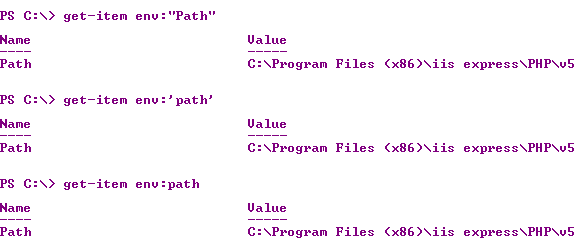
If you want to get a single environmental variable such as 'Path' for example
You can do this:
PS C:\> $x="Path"PS C:\> get-item env:$x
or
PS C:\> get-item env:"Path"
On this machine Windows 7 (x64) Ultimate, "Path", 'path', path all returned the 'PATH' variable.


If you want to know the version of your powershell, try this:


Have a look at this reference for PATH:
http://msdn.microsoft.com/en-us/library/aa922003.aspx
 

Sunday, August 3, 2014

What is 'Path' in Windows 7 and how do you find it?

What is 'Path'?
Path is an environmental variable.

It is a list of directory paths where the computer looks for a command to execute although the full path to the executable is not given.

For example ,

if you type 'Notepad' at a command prompt a Notepad application opens immediately, although its location on your computer is at:
%windir%\system32\notepad.exe which is the same as C:\windows\system32\notepad.exe.

This is because C:\windows\system32\ is in the list of directories in the path.

How do you find the 'Path'?
You can simply type path at a command prompt and the computer prints to the screen the list of directories as shown:
----------------
C:\>path
PATH=C:\Program Files (x86)\iis express\PHP\v5.4;C:\Program Files\Internet Explorer;;C:\oraclexe\app\oracle\product\11.2.0\se
rver\bin;;C:\Windows\system32;C:\Windows;C:\Windows\System32\Wbem;C:\Windows\System32\WindowsPowerShell\v1.0\;C:\Program File
s\Microsoft SQL Server\110\Tools\Binn\;c:\Program Files (x86)\Microsoft SQL Server\100\Tools\Binn\;c:\Program Files\Microsoft
 SQL Server\100\Tools\Binn\;c:\Program Files\Microsoft SQL Server\100\DTS\Binn\;C:\Program Files\Microsoft\Web Platform Insta
ller\;c:\Program Files (x86)\Microsoft ASP.NET\ASP.NET Web Pages\v1.0\;C:\Program Files\SQL Anywhere 16\bin64;C:\Program File
s\SQL Anywhere 16\bin32;c:\Program Files (x86)\Microsoft SQL Server\110\Tools\Binn\;c:\Program Files\Microsoft SQL Server\110
\DTS\Binn\;c:\Program Files (x86)\Microsoft SQL Server\110\Tools\Binn\ManagementStudio\;c:\Program Files (x86)\Microsoft Visu
al Studio 10.0\Common7\IDE\PrivateAssemblies\;c:\Program Files (x86)\Microsoft SQL Server\110\DTS\Binn\;;C:\Windows\System32\
WindowsPowerShell\v1.0\;C:\Program Files (x86)\Microsoft SDKs\TypeScript\1.0\;C:\Program Files (x86)\Java\jre7\bin\;

You can also find it another way using the Computer Properties as shown here:
http://hodentekhelp.blogspot.com/2010/08/compiling-java-in-windows-7.html


Thursday, July 3, 2014

How do you use MS Query in MS Excel 2010?

MS Query is used to import data into a MS Excel application (Work sheet) in Microsoft Excel. Here Microsoft Excel in the Microsoft Office Professional Plus 2013 (x32bit)  suite is used.

Using Microsoft Query data from a table in SQL Server 2012 can be imported into an excel sheet. The process is explained in great detail here:

http://hodentekmsss.blogspot.com/2014/07/how-do-you-import-data-from-sql-server.html

In order to carry out the steps in the above, you must first create an ODBC connection to SQL Server (in this case SQL Server 2012 Express) will be required. If you do not have a DSN made follow this link to learn how:

http://hodentekmsss.blogspot.com/2013/08/how-do-you-create-odbc-dsn-to-sql.html


Sunday, June 29, 2014

How do you remove the Trust Media View malware?

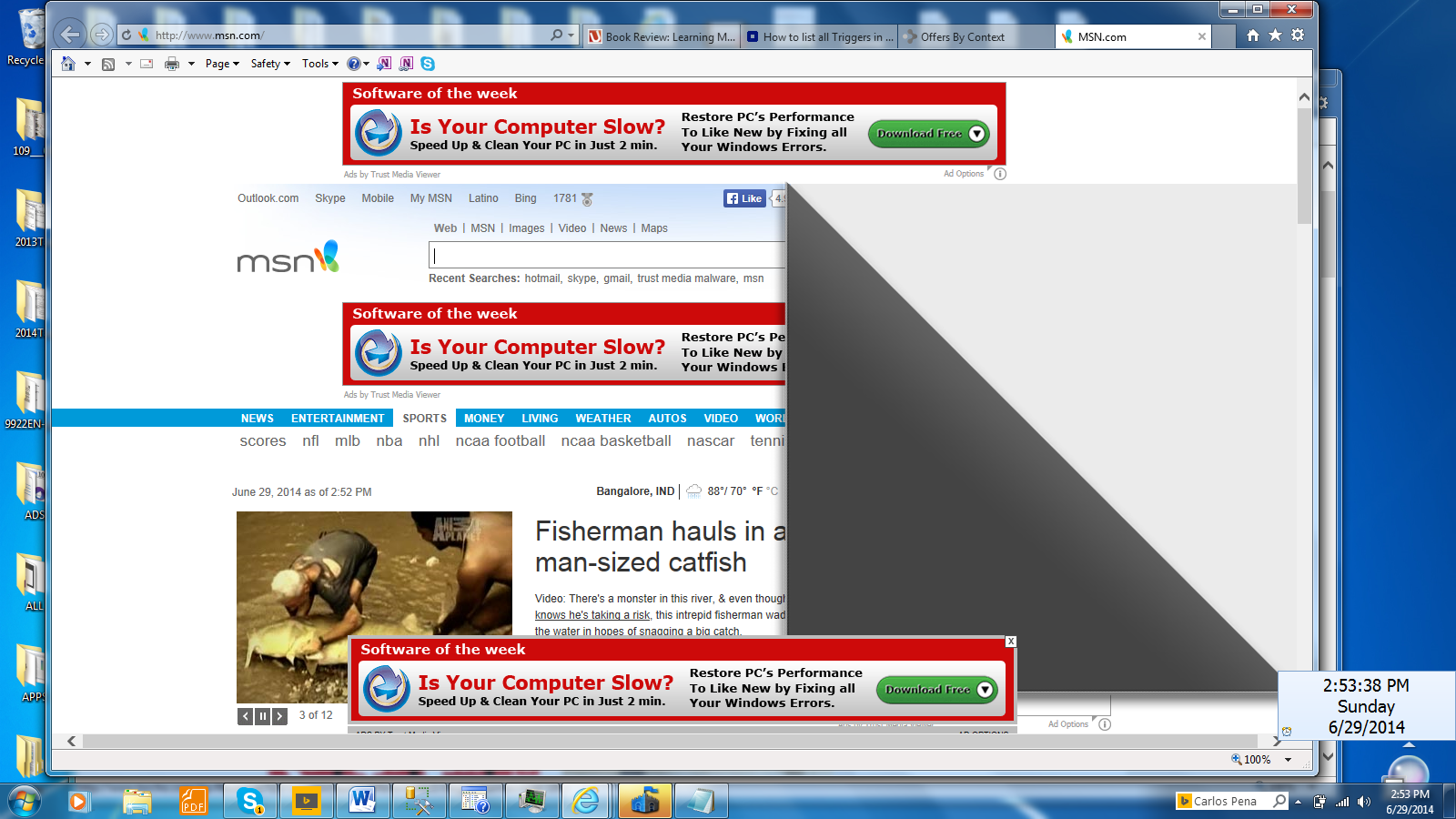
This ugly malware makes your browser look like this:


It is very easy to notice it if your computer is infected. Three pop-ups and a page-turner effect! That's incredible.

Well, Trust Media View started impacting my browser on my Windows 7 Ultimate x64 bit machine. It's kind of ugly and visually nauseating. The people who made it must be pretty dumb. I do not see why they need to show many of the pop-ups on just one page.

I took the following steps:

I tried Microsoft Security Essentials and it reported no problem. Well should I believe this?
I am not sure how good is MES when it comes to malware removal.

Should XP users worry about Microsoft turning off the spigot to provide malware support to XP. Probably it is no big deal.

Clock is ticking for XP support

Finally I tried to disable the add-on and fortunately I found an entry for it in Manage Add-ons window show here.


I just disabled it and then restarted the computer. It does seem that Trust Media View ads have disappeared. I wonder why this screen cannot be modified to remove it.

If it comes back, I am going to do a System Restore. I am getting pretty good at this!
Mahalo

Thursday, June 26, 2014

What is a snippet and how do you insert a snippet in SQL Server?

A snippet is a template of TSQL code that you can use as a basis for writing your TSQL Statements. There are lots of canned templates that makes it easy to insert statements and modify them to suit your needs.

Steps to insert a snippet:

1. Right click the database (here Northwind) in which you want to create snippet and choose New query and New Query window opens(the pane on the right)


2. Right click inside the SQL Query pane and choose Insert Snippet (CTRD+X, CTRL+K) to display the following:


There are many different snippets you can insert and they are categorized as shown in the above to screen shots.

3. Let us say we want to create a table. In this case we insert a statement for creating a table. Click on (or double click) Table


4. Click on Create Table and a code snippet will be inserted. It takes a little while and the following code will be inserted.


This code has all the required items for the syntax. Albeit a simple table with two columns, it is a beginning. You may want to add more data types, more columns, add constraints etc.

What is a trigger in SQL Server?

A trigger is an event or an action that precipitates other events. However a trigger in SQL Server is a special kind of stored procedure that automatically executes when an event occurs in the database server. 

If you want to know what is a stored procedure, follow this link:
http://hodentekhelp.blogspot.com/2011/06/what-is-stored-procedure.html

There are different kinds of events that can occur in a database server such as the following:
  • Data Manipulation language events such as,
Insert
Update
Delete
statements on a Table or View.
In these cases if a trigger is defined, it will fire (respond to the event) regardless of any changes are made to the rows of a table.
  • Data Definition Language events such as,
Create
Alter
Drop
and certain stored procedures that perform DDL-like operations
  • Log-on trigger
These fire when a session is established by a user.