Showing posts with label $PsVersionTable. Show all posts

Thursday, February 1, 2018

Does Microsoft SQL Operations Studio support Windows Power Shell?

Yes. It does.
You can access the console in Microsoft SQL Operations Studio by clicking this option in the User Interface as shown.


PS_SQLOPS_0.png

This displays the terminal.


PS_SQLOPS_1.png

The following version of Power Shell is supported:


PS_SQLOPS_2.png


Wednesday, August 26, 2015

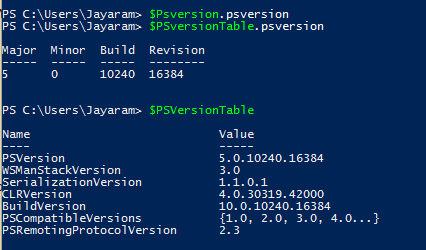
What version of Power Shell is supported in Windows 10?

The version of Powershell is 5.0 in Windows 10 as seen in this response to the $PSversionTable command.


PS5-01.PNG

However version 2.0 also exists as shown here:

PS5-02.PNG
Versions 3.0 and 4.0 are not found on the machine.

There are lots of Power Shell related posts (around 22) and you can access this address to see them all:
http://hodentekhelp.blogspot.com/search?q=Powershell

Wednesday, August 27, 2014

If you have multiple versions of Power Shell how do you change from one to the other?

If you have two or more versions of Power Shell on your computer it is possible to choose the one you want to run.

By default the highest version may be one that runs as in the present case on Windows 8.1 Professional (version 4.0 is installed in Windows 8.1 by default and Version 3.0 in Windows 8).
As described in the previous post, version 2.0 is also present.

You can run the version you want by the following command:
PS C:\>Powershell -version

This is how you run the version you want.
---------------
Windows PowerShell
Copyright (C) 2013 Microsoft Corporation. All rights reserved.
The next command displays the version number
PS C:\Users\Jayaram> $PSVersionTable.PSVersion
Major  Minor  Build  Revision
-----  -----  -----  --------
4      0      -1     -1

The following changes the version to 2.0. Note that there is no response.
PS C:\Users\Jayaram> PowerShell -version 2.0
Windows PowerShell
Copyright (C) 2009 Microsoft Corporation. All rights reserved.

The following displays the version after change
PS C:\Users\Jayaram> $PSVersionTable.PSVersion
Major  Minor  Build  Revision
-----  -----  -----  --------
2      0      -1     -1

PS C:\Users\Jayaram>

Tuesday, August 19, 2014

Can multiple versions of PowerShell exist on a computer?

Power Shell is one of the most powerful scripting languages to use if are working with Windows. Often you may want to know what version you have on your computer and you may also want to know whether multiple versions can exist side-by-side on a computer.

I purchased a Windows 8.0 laptop and a few days later it was upgraded to Windows 8.1. There have been many Windows Updates since I bought the computer and I am not sure if a version of PowerShell was installed. Also a few months later I installed SQL Server 2012 Developer Edition.
After looking through I discovered that I have two versions 2.0 and 4.0; and they can exist side-by-side.

In my previous post here, I mentioned that you can find the version of your PowerShell installation using the following commandlet.

PS C:\>$PSVersionTable.psversion

As you can see from this post that I had PowerShell Version 3.0 on my Windows 7 (x64) machine

http://hodentekhelp.blogspot.com/2014/08/can-you-use-powershell-to-find.html

In Windows 8.1 using the same commandlet I find the following:
-------------------
Windows PowerShell
Copyright (C) 2013 Microsoft Corporation. All rights reserved.

PS C:\Users\Jayaram> $psversionTable.psversion
Major  Minor  Build  Revision
-----  -----  -----  --------
4      0      -1     -1

---------------------
However when invoked PS from SQL Server as mentioned in this post:
http://hodentekmsss.blogspot.com/2014/04/starting-power-shell-from-sql-server.html

I see that the version is 2.0
--------------------------------
PS SQLSERVER:\SQL\HODENTEK8\REGENCYPARK> $psversionTable.psversion
Major  Minor  Build  Revision
-----  -----  -----  --------
2      0      -1     -1

------------------------------------
This means that the versions 2.0 and 4.0 can exist side-by-side

May be you are interested in these as well:
http://hodentekmsss.blogspot.com/2014/11/a-quick-note-on-writing-powershell_12.html
http://hodentekmsss.blogspot.com/2014/11/a-quick-note-on-writing-powershell.html