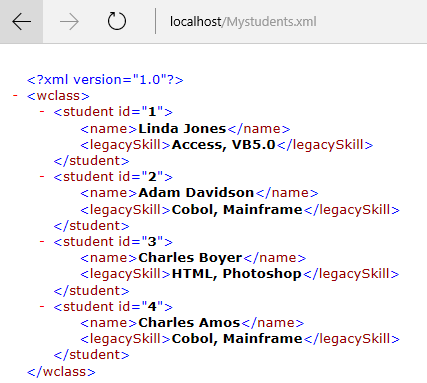
In the previous post, the file was placed on the local internet server and a URL reference was given. It does not have to be that way. The file can be in the folders/files and you just need to change the code a little bit as shown. I am using the same file I used in the previous post.
These are the three lines needed to parse the XML file in the following directory:
------------------
> library(XML)
> fileName="C:\\Users\\Jayaram\\Desktop\\SQLServer2016D\\R Server\\Mystudents.xml"
> xmlFile <- filename="" font="" readlines="" xmltreeparse="">
-------------
And this produces the same result as in the previous post.
---------
$doc
$file
[1] ""
$version
[1] "1.0"
$children
$children$root
Linda Jones
Access, VB5.0
Adam Davidson
Cobol, Mainframe
Charles Boyer
HTML, Photoshop
Charles Amos
Cobol, Mainframe
-------------------
Follow the warnings in the previous post. Also make sure that the file name is typed in as shown in the post (note the double slashes).
These are the three lines needed to parse the XML file in the following directory:
------------------
> library(XML)
> fileName="C:\\Users\\Jayaram\\Desktop\\SQLServer2016D\\R Server\\Mystudents.xml"
> xmlFile <- filename="" font="" readlines="" xmltreeparse="">
-------------
And this produces the same result as in the previous post.
---------
$doc
$file
[1] "
$version
[1] "1.0"
$children
$children$root
-------------------
Follow the warnings in the previous post. Also make sure that the file name is typed in as shown in the post (note the double slashes).