Showing posts with label Firefox. Show all posts

Tuesday, May 29, 2018

What is Web SQL?

Web SQL is simply SQL database that you can run in the web. It is only supported in the latest version of Safari, Chrome and Opera. Web SQL database API  are used to work with client based databases. It is well suited for web applications.

The core methods are:

openDatabase
transaction
executeSql


openDatabase create a database aobject allows you to open an existing database or allows you to create a new one.

transaction allows you control transaction helping you to commit or rollback.

executeSql allows you to execute a Sql queries.

Firefox and Microsoft Edge does not support Web SQL since it is not going to be a W3C standard. However, Web SQL are wrappers for SQLite.

Tuesday, October 10, 2017

How do you capture screenshots with Firefox?

Firefox screen shots - an application to capture sections or whole Web pages is still in BETA, but you can give it a try. I have version 56.0(32bit).

The Firefox browser has a new menu item.


 It is very easy to use. Let us say, I open this page:

I get to see today's Bing page as shown:


I used a desktop app called lightshot to capture this image.

Now let me use the Firefox Screenshot menu to capture a part of this web page. In order to describe I will be capturing the steps again using lightshot.

Click on the menu item (you will see Firefox Screenshots when you hover the item). You get this intro screen.

You just hit the right pointing arrow to get to the next page of this wizard.


Click again the arrows.


Here click on this page and select the region as shown


Click Save. It gets saved to the cloud.


Click Download and it gets into your Downloads folder as shown.


Well it can only capture anything on the Firefox browser. Useful but other tools do exist.

Tuesday, August 29, 2017

Does your browser support localStorage?

If your browser supports HTML5 then your browser supports local storage. The image below is for Microsoft Edge 15.


You can also view this HTML file (TodaysDate.html) below on your local IIS.


<html>
<body>

<div id="result"></div>

<script>
// Check browser support
if (typeof(Storage) !== "undefined") {
    // Store
    localStorage.setItem("Today", Date());
    // Retrieve
    document.getElementById("result").innerHTML = localStorage.getItem("Today");
} else {
    document.getElementById("result").innerHTML = "No browser support for localStorage";
}
</script>

</body>
</html>

If localStorage is supported then you should see the following (for today).

This also worked on IE 11 as well as Mozilla Firefox.


Monday, August 14, 2017

Is SVG a part of HTML5?


SVG is variously described as  'part of HTML5 specification' or an HTML5 extension. In either case, I am very happy as I am a fan of SVG.

In HTML documents you could embed an in-line SVG code.
SVG in some cases appear superior to Canvas in HTML. SVG creates prefabricated graphics that is part of the documnet model which can be accessed by the ID for any event based action, where as the graphics for use in CANVAS needs to be created and rendered during page loading.

Read my SVG related posts here:

http://hodentekhelp.blogspot.com/2015/12/does-microsoft-edge-support-svg.html

http://hodentek.blogspot.com/2009/10/finally-svg-in-visual-studio.html

http://hodentek.blogspot.com/2010/09/svg-gets-rendered-on-ie-90.html

http://hodentek.blogspot.com/2013/08/short-of-cash-get-apache-openoffice-40.html

http://hodentek.blogspot.com/search?q=svg

http://hodentekmobile.blogspot.com/2016/03/intel-xdk-controls-2-usage-of-svg-and.html

Monday, February 1, 2016

Does HTML5 WebSockets work for you?

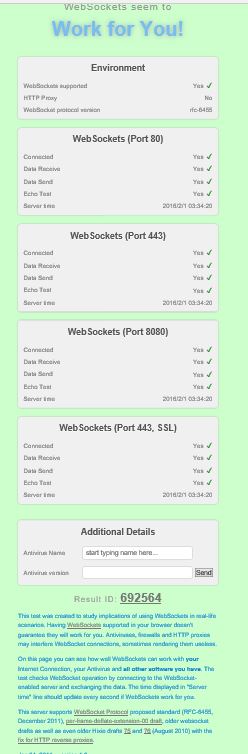
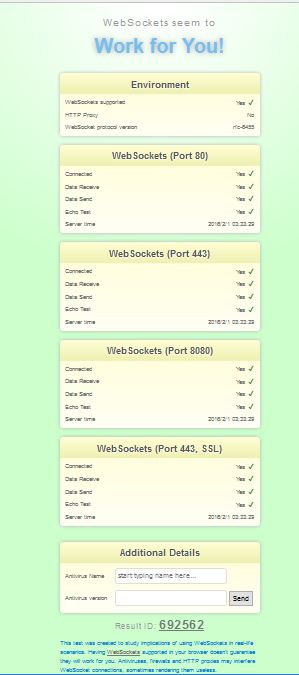
This is an easy test that will get you the answer in no time at all. I have Mozilla Firefox 44.0 and Microsoft Edge 25.10586.0.0 and Microsoft EdgeHTML 13.10586. Both reported that Web Socket will work on this Windows 10 (x64) computer. Even IE 11 reported the same. However there may be other issues. Here are the results from Firefox and Edge.
Just launch the browser and enter the following for the URL:
websocketstest.com. That's it!

Works on Edge

 Works on Firefox

Saturday, December 19, 2015

Which of Firefox and Microsoft Edge support MathML better?

This is just the view point looking at just one example and must not be construed to apply to whole of MathML. You may review some basic MathML information here.

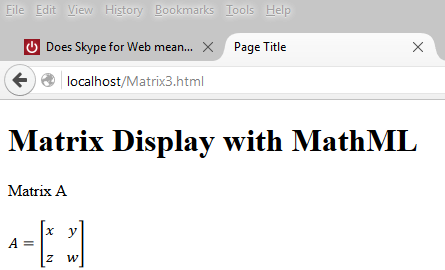
Here is an example of displaying a matrix using the presentation elements of MathML. Browsers do not support MathML the same way, some do better than others. Generally speaking browsers that support HTML5 should support MathML to some extent. This post considers only the latest versions of Firefox and Microsoft Edge at present.

This page can be hosted on a web server(in this case on the local ISS, IIS Version 10.0.10586) on Windows 10 Pro)

Matrix Display with MathML


Matrix A
 
     
  A
  =


         x
         y


         z
         w


This is a very simple page but there are differences how the browsers display them. The MathML is highlighted in yellow in the HTML page.

Firefox 42
Firefox displays as shown here without any modification. This is the correct way of displaying a matrix.


Microsoft Edge 25

The HTML code used as is (with the

Tuesday, May 26, 2015

Do you know what browser you are using in your smart phone?

You don't like your smart phone browser. Find it and change it (you can change it for only iPhone and perhaps Androids).

Open your browser and type-in the following:
http://www.whatbrowser.org and you will get your answer as I got on mine (Android) Windows Phone 8.1 (I have to double check if this is true).

You can of course change it. Unfortunately none of these can be chosen as they appear to be not available for Windows Phone from windows store.

Here is the correct and complete answer: Go to WhatIsMyBrowser.com on Windows Phone.


 Few more comments added here.