Showing posts with label Chrome. Show all posts

Monday, August 5, 2024

What is a virtual card?

There is always a concern that your credit card details for paying online may get to the wrong hands or gets retained, or leaked out.


The virtual card number that is created by your browser will be sent to the online transaction instead of your real card details.. The real card details will remain on your computer but the virtual details will be transmitted to the online transactions. This is available in the Edge browser. It is also called the Wallet or Edge Wallet.

Follow this link for setting it up in the Edge browser:

How to set up your Edge Wallet (thewindowsclub.com)

You need to do this on Chrome:


1. Open **Chrome**.

2. Navigate to `chrome://settings/payments`.

3. Make sure to turn on:

   - **Save and fill payment methods**.

   - **Allow sites to check if you have payment methods saved**.

4. Find the card you added to your Google Account.

5. Click **More**, then select **Turn on virtual card**¹.


 This enhances security and shields you against fraud. Remember that the virtual card number, expiration date, and CVC may differ from your physical card¹. 


Besides Internet browsers some financial companies also adopt this method to shield against fraud.


Monday, July 22, 2024

How do AI Chatbots fare with image creation?

We have seen that some of the chatGPT based chats (CoPilot,DALL-E 2, MidJourney, NightCafe  Creator, etc.) seem to work with both textual /image information. However, AI's interaction with text is lot more advanced than with the images. 

The difference between text, and image is analogous to structured data and unstructured data. Most of the textual information is highly ordered and structured, but that of the image is unstructured. Text may give a more intimate view into what it represents and it may even generate human-like text, but image gives only a give few of its attributes like shape, color, size and it may not be able to give the full context, like emotions. We can say at this point that text gives a higher contextual understanding than an image.

Image analysis using AI commonly known as computer vision has also made great advances but challenges are many. The probing of images by AI with research in deep learning and neural networks is narrowing this gap. Presently AI models are getting better at object detection, image recognition and generate images from text descriptions.

Here are some examples of images created from text:

Create a detailed picture of Ayodhya temple in India.

Co_Pilot tried to create an image. I am not showing all its attempts as they did not remotely resemble a Hindu temple but something from the fairy tales.

Here is what I finally got after goading:


This is one of the four images that are created automatically.

Well, Gemini tried as well but these are the results. I did not try repeated refinements of my text to get them.


Meta AI also tried its hand at creating the Ayodhya temple using it Emu, Meta Ai's proprietary engine.


The temple in India looks like this.


Presently, this is the best th ChatBots can do.

I do have an image from NightCafe and I will paste it here when I find it.

Tuesday, May 29, 2018

What is Web SQL?

Web SQL is simply SQL database that you can run in the web. It is only supported in the latest version of Safari, Chrome and Opera. Web SQL database API  are used to work with client based databases. It is well suited for web applications.

The core methods are:

openDatabase
transaction
executeSql


openDatabase create a database aobject allows you to open an existing database or allows you to create a new one.

transaction allows you control transaction helping you to commit or rollback.

executeSql allows you to execute a Sql queries.

Firefox and Microsoft Edge does not support Web SQL since it is not going to be a W3C standard. However, Web SQL are wrappers for SQLite.

Monday, August 14, 2017

Is SVG a part of HTML5?


SVG is variously described as  'part of HTML5 specification' or an HTML5 extension. In either case, I am very happy as I am a fan of SVG.

In HTML documents you could embed an in-line SVG code.
SVG in some cases appear superior to Canvas in HTML. SVG creates prefabricated graphics that is part of the documnet model which can be accessed by the ID for any event based action, where as the graphics for use in CANVAS needs to be created and rendered during page loading.

Read my SVG related posts here:

http://hodentekhelp.blogspot.com/2015/12/does-microsoft-edge-support-svg.html

http://hodentek.blogspot.com/2009/10/finally-svg-in-visual-studio.html

http://hodentek.blogspot.com/2010/09/svg-gets-rendered-on-ie-90.html

http://hodentek.blogspot.com/2013/08/short-of-cash-get-apache-openoffice-40.html

http://hodentek.blogspot.com/search?q=svg

http://hodentekmobile.blogspot.com/2016/03/intel-xdk-controls-2-usage-of-svg-and.html

Sunday, June 18, 2017

What is V8?

V8 is a 8 cylinder engine if you are a automobile geek. However V8 is also the open source, high performance ECMA compliant JavaScript engine from none other than Google.

V8 is written in C++. It is used in many embedding applications such as Chromium and Node.js ("Node.js® is a JavaScript runtime built on top of Chrome's V8 JavaScript engine).  Just like a web browser access the document object model(DOM), V8 engine together with Chromium provides the same functionality and additionally provides all data types, operators, objects, functions etc.

In addition to compiling Javascript code, it does memory managment; assigning objects to memory; monitoring property changes and doing garbage collection.

Read more here:
https://github.com/v8/v8/wiki/Introduction

Saturday, December 19, 2015

Which of Firefox and Microsoft Edge support MathML better?

This is just the view point looking at just one example and must not be construed to apply to whole of MathML. You may review some basic MathML information here.

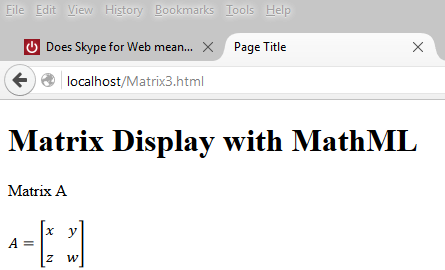
Here is an example of displaying a matrix using the presentation elements of MathML. Browsers do not support MathML the same way, some do better than others. Generally speaking browsers that support HTML5 should support MathML to some extent. This post considers only the latest versions of Firefox and Microsoft Edge at present.

This page can be hosted on a web server(in this case on the local ISS, IIS Version 10.0.10586) on Windows 10 Pro)

Matrix Display with MathML


Matrix A
 
     
  A
  =


         x
         y


         z
         w


This is a very simple page but there are differences how the browsers display them. The MathML is highlighted in yellow in the HTML page.

Firefox 42
Firefox displays as shown here without any modification. This is the correct way of displaying a matrix.


Microsoft Edge 25

The HTML code used as is (with the

Friday, December 18, 2015

Is there a test for WebRTC support in browsers?

Yes. There is a test devised by WEBRTC.ORG. You can test the browsers with this simple test. As WebRTC depend on the use of built-in devices of your computer like Camera, Audio etc, you will have to give explicit permission to their use by the test.

Mozilla Firefox passes all the tests devised by WebRTC.org as shown in the following. All you need to do is launch your browser and type in the address, test.webrtc.org. You will be asked whether you are ready to share the devices like camera, audio etc. After getting an affirmative answer you will be presented with this test screen.
Webrtc_MOZ_test.png
You start the test by hitting the Start button. The various tests are run and if you wait a little while you will get this display,

Webrtc_Moz.png

As you can see most of the tests were successful except for one. This may be due to the configuration as you see this detail:

 Reflexive connectivity
[ INFO ] Gathered candidate of Type: srflx Protocol: UDP Address: 24.25.241.5
[ WARN ] Could not connect using reflexive candidates, likely due to the network environment/configuration.


With Microsoft Edge most of the tests fail and the results are as shown in the following images:

 WebRTC-MSFT01
 WebRTC-MSFT02
WebRTC-MSFT03

I did wait for a while to see if it runs the remaining tests and it did not.

The good news however is that ORTC through its APIs, support WebRTC in Edge so that Edge can communicate with Firefox a la WEBRTC. We shall look at it in another post.

Monday, December 14, 2015

What is MathML?

ML stands for Markup Language and MathML is the markup you can use in web pages (html for example) to display mathematical equations, expressions etc.

MathML is the XML standard for encoding mathematics. It is not just for incorporating mathematics into web pages but also for communicating and exchanging mathematics in mathematical and scientific applications. While most browsers would implement MathML from a standards view point Chrome wanted to have its own way of implementing MathML. However check with the latest version of Chrome for its MathML support.

 The earliest MathML specification is at least some 8 years old. MathML is quite widely used in print books, eBooks, etc. It is also used as an exchange format to support mathematical symbols and content in Microsoft Word, Open Office etc. With all kinds of sensors entering the web by way of Internet of Things, I am positive MathML will be used more widely than at present.

Read more here:
http://www.w3.org/TR/MathML2/overview.html
http://www.dessci.com/en/reference/webmath/tech/mathml.htm

Tuesday, May 26, 2015

Do you know what browser you are using in your smart phone?

You don't like your smart phone browser. Find it and change it (you can change it for only iPhone and perhaps Androids).

Open your browser and type-in the following:
http://www.whatbrowser.org and you will get your answer as I got on mine (Android) Windows Phone 8.1 (I have to double check if this is true).

You can of course change it. Unfortunately none of these can be chosen as they appear to be not available for Windows Phone from windows store.

Here is the correct and complete answer: Go to WhatIsMyBrowser.com on Windows Phone.


 Few more comments added here.

Tuesday, September 2, 2008

Google Chrome Beta install page does not work

Tried to down load from this link:

http://gears.google.com/chrome/eula.html?hl=en

It does not like to install.

In IE  7.0 errors on Line 133 and 146

In Mozilla/5.0 Firefox 3.0.1 nothing happens, no messages nada

In Safari 3.1.1 nothing happens, no messages

Anyone find a better site to down load?