Yes, you can.
Tuesday, April 12, 2022

Where do I find the IIS EXPRESS installation files?
You can find it here:
https://www.microsoft.com/en-us/download/details.aspx?id=48264
You can install it on these systems: Supported Operating Systems
Windows 10, Windows 7 Service Pack 1, Windows 8, Windows 8.1, Windows Server 2008 R2, Windows Server 2012, Windows Server 2012 R2
You can run it immediately after downloading and running from your chosen location.
These are the benefits of using IIS EXpress:
- The same web server that runs on your production server is now available on your development computer.
- Most tasks can be done without the need for administrative privileges.
- IIS Express runs on Windows 7 Service Pack 1 and all later versions of Windows.
- Many users can work independently on the same computer.
All information from Microsoft Site.
How do I run IIS Express from command line?
Make sure you have installed it on your machine by checking C:\IISExpress /?
Then you can access using the command line.
Please refer to this document:
https://docs.microsoft.com/en-us/iis/extensions/using-iis-express/running-iis-express-from-the-command-line
What are the differences between IIS and IIS Express?
There are a number of differences.
Here is a table I extracted from the Microsoft website:

Can I manage IIS Express in IIS Manager?
The simple answer is no.
IIS is managed by IIS Manager and appcmd.exe
IIS Express is managed by Appcmd.exe
IIS Express Management tasks are built into:
WebMatrix
Visual Studio 2010 SP1 and later versions
Saturday, March 12, 2022
Are you unable to connect to the SQL Server Configuration Manager?
This could happen sometimes even if you have SQL Server installed on your computer (or laptop). Normally on Windows 10, you should see this in the Server Folder shown here.


This problem crops up from time to time because SQL Server Configuration Manager is part of the Microsoft Management Console add-in.
Details to bring it up are described here for SQL Server 2016 I was using one time.
Following the above, I can see all my different SQL Server Configuration Managers here:
Also, You can search for it using SQLServerManager11.msc in the Windows 10 Search as shown:

BTW, my blog "http://hodentekMSSS.blogspot.com " is basically created for Microsoft SQL Server related topics
If you want to know how to open "MMC" read here:
Tuesday, March 8, 2022
How to access Microsoft Management Console in Windows 10 and create Certificate snap-in?
It is not difficult to create a certificate snap-in in Windows 10. Just follow the steps in this step-by-step procedure. The screenshots are self-explanatory but a few comments have been added. You can use a certificate snap-in for the following accounts, Computer Account, My User account, or Service account.
Invoking the Microsoft Management Console.
Just type in MMC in the windows search at the bottom of the desktop and use the Run Command as shown.

Or you can invoke the RUN command and type 'mmc' in it.


In the File menu item choose Add/Remove snap-in as shown.

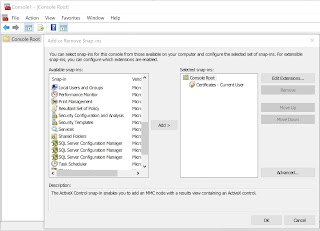
The Add/Remove snap-in windows get displayed. There are many items you can add as a snap-in. Observe that 'Certificates' is one of the snap-ins you can add.

Adding the snap-in is easy. Observe the 'ADD' button between the two boxes in the above figure. Highlight Certificate in the left box and click ADD.

A new window opens asking you to choose from 3 of the options for which certificates can be added as shown.

Choosing 'My User Account' brings up this image.


From here explore for yourself the different items of the current user to learn about them.
Good luck
Subscribe to:
Posts (Atom)