Friday, March 31, 2017

What was the fix for the DVD drive that disappeared?

Quite a long time ago I reported in my post regarding the loss of DVD drive. I use the DVD very infrequently and it was on the back burner. Finally I decided to get to the bottom of it and succeeded. Here is the result.

In the Device Manager I could see that the DVD device was not working properly as reported in the previous link. The Toshiba, TSST Corp CDDVDW SU-208DB drive was not working and the DVD drive was not seen in the Windows Explorer. The properties of the problematic drive appeared as shown with the Code 19 error (image from the above post).


Finally I came across this Toshiba support site here.

Interestingly this page does not say anything about Windows 10 but describes the fix for Windows 8
My problem started when Windows 10 anniversary update was made and the DVD stopped working from that time.

The fix for this problem consisted of removing two of the programs from the Control Panel|...|Programs and Features shown here:

Toshiba Recovery Media Creator
Toshiba Disk Creator


and also uninstall the DVD\CD_ROM Drives element in the Device Manager.

I did not have the Toshiba Disk Creator, but I uninstalled the TOSHIBA Recovery Media Creator and the DVD/CD-ROM drives in the Device Manager.

These are as shown in the screen shots:


DVD-000


DVD-001

And now after restarting the computer I can see the DVD drive in the explorer.


Wednesday, March 29, 2017

What is a dual-band router?

A dual-band router is a router that has two bands.

For example, the Arris router used by subscribers to Time Warner Oceanic service provider uses the service provider provided router that two has bands, 2.4 GHZ and 5 GHz.

A typical dual-band router has an administration panel shown here:

 You can see that you can have separate settings (password, encryption, etc.) for the 2.4 GHz and 5 GHZ bands that this router can provide.

You can have devices working with either of these two bands or both. For example one or two of desktop works on 2.4 GHZ and my Lumia 950 on 5 GHZ.
My Samsung TV works on the 2.4GHZ as well.

If want to utilize the full power of bandwidth, or have multiple devices that depend on Wi-Fi it may be better to go to dual-band router although they may cost higher.

Tuesday, March 28, 2017

Are there tools to look at financial information of the stock market in R?

I read a very illuminating article on R-Bloggers which was originally published on R-Curtiss Miller's Personal Website (https://ntguardian.wordpress.com/2017/03/27/introduction-stock-market-data-r-1/).

Ever since Microsoft SQL Server began supporting R in its 2016 version, I got interested in R language. It is extremely rich with wide applicability from Astronomy(http://www.astro.umd.edu/~harris/r/index.html) to Zoology(https://www.zoology.ubc.ca/~schluter/R/data/) and everything in between.

Financial information from Yahoo as the source, the packgae 'quantmod' brings with it most of the useful financial information about stocks. quantmod gets data from Yahoo Finance and Google Finance plus from other sources.

In order to work with financial data you should download the package which can done as shown:
------------
> # Get quantmod
> if (!require("quantmod")) {
+     install.packages("quantmod")
+     library(quantmod)
+ }
Loading required package: quantmod
Installing package into ‘C:/Users/Jayaram/Documents/R/win-library/3.2’
(as ‘lib’ is unspecified)
--- Please select a CRAN mirror for use in this session ---
also installing the dependencies ‘xts’, ‘zoo’, ‘TTR’
[ I chose the CRAN site in California ]
trying URL 'https://cran.cnr.berkeley.edu/bin/windows/contrib/3.2/xts_0.9-7.zip'
Content type 'application/zip' length 662188 bytes (646 KB)
downloaded 646 KB

trying URL 'https://cran.cnr.berkeley.edu/bin/windows/contrib/3.2/zoo_1.7-14.zip'
Content type 'application/zip' length 905140 bytes (883 KB)
downloaded 883 KB

trying URL 'https://cran.cnr.berkeley.edu/bin/windows/contrib/3.2/TTR_0.23-1.zip'
Content type 'application/zip' length 432456 bytes (422 KB)
downloaded 422 KB

trying URL 'https://cran.cnr.berkeley.edu/bin/windows/contrib/3.2/quantmod_0.4-7.zip'
Content type 'application/zip' length 473601 bytes (462 KB)
downloaded 462 KB

package ‘xts’ successfully unpacked and MD5 sums checked
package ‘zoo’ successfully unpacked and MD5 sums checked
package ‘TTR’ successfully unpacked and MD5 sums checked
package ‘quantmod’ successfully unpacked and MD5 sums checked

The downloaded binary packages are in
        C:\Users\Jayaram\AppData\Local\Temp\RtmpOIHqF6\downloaded_packages
Loading required package: xts
Loading required package: zoo

Attaching package: ‘zoo’

The following objects are masked from ‘package:base’:

    as.Date, as.Date.numeric

Loading required package: TTR
Version 0.4-0 included new data defaults. See ?getSymbols.
Warning messages:
1: In library(package, lib.loc = lib.loc, character.only = TRUE, logical.return = TRUE,  :
  there is no package called ‘quantmod’
2: package ‘quantmod’ was built under R version 3.2.5
3: package ‘xts’ was built under R version 3.2.5
4: package ‘zoo’ was built under R version 3.2.5
5: package ‘TTR’ was built under R version 3.2.5
---------------
Once it is installed. You can set up start and end dates variables for viewing your stocks like in:
start<- as.date="" br="">end <- as.date="" br="">
With these defined, you can get the Apple's stock price using its ticker symbol AAPL using the functions in the package as shown obtaining data from the Yahoo source.
> getSymbols("AAPL", src="yahoo", from=start, to=end)
To view the data just run the statement
head(AAPL)

Thursday, March 23, 2017

How do you set up the DMZ on your router?

You may want to place one of your computers behind the firewall temporarily outside the firewall for troubleshooting purposes. Keeping a computer outside the firewall is not good practice except temporarily for troubleshooting.

In order to do this you need access to your router's IP Address. In most home computers connected to the Internet via a router, this address is http://192.168.0.1.

On my Arris router supplied by Oceanic Time Warner, I can go to the DMZ page directly by entering the router address as shown:


DMZ.png

Of course you need the username and password, which you can get from the service provider.

All you need to do is indicate which of the Internal computers behind the firewall goes to the DMZ. The settings of DMZ will have both a Public IP (WAN IP) as well as an Internal (Private IP). Note that all the ports on the computer in the DMZ can be attacked by hackers.

Tuesday, March 21, 2017

What kind of a file is this?

This is often a question you ask yourselves when you come across a file which has no extension, or has an extension that you do not recognize. Often you get into this questioning mode while trying to read an email attachment, or a file you downloaded from the Internet. Often times it is also an archived document.

The designer of TriEngine has looked through various types of documents, over 8000 of them and has set up a database which he uses to compare the patterns in the files to make the best guess of the file type. This is useful mostly for files in binary format.

You can download a copy of the latest program from here or use an online version )of it.

I did downlaod a windows version and a .NET GUI version, but they had problems with a missing root for some XML file. You may give it a try.


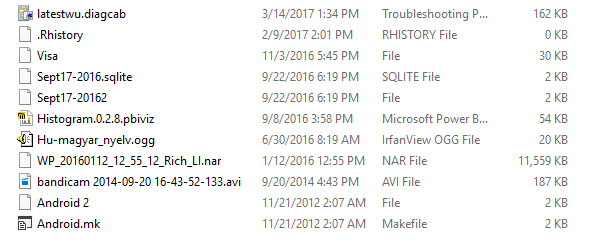
I used the online version to see if it can find some of the files in my directory filled with file types. I deliberately deleted extensions from two of the files but renamed it to recognize later. 


It did quite a reasonable job. It found the match if it is within the definitions directory(constantly updated) which now has over 8000 definitions. Here are some of the results:

.diagcab file


 .sqlite file

 .pbiviz file


.ogg file


It did not file with an extension .nar and a file with no extension was recognized as a .pdf file

Friday, March 17, 2017

What if I do not find Remote Procedure Call Service (RPC) on my Windows 10?

It can happen as it happened to me that the RPC service line item may be missing in the Windows 10 Professional.

RPCss is the Service Control Manager (SCM) for COM and DCOM servers. It performs object activation requests, object explorer resolutions and distributed garbage collection for COM and DCOM. Programs on the local computer and or on a remote computer may fail if it is not working.

You should find this in Control Panel|...|Services.

By default RPC will be running as NT Authority\NetworkService, a shared process of svchost. If it fails error is logged.

If it is absent you can get it from here:
http://batcmd.com/windows/10/services/rpcss/

Note. Make sure that the rpcss.dll file exists in the %WinDir%\system32 folder.


If this file is missing you can try to restore it from your Windows 10 installation media.

Tuesday, March 14, 2017

How do you open a X.tar.gz file in Window 10?

The word 'tar' refers to the software utility program for archiving many files into an archive file. It was usually called a tarball for distributing or backing up file lots. This is very similar to the x.zip files in Windows.

Recently I needed to open a file of this type in my Windows 10 Professional and I looked at the various Apps in Windows Store. I finally decided to use the app, OpenZip shown here.


Open ZIP+_0.png

This iss downloaded from the Windows Store as shown.


Open ZIP+_1.png

I had downloaded the file with extension  tar.gz to the Downloads folder. After launching Open ZIP+,  I just browsed the file and extracted to a folder on the desktop.


Open Zip+_2.png

Extracted files were saved to a folder on the computer as shown:

Open Zip+_2.png 

Looks like this is a reliable app for this task.