This is an obnoxious malware that somehow gets into your computer (even inadvertently entering the address of an unknown URL). It manifests in the form of putting long rectangular pop-up ads on four sides of your browser besides adding many other obnoxious features like page turnover effects etc. as shown:
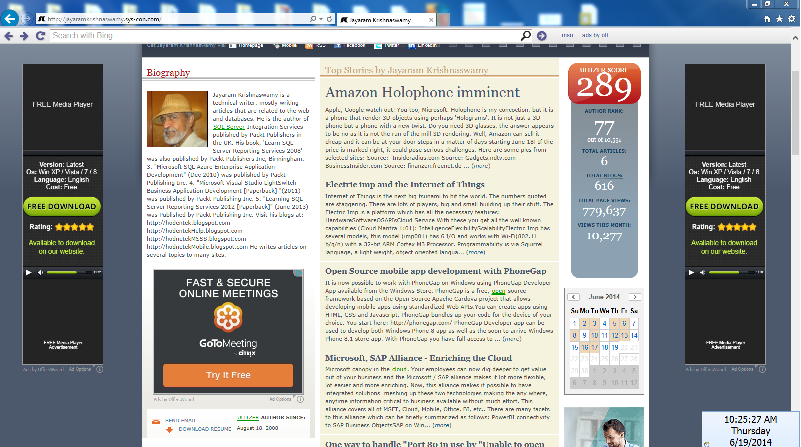
 On noticing this you should immediately take some action. Tried to cleanse with these steps in IE 11.0 but did not seem to remove this malware.

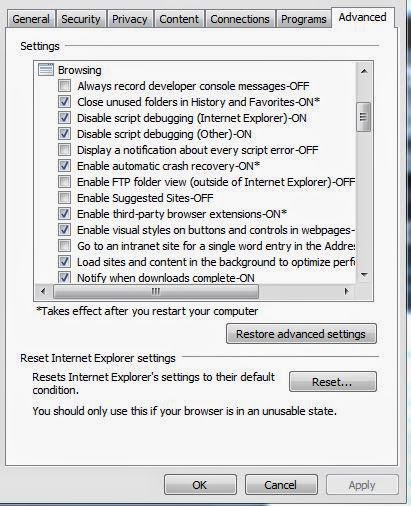


The lesson is if the Internet Options | Advanced (tab) | Browsing node changes (mostly reset) does not fix perhaps you should restore the computer to an earlier date. You should take steps to remove this malware as soon as you notice it.
Microsoft Security Essentials is a free download available for Windows 7 and Windows 8 OS.
Download here:
http://windows.microsoft.com/en-US/windows/security-essentials-download
Tweaked the Advanced features some more as shown:
But this did not help. Also tried Microsoft Security Essentials which validated that the PC is clean, but did not help.
Finally, did a System Restore to an earlier date and this seemed to have fixed the problem.
After restore the IE displayed the following message:
The lesson is if the Internet Options | Advanced (tab) | Browsing node changes (mostly reset) does not fix perhaps you should restore the computer to an earlier date. You should take steps to remove this malware as soon as you notice it.
Microsoft Security Essentials is a free download available for Windows 7 and Windows 8 OS.
http://windows.microsoft.com/en-US/windows/security-essentials-download
