Showing posts with label Elevated Permissions. Show all posts

Friday, September 1, 2017

Is there a dashboard for SQL Server?

If you mean Server Dashboard, yes there is one.

You need to access from Reports.. menu as shown.


When you open Server Dashboard you would be able to see this one (specific to each installation).


If you do not see this and see a page full of errors, try logging in as an administrator.

Monday, December 21, 2015

Windows Mail app does nothing when clicked, how do you fix it?

Windows 10 Mail App stops responding and probably Calendar and People apps as well. When you click on the app nothing happens. You go to settings to see if you can uninstall. You will find there is no uninstall for this. It is part of the operating system and you cannot uninstall it.

This happened on my Windows 10 Pro on my Toshiba Satellite S70 series as well as Toshiba's Windows tablet running Windows 10.

What now?

You can run the following (System File Checker) on the command-line with elevated permissions. It will try to verify and fix problems with files (http://hodentekhelp.blogspot.com/2015/05/how-to-run-system-file-checkersfc.html).

However, this did not solve the problem on both the devices.

Next following this thread I launched Windows PowerShell with elevated permissions and ran the following statement:

Get-appxprovisionedpackage –online | where-object {$_.packagename –like "*windowscommunicationsapps*"}
| remove-appxprovisionedpackage –online

Here is the screen shot of this run:

MailAppProblem

This fixed the problem on my laptop, but the Tablet is still having the same problem- non-responsive mail app.

Just before I ran the PowerShell application I had noticed that there was a new Windows Update and the Windows 10 build was 10586.

My tablet still had the build 10240 which I am upgrading to 10586. Let me see if this fixes the problem. Since these are Windows 10 programs, Microsoft should make sure they work all the time as most users may not even know what powershell is not to speak of elevated permissions, sfc etc.

Monday, November 10, 2014

What is the difference between Windows PowerShell and Windows PowerShell ISE?

Windows PowerShell is not a GUI application and it runs the PowerShell engine in the host program. You will see the following screen displayed when you access Windows PowerShell from the Search charm on Windows 8.1.


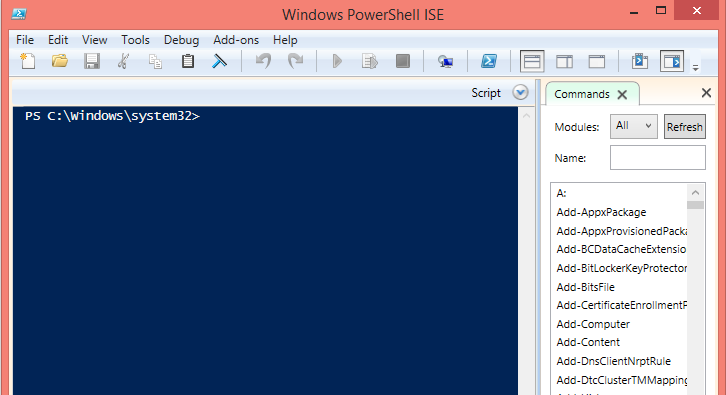
If you choose to launch you should search for 'Windows PowerShell ISE. The following screee will be displaced. It is rich interface that has many features including interactive help in scripting. If you are new to Power Shell you should begin your learning with this tool.


You can launch them as administrator which gives you more power (Run as Administrator) and is called launching with elevated permissions.

You can launch multiple instances.

You may be interested in these two posts as well:
http://hodentekmsss.blogspot.com/2014/11/a-quick-note-on-writing-powershell_12.html
http://hodentekmsss.blogspot.com/2014/11/a-quick-note-on-writing-powershell.html

Do you know that Here-Strings are?
Find it here:
http://hodentekhelp.blogspot.com/2015/06/what-is-here-string-in-windows.html