This is probably a settings issue. Happened to me once.
Here is the fix:
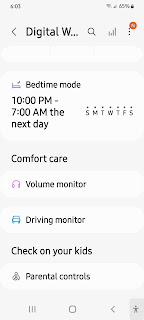
There is a mode called 'Bedtime mode'. If it is set for Turn on now make sure it is set correctly. Start with Settings and follow it up.

This is probably a settings issue. Happened to me once.
Here is the fix:
There is a mode called 'Bedtime mode'. If it is set for Turn on now make sure it is set correctly. Start with Settings and follow it up.
You have built a web application on your PC or laptop. Now, you want to see how it appears on a mobile device. This is the use case for a mobile simulator, an extension that displays how your site would appear on a handheld. It is a responsive testing tool.
It is available on Google Chrome Webstore. It can simulate 5 models of Android smartphones and 11 models of Apple smartphones.
Deatils here: Mobile Simulator
From the above site you can add it to Microsoft Edge where it will show as one of the extensions as shown.

How do you test it?
Just bring up a web page (any) as shown here:

Now click on this icon and see the simulator getting displayed as shown:

There is another web site here with some operational buttons on the right.

It is a security feature that locks up your computer/laptop when you are away (out of the Bluetooth range) from the computer. You can use this feature with your Bluetooth-enabled SmartPhone, Bluetooth headset, etc.
It is possible to lock the computer with Windows Key+L but the dynamic key can be useful when you forget to log out or go to sleep.
The "Dynamic Locking" feature is by default inactivated but you need to activate it.
Here are some screens that may be useful to you. I have paired my Samsung smartphone with my laptop.


You can find it in Settings/System. Go to the very bottom of this page and look up About.

This is quite a frequent error many folks are confronted with while installing some new software. I encountered this problem trying to install Android Studio on my Windows 10 (x64).
What is Windows 10 controlled folder access?
Controlled folder access is an anti-ransomware feature in Windows 10 that helps protect your file system on your computer from modification by suspicious or malicious apps (especially ransomware). You should find this in "System Protection"
Controlled folder access in Windows Security reviews the apps that can make changes to files in protected folders and blocks unauthorized or unsafe apps from accessing or changing files in those folders.
Access the relevant feature page in the Control Panel as follows:
Select Start > Settings > Update & Security > Windows Security > Virus & threat protection.
In Virus & threat protection settings, select Manage settings.
Under Controlled folder access, select Manage Controlled folder access.

Although I could have looked through other options for managing, I wanted something which was quick to test my hunch but it cannot be a permanent solution.
I took a calculated risk. chose to switch the access to OFF temporarily. I then initiated the install process for the Android Studio and when it was installed, I switched the protection ON.
I did not get any more notifications and the software was installed successfully.
What folders are protected?
In the above image, you can click on Protected folders to review them. Here is a partial list.

Windows 'hosts' file contains mappings of IP addresses to hostnames.
You can find the file in the Windows System32 folder if you run your DOS program with administrative privileges as shown.

You can open this file with Notepad also run with administrative privileges. There is another 'hosts' file related to iCalendar.

It is just a text file that you can edit and save with your changes.

More here:
https://hodentek.blogspot.com/2009/07/in-vista-home-premium-computer-name-is.html
You can also use the "Hostsman" application to edit the "hosts" file:
One more arrow at the heart of this Wuhan virus.

"BENGALURU, Aug 20 (Reuters) - India's drug regulator has granted emergency use approval for Zydus Cadila's
This is the second homegrown vaccine ( Zycov-D ) made by the generic drug maker Cadila Health Care of India. The first one, also approved is the Covaxin. It is a needle-free vaccine that does not need very low temperatures. The late-stage trial had 28000 participants with about 1000 in the lower age group (12 to 18).
https://www.zyduscadila.com/

More here:
https://www.bbc.co.uk/news/world-asia-india-57774294
https://www.axios.com/india-first-dna-covid-vaccine-f07c5105-893c-473f-8c60-8b5aaef28e5a.html
