Sunday, May 24, 2020

How do you use the stock data type in MS Excel?

This is the easiest way to work on your stock holdings using Excel. The stock data type is awesome. Just one entry in a cell gives everything you want to know about your stock. You can build applications with it, but I will show you how to do it in three simple steps.

Step 1. Open a cell and enable it for stock data type using the Data menu.


Step 2: Open a cell or cells (I am just showing ROKU in one cell). You can type in stock ticker symbols in any number of rows in the same column. Highlight the column each row of which contains a ticker symbol and click Stocks in the Data Menu. By the way, I just typed ROKU and it changes to Roku Inc.(XNAS:ROKU)


Step 3: Now you pick the items you want to see in the little icon with a + in green. I choose Price (scrolling down this list) and in the adjoining column the current price will be displayed. You can see other items like 52 Week high, 52 Week low, Industry, etc. 


I have added 5% down, 15% down of the stock I sold on a particular date, etc. if you are interested in using it for trading. you could also have a link to your investment account and trade as easily.

Monday, May 18, 2020

How do you hide and unhide worksheets?

You can hide and unhide all columns in an Excel worksheet as shown in the following images:

I will hide all columns in HideAll.xlsx by clicking in the corner as shown. All cells are highlighted.


Now I go to the VIEW menu and click Hide.


Now everything is hidden. Notice even the worksheet name.


 Now I go back to VIEW and click on View to activate the Unhide submenu item.


 I click the Unhide button and I get the window for unhiding where I can choose to unhide the file.


Click on HideAll.xlsx. The HideAll.xlsx is displayed showing all columns and rows.


Wednesday, May 13, 2020

How do you query data in a MS Excel Worksheet?


Excel has a tool called Power Query which can be used to query data from many data sources, external data sources, or a source in an Excel worksheet, such as a table.

Here are the types of external data you can query using Excel.
Power Query Data Sources

Web page

Excel or CSV file

XML file

Text file

Folder

SQL Server database

Microsoft Azure SQL Database

Access database

Oracle database

IBM DB2 database

MySQL database

PostgreSQL Database

Sybase Database

Teradata Database

SharePoint List

OData feed

Microsoft Azure Marketplace

Hadoop File (HDFS)

Microsoft Azure HDInsight

Microsoft Azure Table Storage

Active Directory

Microsoft Exchange

Facebook

In the present post, you can see how you can query data in a worksheet, using Power query.

The following three steps show how you may do it.


 In the above worksheet, I created a table. Inserted three rows of data and highlighted them. Then I clicked, Insert and, picked up Create Table from the drop-down. This gave me the second dialog Create Table pre-filled with my data. I then clicked OK to create a table as shown in the bottom of the above.


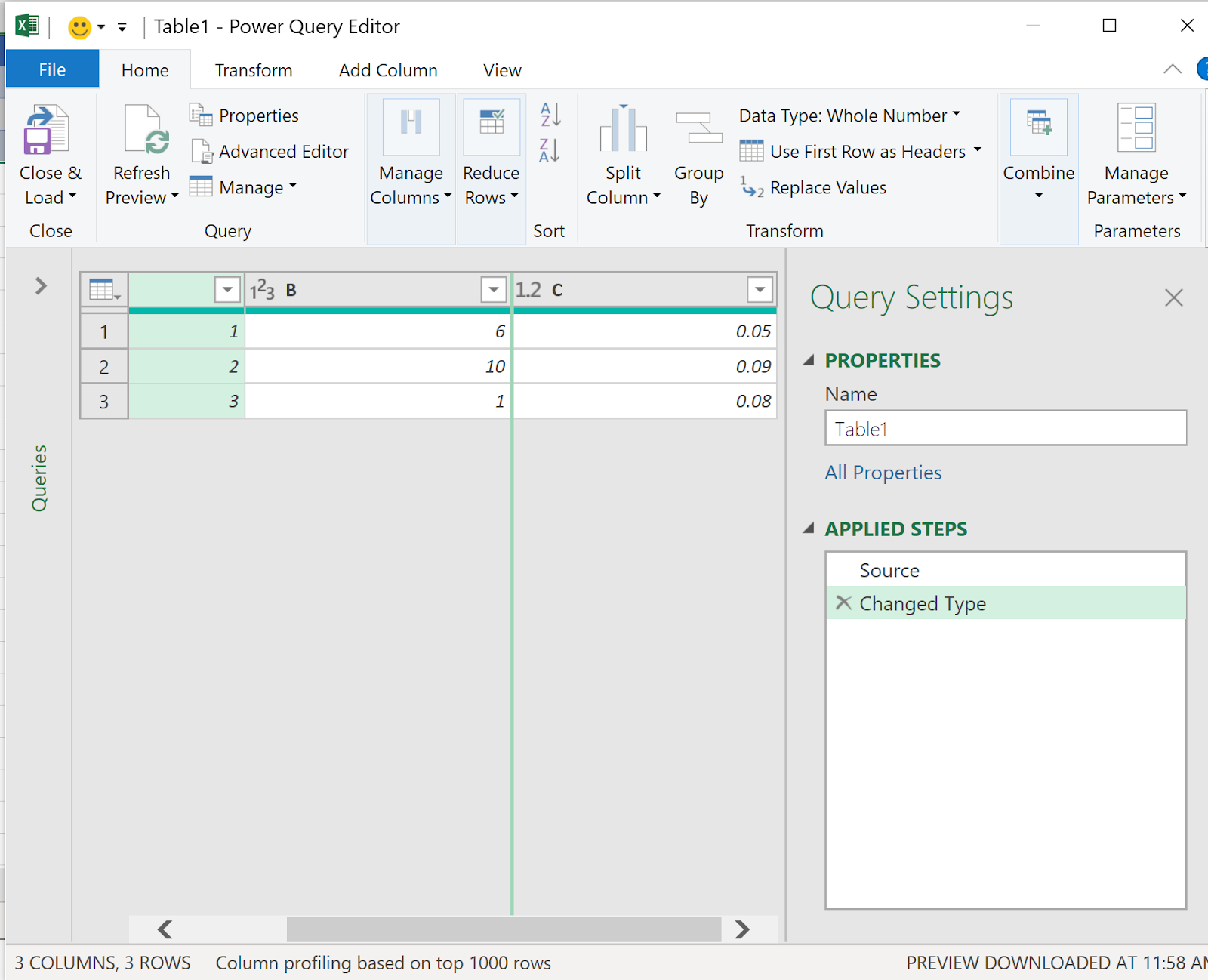
Now I clicked Data and Query and Connections. I then clicked the option From/Table Range to Open the Power Query Editor. 


Now it is straight forward to query the Table in Excel worksheet.

More on Power Query here:

https://support.office.com/en-us/article/introduction-to-microsoft-power-query-for-excel-6e92e2f4-2079-4e1f-bad5-89f6269cd605

Wednesday, March 4, 2020

What is lxml?

lxml is a parser for XML and HTML. It binds c libraries linxml2 and licxslt to Python and should work with Python versions 2.8 through 3.8.

lxml is better than ElementTree I used with python 3.7:

https://hodentek.blogspot.com/2018/07/parsing-xml-with-python-37.html

You can download the complete and this te documentation in pdf from here:
https://lxml.de/lxmldoc-4.5.0.pdf

The HTML parsing may be available here:
https://lxml.de/index.html#download

As a parser, it builds a data structure (parse tree) given the XML. There are many programs to parse XML but this is python specific.

How do you install?

Get the lxml from here:

http://pypi.python.org/pypi/lxml/ 

 use the following public key:

https://lxml.de/3.8/pubkey.asc 

If you have Python 3.8, like I have, the lxml 3.8.0 is here:

https://lxml.de/files/lxml-3.8.0.tgz
Documentation here:
https://lxml.de/3.8/lxmldoc-3.8.0.pdf

If you are using Windows 10 and already have Python 3.8 use the following steps:


Step 1: Verify you can run 'pip' as shown here:
-------
Microsoft Windows [Version 10.0.18362.657]
(c) 2019 Microsoft Corporation. All rights reserved.

C:\WINDOWS\system32>pip

Usage:
  C:\Users\Owner\AppData\Local\Microsoft\WindowsApps\PythonSoftwareFoundation.Python.3.7_qbz5n2kfra8p0\python.exe -m pip [options]

Commands:
  install                     Install packages.
  download                    Download packages.
  uninstall                   Uninstall packages.
  freeze                      Output installed packages in requirements format.
  list                        List installed packages.
  show                        Show information about installed packages.
  check                       Verify installed packages have compatible dependencies.
  config                      Manage local and global configuration.
  search                      Search PyPI for packages.
  wheel                       Build wheels from your requirements.
  hash                        Compute hashes of package archives.
  completion                  A helper command used for command completion.
  debug                       Show information useful for debugging.
  help                        Show help for commands.

General Options:
  -h, --help                  Show help.
  --isolated                  Run pip in an isolated mode, ignoring environment variables and user configuration.
  -v, --verbose               Give more output. Option is additive, and can be used up to 3 times.
  -V, --version               Show version and exit.
  -q, --quiet                 Give less output. Option is additive, and can be used up to 3 times (corresponding to
                              WARNING, ERROR, and CRITICAL logging levels).
  --log                 Path to a verbose appending log.
  --proxy              Specify a proxy in the form [user:passwd@]proxy.server:port.
  --retries          Maximum number of retries each connection should attempt (default 5 times).
  --timeout              Set the socket timeout (default 15 seconds).
  --exists-action     Default action when a path already exists: (s)witch, (i)gnore, (w)ipe, (b)ackup,
                              (a)bort.
  --trusted-host    Mark this host as trusted, even though it does not have valid or any HTTPS.
  --cert                Path to alternate CA bundle.
  --client-cert         Path to SSL client certificate, a single file containing the private key and the
                              certificate in PEM format.
  --cache-dir
           Store the cache data in .
  --no-cache-dir              Disable the cache.
  --disable-pip-version-check
                              Don't periodically check PyPI to determine whether a new version of pip is available for
                              download. Implied with --no-index.
  --no-color                  Suppress colored output
---------------------

Step 2: Use this command to install lxml:


Tuesday, February 4, 2020

How do you correct Window's 10 display problem ( displaying bands in the desktop)?

The bands on Desktop's display appear as shown.


Normally, the desktop is just solid blue.

This fix which came in Windows Central in July 2019 still works.
https://www.windowscentral.com/how-fix-vertical-stripes-color-issue-affecting-displays-windows-10-may-2019-update

Steps for correction:

Windows Task Scheduler--> Microsoft-->Windows-->WindowsColorSystem-->

CalibrationLoader

Properties of CalibrationLoader


Click Triggers.


Disable both At log on and On connection to user session using the Edit...button as shown for one of them.

Restart Windows and there should not be any bands in the display.

Is your desktop display banded?

Here are some snapshots of my laptop display:


Looks crazy right. Microsoft modified their IE to the 'new Edge'. They should do something to the Windows and Outlook (free).