Very simple.
You can do it in the SQL Server Management Studio (SSMS) or use System Stored Procedures.
You can see a step by step method at this link here.
http://hodentekmsss.blogspot.com/2010/05/using-sample-databases-with-sql-server.html
Moving from SQL Server 2000 to 2005 read here:
http://www.aspfree.com/c/a/MS-SQL-Server/Moving-Data-from-SQL-Server-2000-to-SQL-Server-2005/3/ [about 0.5 million page views]
Friday, May 14, 2010

Monday, May 10, 2010
Pure Microsoft SQL Servers
I have started a new blog exclusively covering topics that interested me (off /On) related to Microsoft SQL Servers. I also plan on posting links to my older articles on this subject.
I am a busy guy, you will also find new stuff that may help you in your learning experience.
Well, Hodentek is all about learning.
http://hodentekmsss.blogspot.com/
Welcome to the new blog.
Jay
I am a busy guy, you will also find new stuff that may help you in your learning experience.
Well, Hodentek is all about learning.
http://hodentekmsss.blogspot.com/
Welcome to the new blog.
Jay
Sunday, February 21, 2010
How do you telnet in Windows 7?
You must enable Telnet Client. If this is not in place you will not be able to telnet.
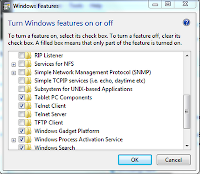
Go to Control Panel -->Programs -->Programs and Features -->Turn windows features on or off
This brings up the following window.

Place check mark for Telnet Client and click OK.
Now you can use the Telnet ccommand in the DOS window.
Tuesday, December 1, 2009
How do you change DOS windows' command prompt in Windows 7?
Get help file:
C:\Users\Jay>prompt /?
Changes the cmd.exe command prompt.
PROMPT [text]
text Specifies a new command prompt.
Prompt can be made up of normal characters and the following special codes:
$A & (Ampersand)
$B (pipe)
$C ( (Left parenthesis)
$D Current date
$E Escape code (ASCII code 27)
$F ) (Right parenthesis)
$G > (greater-than sign)
$H Backspace (erases previous character)
$L < (less-than sign)
$N Current drive
$P Current drive and path
$Q = (equal sign)
$S (space)
$T Current time
$V Windows version number
$_ Carriage return and linefeed
$$ $ (dollar sign)
If Command Extensions are enabled the PROMPT command supports the following additional formatting characters:
$+ zero or more plus sign (+) characters depending upon the depth of the PUSHD directory stack, one character for each level pushed.
$M Displays the remote name associated with the current drive letter or the empty string if current drive is not a network
Example: Changing from "C:\" to "%"
-------------------------------------
C:\Users\Jay>prompt %--->Changes to %
%
%Prompt C:\ ------------->Changes back to C:\
C:\
C:\
C:\Users\Jay>prompt /?
Changes the cmd.exe command prompt.
PROMPT [text]
text Specifies a new command prompt.
Prompt can be made up of normal characters and the following special codes:
$A & (Ampersand)
$B (pipe)
$C ( (Left parenthesis)
$D Current date
$E Escape code (ASCII code 27)
$F ) (Right parenthesis)
$G > (greater-than sign)
$H Backspace (erases previous character)
$L < (less-than sign)
$N Current drive
$P Current drive and path
$Q = (equal sign)
$S (space)
$T Current time
$V Windows version number
$_ Carriage return and linefeed
$$ $ (dollar sign)
If Command Extensions are enabled the PROMPT command supports the following additional formatting characters:
$+ zero or more plus sign (+) characters depending upon the depth of the PUSHD directory stack, one character for each level pushed.
$M Displays the remote name associated with the current drive letter or the empty string if current drive is not a network
Example: Changing from "C:\" to "%"
-------------------------------------
C:\Users\Jay>prompt %--->Changes to %
%
%Prompt C:\ ------------->Changes back to C:\
C:\
C:\
Thursday, November 26, 2009
How do I connect to a SQL Server Compact Database from SQL Server 2008 R2 Nov_CTP?
The database is present in the installation directory but you need to enable permissions.
Click Connect SQL Server Compact... in MS SQL Server Management Studio.

In the Connect to Server window click on the drop-down handle as shown.

Click on the drop-down item "Browse for more...". Expand the C:\node as shown

Click OK. The Connect to Server gets updated.
You may not be able to connect to the database as permissions are needed.

You can modify the permissions on the sample database. The database gets dispalyed in the Management Studio after you click OK on the Connect to Server window after modifying the premissions.

Click Connect SQL Server Compact... in MS SQL Server Management Studio.
In the Connect to Server window click on the drop-down handle as shown.

Click on the drop-down item "Browse for more..."

Click OK. The Connect to Server gets updated.
You may not be able to connect to the database as permissions are needed.

You can modify the permissions on the sample database. The database gets dispalyed in the Management Studio after you click OK on the Connect to Server window after modifying the premissions.

Wednesday, October 21, 2009
What is the difference between Title and WindowTitle properties in a Xaml Browser application?
In a Xaml browser application (XBAP) as a page's properties you can set a TITLE as well as a WindowTitle property.
----------------------------------------
The Page.Title property is defined as in the following:
----------------------------------------------------------------
public string Title { set; get; }
Member of System.Windows.Controls.Page
Summary:
Gets or sets the title of the System.Windows.Controls.Page. This is a dependency property.
Returns:
The title of the System.Windows.Controls.Page.
---------------------------------------------
Whereas the WindowTitle is defined as in the following:
-------------------------------------------
public string WindowTitle { set; get; }
Member of System.Windows.Controls.Page
Summary:
Gets or sets the title of the host System.Windows.Window or System.Windows.Navigation.NavigationWindow of a System.Windows.Controls.Page.
Returns:
The title of a window that directly hosts the System.Windows.Controls.Page.
==================
What is observed when you bring up this page shown here is
-----------
xmlns="http://schemas.microsoft.com/winfx/2006/xaml/presentation"
xmlns:x="http://schemas.microsoft.com/winfx/2006/xaml"
Title="Pagex"
Background="Azure"
WindowTitle="What is this?"
>
-----------------------
displayed here.

As you can see Title property is not displayed where as the Window that gets displayed, the browser window shows this title. If you remove the WindowTitle property what is displayed is shown here,

Monday, July 27, 2009
What is MD5?
OK. I will share my notes on MD5.
After downloading I verified the version and usage using the following:

I verified one of the items from the test suite. For testing the program I created a
text file in Notepad with just these two words "message digest" and used it as the input file. Here follows the
result (matches the one in suggested suite).
C:\Documents and Settings\Jayaram Krishnaswamy\Desktop\HodentekHelp>MD5 "C:\Md5test.txt"
F96B697D7CB7938D525A2F31AAF161D0 C:\Md5test.txt
- MD5 is a 128 bit message digest algoritm.
- RF1321 describes the MD5
- MD4 and MD5 are replacements for legacy programs that checked transmission errors of digital data such as CRC.
- MD5 supercedes MD4 and happens to be more secure albeit somewhat slower. This was deliberate to make the code more secure.
- MD5 is available for both Windows and UNIX platforms.
- You can download MD5 from http://www.fourmilab.ch/md5/
- In windows you can just click md5.exe from its download location to install
After downloading I verified the version and usage using the following:

I verified one of the items from the test suite. For testing the program I created a
text file in Notepad with just these two words "message digest" and used it as the input file. Here follows the
result (matches the one in suggested suite).
C:\Documents and Settings\Jayaram Krishnaswamy\Desktop\HodentekHelp>MD5 "C:\Md5test.txt"
F96B697D7CB7938D525A2F31AAF161D0 C:\Md5test.txt
Subscribe to:
Posts (Atom)