Showing posts with label iPad. Show all posts

Tuesday, December 2, 2014

What are the different frameworks you can use with Intel XDK App Designer project?

In the latest version of Intel XDK you can create one of four frameworks to work with. They are,
  • App Framework
  • BootStrap 3
  • jQuery Mobile
  • TopCoat
App Framework
Basically used for mobile devices and supports native OS such as Googl Android, Apple iOS, RIMBlackberry and Microsffot Windows 8. It has no outside dependencies and optimized for speed. It is Javascript library for mobile HTML5 apps.
http://app-framework-software.intel.com/

Bootstrap 3
It is an open source UI library mostly used for web. Although not meant for mobile devices it still works OK. It is heavy on CSS3 and uses jQuery
http://getbootstrap.com/

jQuery Mobile
Uses JQuery and meant for mobile and optimized for touch. Use HTML5 for UI design for rsponsive weeb and apps (smartphone, tablet and desktop).
http://jquerymobile.com/

Topcoat
Pure Open source CSS for clean mobile and web apps. Optimized for performance with no other dependencies. It has its origins in Adobe design.
http://topcoat.io/

Sunday, September 21, 2014

How to join a Windows tablet to the HomeGroup?

I recently bought a Toshiba Encore 2 WT10 A tablet (OS: Windows 8.1) by trading in my iPad which had several problems one of which was the network connection was falling off too often and emails
remained unread till my next stop at Apple Store.

Toshiba's tablet is quite nice, the cameras are not that great but lots of peripherals like external memory, USB etc.. Anyway, I have Nokia Icon which takes superb pictures and I have whole suit of Nokia Camera related apps that fixes up most photos I take.

Joining the HomeGroup

I wanted the tablet to join the HomeGroup which was already present on my Toshiba Satelite 570 Series laptop with its own default password. I think each device comes with it own default HomeGroup password which you can 'leave' to 'join' another.

All I needed to do was to start tapping Settings -> Change PC Settings -> Network -> and HomeGroup in that order. Then the HomeGroup details gets displayed as shown.


You should click the 'Leave' button on the tablet and copy and paste the password from the Homegroup on your laptop (or PC) in its place and click 'Join' on your tablet.

Now the tablet has joined the laptop's HomeGroup. You can also enable other options as to what can be shared on this HomeGroup page. However, you have to select one at a time since it takes a while for the share to be enabled.

Saturday, January 18, 2014

What is the easiest way to transfer a photo album from iPad to a Windows PC?

There are quite a few Apps available to carry out this task, but they do not work as advertised and may need troubleshooting. They try to transfer files using the existing WIFI.

 Photo Transfer APP

Backsup albums from iPhone, iPad,iPad mini and iPod Touch to Mac
use Photo Transfer APP
http://www.phototransferapp.com/help/mac/backup-albums/

There is one for PC as well, follow this link:
http://www.phototransferapp.com/win/

I did not try the above as I was not sure if it would work (I had tried two others that did not work in the time I had allotted myself to finish transferring and to make them work required reading a long connection issues list: transmitr APP and WiFi photo) and had found an easier way.

There is only one step in this procedure:

You do not need anything other than what you should be having.

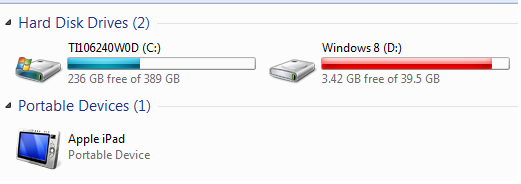
Hook your iPad (firmware 7.0.4) connector's USB end to the Windows OS computer's USB Drive (assume that the other end is connected to iPad). The Windows computer recognizes the connection and now click Start | Computer and you should be able to see your iPad as shown.


If you open the DCIM folder that is displayed when you double click Apple iPad in the above it will be empty.

After sometime you get an iPad message, Trust this computer?
Click Trust

Then the Autoplay window is displayed as shown.


Now click Open device to view files. This will open the internal storage as shown which contains your photos and it will not display the folders you might have created on the iPad.


That is all there is to it!