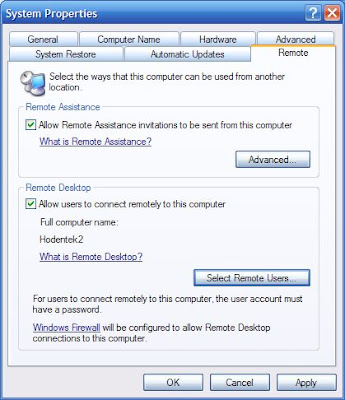
Before you can access your computer remotely[[it is assumed that the computers are connected or networked] you need to enable it. The figure shows how you may do it in the SYSTEM folder [Remote tab]in the Control Panel (Windows XP). Place a check mark for Allow users to connect remotely to this computer.
This is a neat way to work with two computers at the same time from one set of keyboard, mouse and monitor. You can copy and paste from most files, especially if they use the same program. For example you can copy contents of Notepad from one computer[this is the local] and paste it into the other [this is the remote]. It helps you to keep the monitor display color different so that you don't get confused between the local and the remote.

This is a neat way to work with two computers at the same time from one set of keyboard, mouse and monitor. You can copy and paste from most files, especially if they use the same program. For example you can copy contents of Notepad from one computer[this is the local] and paste it into the other [this is the remote]. It helps you to keep the monitor display color different so that you don't get confused between the local and the remote.
Added: May 22 2008
Additionally you may also need to enable this in the firewall as an exception as shown in the next figure. By default this is not enabled. Place a check mark for the Remote Desktop and click OK.

Once enabled you go to the other computer and establish a remote connection as described in
http://hodentekhelp.blogspot.com/2008/05/how-do-you-change-computer-time-on.html
http://hodentekhelp.blogspot.com/2008/05/how-do-you-change-computer-time-on.html
