You some times see this error in your RStudio console:
What is described is not a complete fix but a possible explanation of what is happening. It is most probably related to RStudio using the Microsoft Edge in Windows 10 operating system.
There are three modes that you can run to display in a viewer. This are shown in this image here:
 ShinyError_000.png
Run in Window mode:
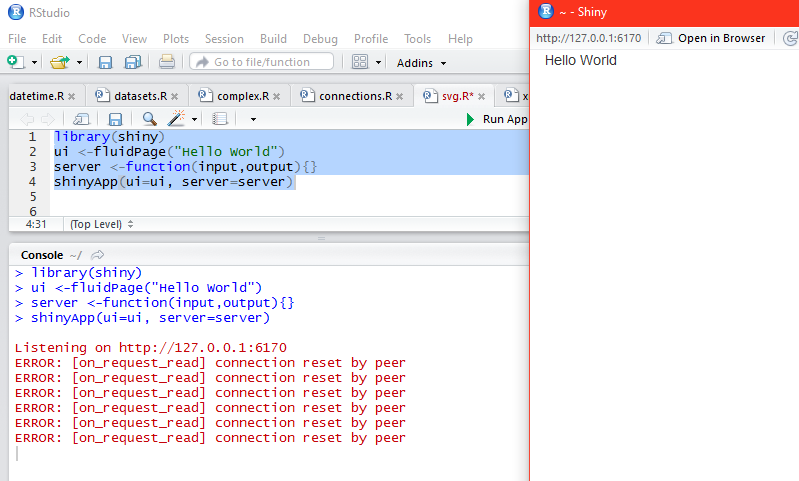
Run in Window opens a window ~ -Shiny as shown and runs the highlighted code to display the result.
 ShinyError_00.PNG
Notice that the tab that is open is http://127.0.01:6170. Now if you change over the tab to 'Open in Browser', Microsoft Edge opens displaying the same URL. Now if you close the browser you see the error messages as shown. I am not sure why it repeats so many times.
 ShinyError_02.PNG
However, if you copy the URL (http://127.0.0.1:6170) and paste it into a Firefox browser you will see 'Hello World' displayed again. But if you close this browser, no error is reported in RStudio console.
Hence in Run in Windows mode you can get away without producing error and stopping by pasting the code in Mozilla Firefox (assuming you want to see it in a browser).
Run External:
In this mode the Run result is displayed in the external browser which happens to be Microsoft Edge and you cannot avoid the error. Of course the code runs and displays the result but when you close the browser the error crops up in the console.
Run in Viewer Pane:
Viewer pane is one of the panes of RStudio. When you run the code in this mode the result will be displayed as shown.
The error crops up immediately as shown.

ShinyError_04.PNG
You need to click the Stop button to return to console prompt.
You can avoid this problem by choosing Mozilla Firefox as your default browser.
 ShinyError_05.PNG
ERROR: [on_request_read] connection reset by peer
What is described is not a complete fix but a possible explanation of what is happening. It is most probably related to RStudio using the Microsoft Edge in Windows 10 operating system.
There are three modes that you can run to display in a viewer. This are shown in this image here:

Run in Window mode:
Run in Window opens a window ~ -Shiny as shown and runs the highlighted code to display the result.

Notice that the tab that is open is http://127.0.01:6170. Now if you change over the tab to 'Open in Browser', Microsoft Edge opens displaying the same URL. Now if you close the browser you see the error messages as shown. I am not sure why it repeats so many times.
However, if you copy the URL (http://127.0.0.1:6170) and paste it into a Firefox browser you will see 'Hello World' displayed again. But if you close this browser, no error is reported in RStudio console.
Hence in Run in Windows mode you can get away without producing error and stopping by pasting the code in Mozilla Firefox (assuming you want to see it in a browser).
Run External:
In this mode the Run result is displayed in the external browser which happens to be Microsoft Edge and you cannot avoid the error. Of course the code runs and displays the result but when you close the browser the error crops up in the console.
Run in Viewer Pane:
Viewer pane is one of the panes of RStudio. When you run the code in this mode the result will be displayed as shown.
The error crops up immediately as shown.

ShinyError_04.PNG
You need to click the Stop button to return to console prompt.
You can avoid this problem by choosing Mozilla Firefox as your default browser.


