Yes you can.
You need to understand a few items. Let me go over them.
What is meant by here-strings?
http://hodentekhelp.blogspot.com/2015/06/what-is-here-string-in-windows.html
Using a variable in a here-strings:
http://hodentekhelp.blogspot.com/2015/06/can-you-have-variable-in-powershell.html
How to query a SQL Server with SQLCMD?
http://hodentekmsss.blogspot.com/2015/06/querying-sql-server-database-with-sqlcmd.html
How do you query a database using PowerShell?
http://hodentekmsss.blogspot.com/2015/06/how-do-you-query-database-using.html
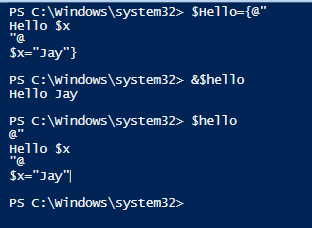
If you review the above articles then you can put together all the information in running a query as shown where the query to the database is in here-strings.
 That is all folks!
Here-strings come in very handy when the query contains single quote, double quotes and other such ugly characters which a mere string representation cannot handle.
You need to understand a few items. Let me go over them.
What is meant by here-strings?
http://hodentekhelp.blogspot.com/2015/06/what-is-here-string-in-windows.html
Using a variable in a here-strings:
http://hodentekhelp.blogspot.com/2015/06/can-you-have-variable-in-powershell.html
How to query a SQL Server with SQLCMD?
http://hodentekmsss.blogspot.com/2015/06/querying-sql-server-database-with-sqlcmd.html
How do you query a database using PowerShell?
http://hodentekmsss.blogspot.com/2015/06/how-do-you-query-database-using.html
If you review the above articles then you can put together all the information in running a query as shown where the query to the database is in here-strings.

Here-strings come in very handy when the query contains single quote, double quotes and other such ugly characters which a mere string representation cannot handle.