Showing posts with label 110. Show all posts

Friday, January 26, 2018

Can you use JSON for any SQL Server compatiblity level?

It has got to be compatibility level 130 or higher. It will fail otherwise.
You may change the compatibility level and then you can use JSON.

Read here:
https://hodentekmsss.blogspot.com/2016/11/change-compatibility-level-of-database.html

Compatibility level can be changed in SQL Server Management Studio.

SQL Server 2017: The compatibility level for Northwind (SqlServer 2008(100) restored from a backup file from CodePlex site is the following:


Change compatibility level using drop-down in the above.

Saturday, October 29, 2016

How do you change the compatibility level of a SQL Server database?

The compatibility level of a SQL Server database matters since the T-SQL code from a higher compatibility level will not work in a database with lower compatibility level.
How do you change the compatibility level?

Launch SQL Server Management Studio and pick the database for which you want to find the compatibility level.

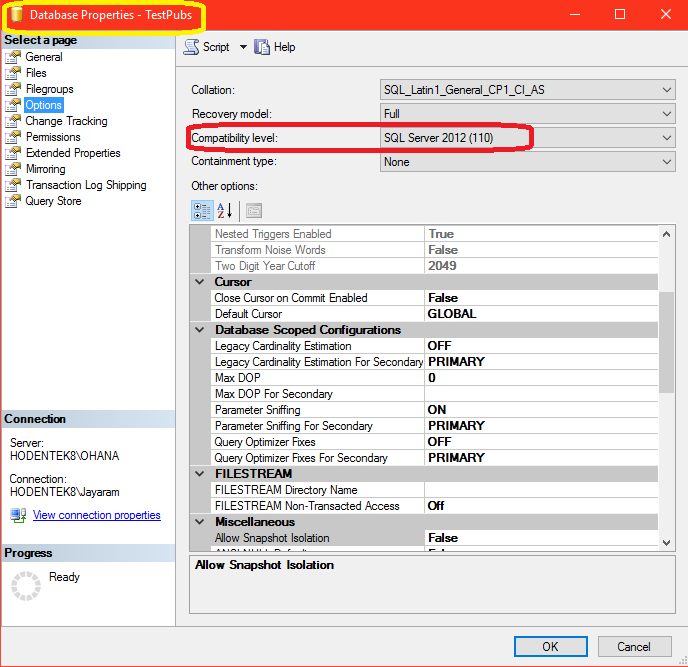
Right click the database node. From the drop-down pick Properties. In the properties page click Options and you will find the compatibitlity level as shown.

Compatibility_00.png

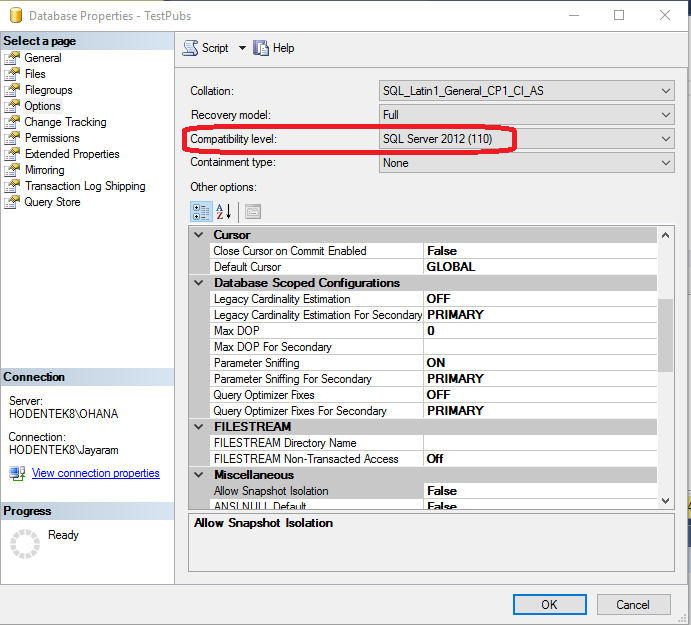
The TestPubs database (a renamed Microsoft legacy sample, pubs database) has a compatibility level of 110 (SQL Server 2012). This database was brought over to SQL Server 2016 by a process which did not change the comaptibility level.

Click on the Compatibility level and from the drop-down choose the one you want. For example to be cmpatible with SQL Server 2016 you would choose 130.

Compatibility_01.png

Of course you can always go back to the previous level any time.
 

Thursday, September 29, 2016

How do you find the compatibility level of a SQL Server database?

The compatibility level of a SQL Server database matters since the T-SQL code from a higher compatibility level will not work in a database with lower compatibility level.

How to find compatibility level?

Launch SQL Server Management Studio and pick the database for which you want to find the compatibility level.

Right click the database node. From the drop-down pick Properties. In the properties page click Options and you will find the compatibitlity level as shown. This is for SQL Server 2012.