Thursday, January 31, 2013

How to start an IE browser with Administrator's privileges?


Some programs even though opened in a browser, needs special permissions, usually that of the adminsitrator's pemissions.

You can always right click IE browser and click Run as administrator

However you can set it up so that it always opens in the above manner.

Review the next image:


How do I find the number of cores in the computer?

The following procedure showed that I have 8 cores in my Toshiba Laptop (Satellite P775).

Click Start | Computer |

Right click Computer to look at Properties (Click Properties from the drop-down menu).


Click Device Manager.


Click Processors.


Count the number of processors. They all have the same name.

Right click one of the processors and look at the properties to see the version and the name of SYS file as shown.
 
Mahalo


Monday, December 3, 2012

How do you copy from Notepad and paste to command line(DOS)?

Sometimes you may want to run a huge script from the command line but you hesitate to type it into the DOS window. In such cases you may want to type the script into NOTEPAD where you can more easily edit and then paste it into command line. Is this possible?

Yes, you can do it. First you have to run the DOS program with elevated permission, that is as an administrator. Once you do that you can paste it into the command line.
Step 1:
Run CMD with Administrators permission.

The DOS program starts

Step 2:
Prepare your script in NOTEPAD such as the one shown here.

Highlight the script you want to run and copy it to clipboard

Step 3:
Right click in the open DOS screen to pop open drop-down menu.

Click Paste (Control-V does not work). Your text is now copied to command line.
You are done!!


Thursday, November 15, 2012

Do you want to upload 2GB files to sky?

Aloha from Bengaluru

Microsoft SkyDrive has just released the stuff that helps you to upload 2GB files. That's hefty!!

You can also pick and choose files that you need (Selective Sync) from SkyDrive as well as better organize your uploads. SkyDrive also has a SkyBin. You don't need it, send it to SkyBin and, you want it, get it restored.

Web, Mobile and Desktop (WMD, not that WMD) boundaries are disappearing. They are all one and the same, your stuff, but just 3 avataras.

Note: SkyBin is the blogger's construct.


Organize


Share / Sync


Skybin (Recycle bin on SkyDrive)


Thursday, September 27, 2012

Breaking News: Packt finished publishing its 1000th Book

Aloha,

Packt is celebrating and I have been a part of this success story. Particpate in the celebration and get a free eBook to mark this occasion.

Just go to Packt's web site and register yourself if you are not already registered. The rest is simple.

If you are looking for jump starting your SQL Server / Applications you search for eBook versions of my books shown here:


Good luck
Mahalo

Sunday, September 23, 2012

How to get rid of the FBI Green Dot MoneyPak Virus

This was quite bothersome virus which froze the screen with its own screen purporting to be from FBI warning you of some dire consequences, unless you send $100 to them on recieving which they will unclock your computer.

I got this on my Laptop which was dual boot Win7/Win8. I could access Win8 but not WIn7. Win7 got infected.

The first thing I tried was to restore it to an earlier point. I chose a point some 3 days earlier to the day I encountered this frozen screen. It did not do any good. It came right back.
I searched the web here and there. At least I knew it was a scam. I did read someone got so scared he was contemplating committing suicide, may be he was doing something illegal and felt that he may be caught.

Then I got hold of Norton 360 6.0 and scanned the whole system on the Win7 side. It had no clue. It found some 7 non-consequential cookies which it removed. I called up Norton and chatted for a while. Well, they told me that Norton 360 6.0 should do the job but they would provide a technicain with whose help I could remove the bug. The cost was $99.99 for this service. I was not prepared to part with the money and I wanted to try other options. I also downloaded few others, but I was not quite sure they would do the job.

These are some related sites where you may find some help:
http://www.spywareremove.com/removefbigreendotmoneypakvirus.html
http://www.zimbio.com/Remove+Malware/articles/9kb7G7Lpj5K/Uninstall+FBI+Green+Dot+Moneypak+Virus+Effective
http://community.norton.com/t5/Norton-360/MoneyPak-FBI-virus-Green-Dot/td-p/808830

My advice, forget about Norton, don't pay them $99.99 not even $9.99, send me a $1 for my advice.

If anyone is interested I can provide the transcript of the chat.
Here is my fix:
I went back and restored the computer to a date in August 2012. It's gone and I am rid of that ransomeware. MSFT has a good thing in its SYSTEM Restore.

BTW, when you choose to restore choose the OS that is infected, in case you have multi-os on your computer.

Thursday, August 16, 2012

How to create a drive partition on Windows 7 Home Premium?


Want to try some programs on a partitioned drive? Dual boot Windows 7, Windows 8, Linux etc.

If you need measured steps to do it with screen shots, here it is:

Here I am trying to release some space from my C:\drive


To get to see this you need to go Start | Computer and make a right click and choose Manage from the drop-down list. In the Computer Management Screen choose Disk Management.


Right click the highlighted drive (C:) and pick up shrink Volume..
You get to the Shrink C: screen 


Enter the amount you want to shrink. This was my choice.


Hit Shrink button.

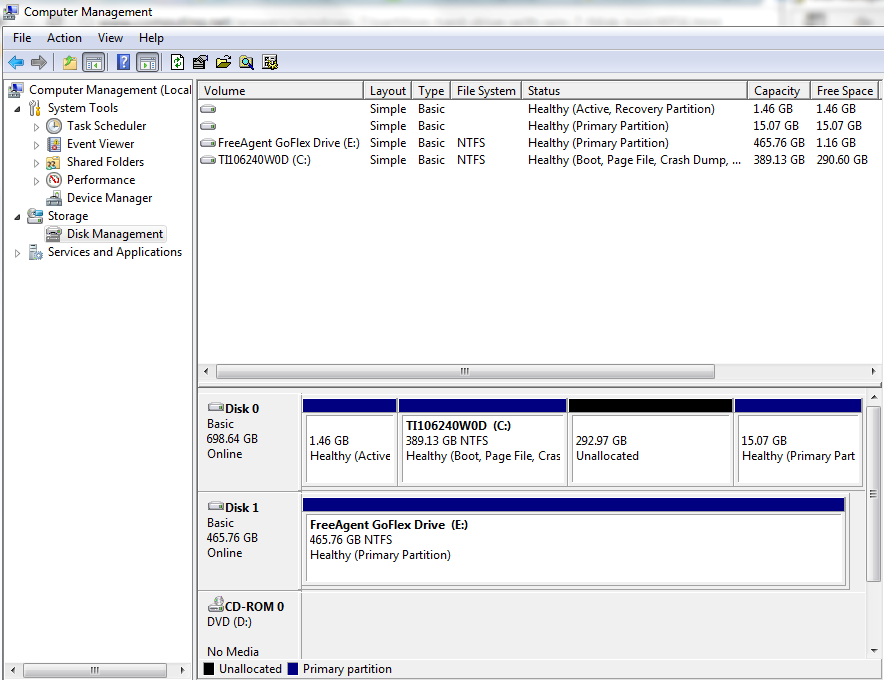
Now you are sizzling. You have 292.97 GB free.
Right click this new released space and click New Simple Volume...

New Simple Volume Wizard shows up.


Read the stuff on it. Hit Next. You need to specify the size of this volume (how many gigabits).


I chose about 40 GB (twice the minimum requirement).

Hit Next. Now in this screen you can choose to create the partitioned drive.


I assumed F: drive. Hit Next to get to the Format drive screen.


I gave Windows 8 as Volume label. Hit Next.


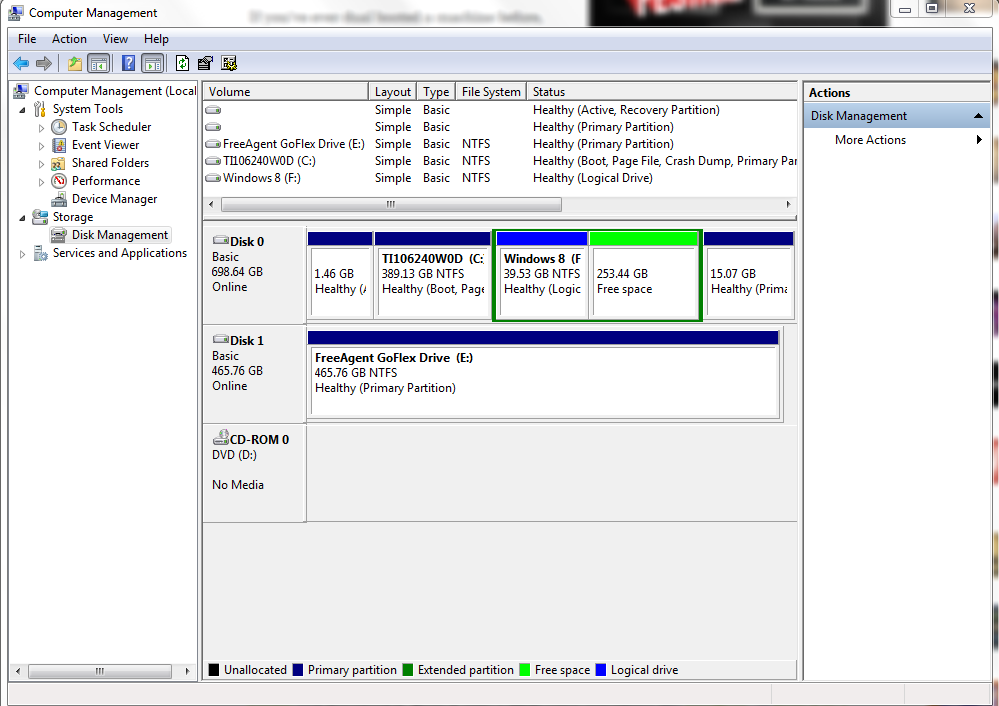
Now you have a F:\ drive with about 40GB. Disk Manager screen gets updated as shown.


You are cooking now. The drive appears in the Windows Explorer as shown.