Get help file:
C:\Users\Jay>prompt /?
Changes the cmd.exe command prompt.
PROMPT [text]
text Specifies a new command prompt.
Prompt can be made up of normal characters and the following special codes:
$A & (Ampersand)
$B (pipe)
$C ( (Left parenthesis)
$D Current date
$E Escape code (ASCII code 27)
$F ) (Right parenthesis)
$G > (greater-than sign)
$H Backspace (erases previous character)
$L < (less-than sign)
$N Current drive
$P Current drive and path
$Q = (equal sign)
$S (space)
$T Current time
$V Windows version number
$_ Carriage return and linefeed
$$ $ (dollar sign)
If Command Extensions are enabled the PROMPT command supports the following additional formatting characters:
$+ zero or more plus sign (+) characters depending upon the depth of the PUSHD directory stack, one character for each level pushed.
$M Displays the remote name associated with the current drive letter or the empty string if current drive is not a network
Example: Changing from "C:\" to "%"
-------------------------------------
C:\Users\Jay>prompt %--->Changes to %
%
%Prompt C:\ ------------->Changes back to C:\
C:\
C:\
Tuesday, December 1, 2009

Thursday, November 26, 2009
How do I connect to a SQL Server Compact Database from SQL Server 2008 R2 Nov_CTP?
The database is present in the installation directory but you need to enable permissions.
Click Connect SQL Server Compact... in MS SQL Server Management Studio.

In the Connect to Server window click on the drop-down handle as shown.

Click on the drop-down item "Browse for more...". Expand the C:\node as shown

Click OK. The Connect to Server gets updated.
You may not be able to connect to the database as permissions are needed.

You can modify the permissions on the sample database. The database gets dispalyed in the Management Studio after you click OK on the Connect to Server window after modifying the premissions.

Click Connect SQL Server Compact... in MS SQL Server Management Studio.
In the Connect to Server window click on the drop-down handle as shown.

Click on the drop-down item "Browse for more..."

Click OK. The Connect to Server gets updated.
You may not be able to connect to the database as permissions are needed.

You can modify the permissions on the sample database. The database gets dispalyed in the Management Studio after you click OK on the Connect to Server window after modifying the premissions.

Wednesday, October 21, 2009
What is the difference between Title and WindowTitle properties in a Xaml Browser application?
In a Xaml browser application (XBAP) as a page's properties you can set a TITLE as well as a WindowTitle property.
----------------------------------------
The Page.Title property is defined as in the following:
----------------------------------------------------------------
public string Title { set; get; }
Member of System.Windows.Controls.Page
Summary:
Gets or sets the title of the System.Windows.Controls.Page. This is a dependency property.
Returns:
The title of the System.Windows.Controls.Page.
---------------------------------------------
Whereas the WindowTitle is defined as in the following:
-------------------------------------------
public string WindowTitle { set; get; }
Member of System.Windows.Controls.Page
Summary:
Gets or sets the title of the host System.Windows.Window or System.Windows.Navigation.NavigationWindow of a System.Windows.Controls.Page.
Returns:
The title of a window that directly hosts the System.Windows.Controls.Page.
==================
What is observed when you bring up this page shown here is
-----------
xmlns="http://schemas.microsoft.com/winfx/2006/xaml/presentation"
xmlns:x="http://schemas.microsoft.com/winfx/2006/xaml"
Title="Pagex"
Background="Azure"
WindowTitle="What is this?"
>
-----------------------
displayed here.

As you can see Title property is not displayed where as the Window that gets displayed, the browser window shows this title. If you remove the WindowTitle property what is displayed is shown here,

Monday, July 27, 2009
What is MD5?
OK. I will share my notes on MD5.
After downloading I verified the version and usage using the following:

I verified one of the items from the test suite. For testing the program I created a
text file in Notepad with just these two words "message digest" and used it as the input file. Here follows the
result (matches the one in suggested suite).
C:\Documents and Settings\Jayaram Krishnaswamy\Desktop\HodentekHelp>MD5 "C:\Md5test.txt"
F96B697D7CB7938D525A2F31AAF161D0 C:\Md5test.txt
- MD5 is a 128 bit message digest algoritm.
- RF1321 describes the MD5
- MD4 and MD5 are replacements for legacy programs that checked transmission errors of digital data such as CRC.
- MD5 supercedes MD4 and happens to be more secure albeit somewhat slower. This was deliberate to make the code more secure.
- MD5 is available for both Windows and UNIX platforms.
- You can download MD5 from http://www.fourmilab.ch/md5/
- In windows you can just click md5.exe from its download location to install
After downloading I verified the version and usage using the following:

I verified one of the items from the test suite. For testing the program I created a
text file in Notepad with just these two words "message digest" and used it as the input file. Here follows the
result (matches the one in suggested suite).
C:\Documents and Settings\Jayaram Krishnaswamy\Desktop\HodentekHelp>MD5 "C:\Md5test.txt"
F96B697D7CB7938D525A2F31AAF161D0 C:\Md5test.txt
Thursday, June 18, 2009
How do I create a simple table in a database on SQL Server 2008 and populate it?
Let us say you want to create a table such as the one shown in this example (PrincetonTemp2) and populate it with some values. There is more than one way to create a table in SQL Server 2008.This one uses Create Table query to create a table. You then edit the table to insert the values. Values can also be inserted using code. In here, the query creates the table and you then manually insert the data.
Step 1: Create table using the query
In SQL Server 2008 right click the database in which you want to create a table and choose New Query

Type in the Query window as shown in the next figure. Check the syntax of the query by clicking the icon at the far right of the figure. Execute the query by clicking the (!)Execute.

You will have created a table called PrincetonTemp2. You can see it in the Tables node after you refresh the database by right clicking the database node and choosing Refresh from the list.
Step 2: Populate the table by editing the table :
Right click the table in the Management Studio after expanding the database node.
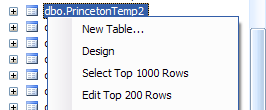
From the drop-down click on Edit Top 200 Rows.
In the table that shows up fill in the data you want to insert. The data has to match the query you used to create the table. One line inserted is shown in the next figure.

Step 1: Create table using the query
In SQL Server 2008 right click the database in which you want to create a table and choose New Query

Type in the Query window as shown in the next figure. Check the syntax of the query by clicking the icon at the far right of the figure. Execute the query by clicking the (!)Execute.

You will have created a table called PrincetonTemp2. You can see it in the Tables node after you refresh the database by right clicking the database node and choosing Refresh from the list.
Step 2: Populate the table by editing the table :
Right click the table in the Management Studio after expanding the database node.

From the drop-down click on Edit Top 200 Rows.
In the table that shows up fill in the data you want to insert. The data has to match the query you used to create the table. One line inserted is shown in the next figure.

Friday, May 15, 2009
What is Caret Browsing?
It is the new accessibility feature in IE 8.0. You can use less of the mouse and more of the keyboard to select portions of content in IE 8.0.
It is not turned on by default, but you may turn it on by pressing the key F7 when your cursor is placed on a web page opened in IE 8.0.
The first time you click F7 while you are on web page you will see the following message.
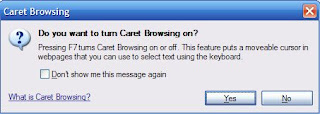
You can read more about it by clicking on the hyperlink in the message.
Here is a demo.
Caret Browsing turned off (default)
Click any where on a web page opened in IE8.0 and then try to use your Shift and the navigation keys (right,left, top, down) to highlight content. You will not be able to select text.
Caret Browsing turned on
Click anywhere on the web page. Hit F7. Enable the Caret browsing. Now with the Shift and navigation keys (right,left, top, down) you can select content just like you were able to do with your mouse.
The only problem is IE 8.0 is very slow!!
It is not turned on by default, but you may turn it on by pressing the key F7 when your cursor is placed on a web page opened in IE 8.0.
The first time you click F7 while you are on web page you will see the following message.

You can read more about it by clicking on the hyperlink in the message.
Here is a demo.
Caret Browsing turned off (default)
Click any where on a web page opened in IE8.0 and then try to use your Shift and the navigation keys (right,left, top, down) to highlight content. You will not be able to select text.
Caret Browsing turned on
Click anywhere on the web page. Hit F7. Enable the Caret browsing. Now with the Shift and navigation keys (right,left, top, down) you can select content just like you were able to do with your mouse.
The only problem is IE 8.0 is very slow!!
Wednesday, April 29, 2009
Can you chain remote desktop connections?
Yes you can.
You can link up multiple machines. Of course you will be using only one computer.
I have computer XPHTEK which I can access from my computer Hodentek.
I have a Laptop with WIFI wireless connected to the above two computers. I can access Hodentek as a remote connection from my laptop HODENTEK2 and from within the remote connection I can remote access XPHTEK. I have some word processing in a language other than English in each of these computers but I can work on them in my laptop and print it out to a shared printer on HODENTEK.

You can link up multiple machines. Of course you will be using only one computer.
I have computer XPHTEK which I can access from my computer Hodentek.
I have a Laptop with WIFI wireless connected to the above two computers. I can access Hodentek as a remote connection from my laptop HODENTEK2 and from within the remote connection I can remote access XPHTEK. I have some word processing in a language other than English in each of these computers but I can work on them in my laptop and print it out to a shared printer on HODENTEK.

Subscribe to:
Posts (Atom)